Hi everyone,
I have some screen I cannot delete because there is a blank workflow attached to them.
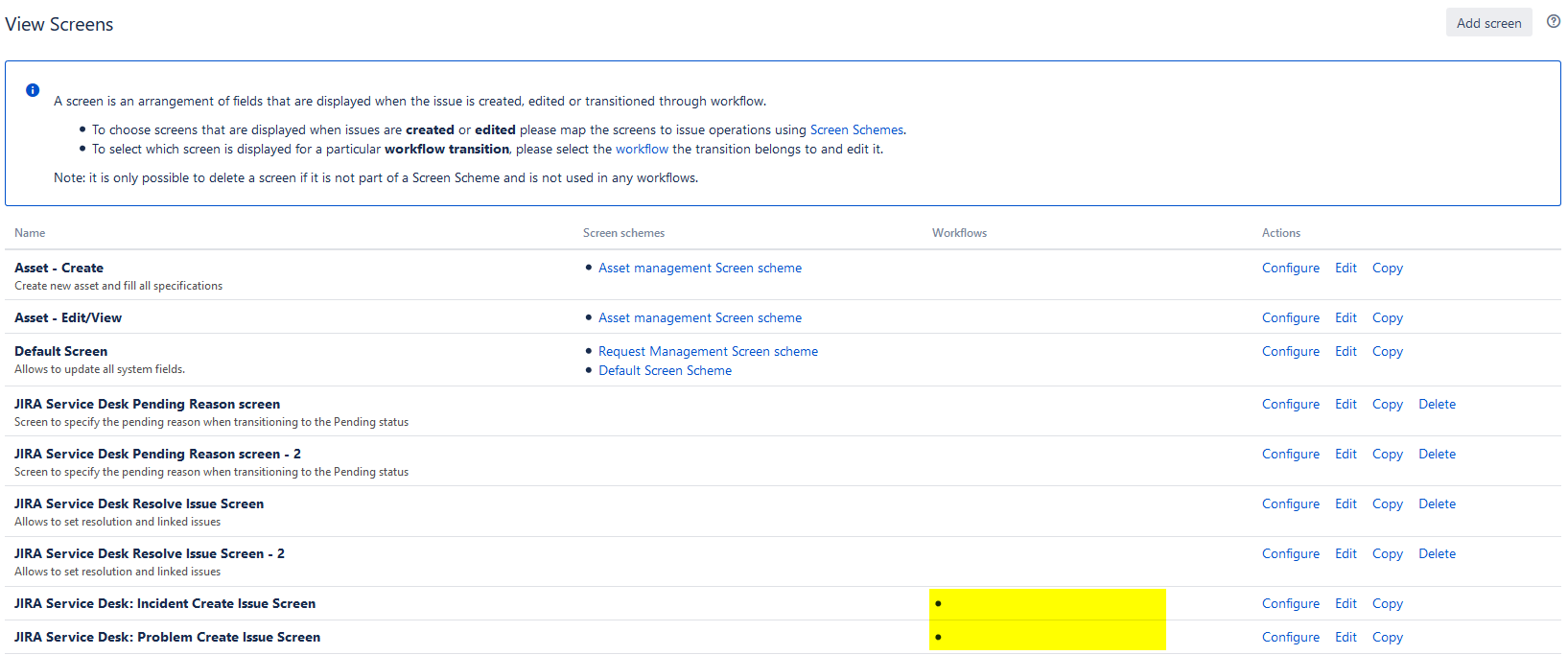
I tried to attached a new workflow to these screens but the blank workflow stay in place. I found a kb about this problem but it does not work in my case.
https://confluence.atlassian.com/jirakb/no-delete-option-on-screens-432801027.html
jira=# SELECT * FROM fieldscreen ORDER BY 2;
  id   |                      name                       |                                  description
-------+-------------------------------------------------+-------------------------------------------------------------------------------
 10101 | Asset - Create                                  | Create new asset and fill all specifications
 10102 | Asset - Edit/View                               |
     1 | Default Screen                                  | Allows to update all system fields.
 10604 | JIRA Service Desk: Incident Create Issue Screen |
 10600 | JIRA Service Desk: Problem Create Issue Screen  |
 10500 | Request - Ask approval                          |
 10411 | Request - Pending                               | Screen to specify the pending reason when transitioning to the Pending status
     3 | Request - Resolve/Close                         | Allows to set resolution, change fix versions and assign an issue.
     2 | Simple comment screen                           | This screen is used to add a simple comment
(9 rows)

jira=# SELECT workflowname FROM jiraworkflows WHERE descriptor LIKE '%JIRA Service Desk: Incident Create Issue Screen%';
 workflowname
--------------
(0 rows)

jira=# SELECT workflowname FROM jiraworkflows WHERE descriptor LIKE '%JIRA Service Desk: Problem Create Issue Screen%';
 workflowname
--------------
(0 rows)
How can I get rid of it?

