Hello,
I have JIRA and confluence both hosted in different VM. I can access jira with baseURL but confluence I cant access via baseURL but using localhost:8090 I can access internally. But outside VM I can access both applications.
I can ping JIRA baseURL in confluence and confluence baseURL in JIRA (so both can see each other) but I cannot open JIRA in confluence box and confluence in JIRA.
Steps to link JIRA with Confluence:
When linking applications (in Confluence I clicked -> General configuration -> Application link -> and added https://mycompany.com after clicking creating I get an error as shown:

If I click continue it asks for additional details:
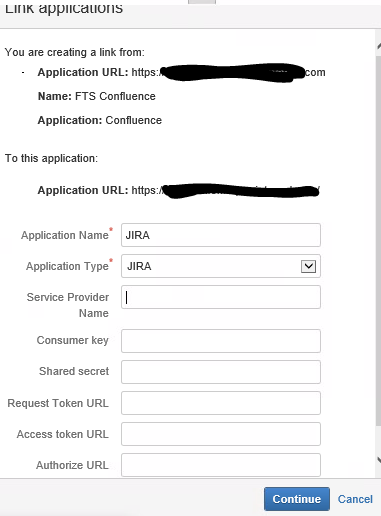
If I click continue I get a link created with a error and if I click edit I get this error:
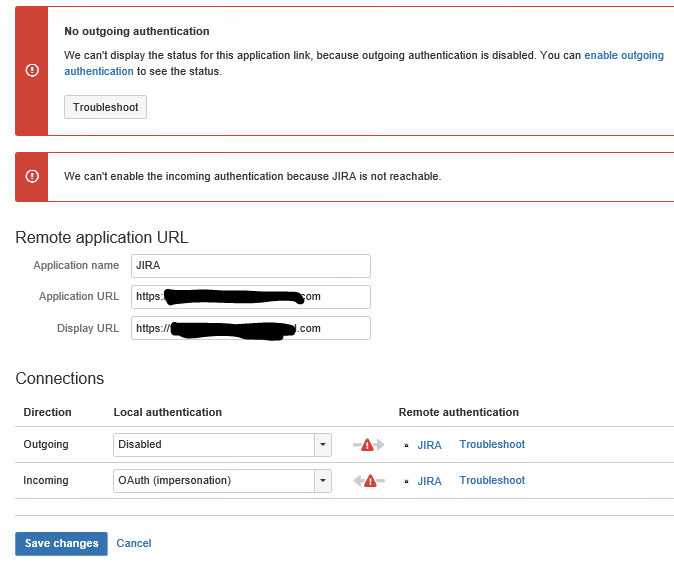
Not sure why JIRA is not reachable because I can ping the host fine. This is what my server.xml file looks like:
<Server port="8000" shutdown="SHUTDOWN" debug="0">
 <Service name="Tomcat-Standalone">
 <Connector port="8090" connectionTimeout="20000" redirectPort="8443"
 maxThreads="48" minSpareThreads="10"
 enableLookups="false" acceptCount="10" debug="0" URIEncoding="UTF-8"
 protocol="org.apache.coyote.http11.Http11NioProtocol" scheme="https" proxyName="mycompany.com" proxyPort="443"/>

 <!-- scheme="https" proxyName="mycompany.com" proxyPort="443" secure="true"-->


 <Engine name="Standalone" defaultHost="localhost" debug="0">

 <Host name="localhost" debug="0" appBase="webapps" unpackWARs="true" autoDeploy="false" startStopThreads="4">

 <Context docBase="../confluence" path="" reloadable="false" useHttpOnly="true" debug="0">
 <!-- Logger is deprecated in Tomcat 5.5. Logging configuration for Confluence is specified in confluence/WEB-INF/classes/log4j.properties -->
 <Manager pathname="" />
 <Valve className="org.apache.catalina.valves.StuckThreadDetectionValve" threshold="60" />
 </Context>

 <Context path="${confluence.context.path}/synchrony-proxy" docBase="../synchrony-proxy" debug="0" reloadable="false" useHttpOnly="true">
 <Valve className="org.apache.catalina.valves.StuckThreadDetectionValve" threshold="60" />
 </Context>
 </Host>

 </Engine>

 <!--
 To run Confluence via HTTPS:
 * Uncomment the Connector below
 * Execute:
 %JAVA_HOME%\bin\keytool -genkey -alias tomcat -keyalg RSA (Windows)
 $JAVA_HOME/bin/keytool -genkey -alias tomcat -keyalg RSA (Unix)
 with a password value of "changeit" for both the certificate and the keystore itself.
 * Restart and visit https://localhost:8443/

 For more info, see https://confluence.atlassian.com/display/DOC/Running+Confluence+Over+SSL+or+HTTPS
 -->


<Connector port="8443" maxHttpHeaderSize="8192"
 maxThreads="150" minSpareThreads="25" maxSpareThreads="75"
 enableLookups="false" disableUploadTimeout="true"
 acceptCount="100" scheme="https" secure="true"
 clientAuth="false" sslProtocol="TLS" SSLEnabled="true"
 URIEncoding="UTF-8" keystoreFile="E:\Program Files\Atlassian\Confluence\jre\confluence_newcert" keystoreType="PFX" keystorePass="PASSWD"/>
 </Service>
</Server>
NOTE: if I add security="true" in my connector I cannot log into confluence localhost:8090 in VM (but outside I can) - it redirects me to login page even after logging in.
Confluence do have SSL certificate and uses Tomcat.
When looking into host file in windows where confluence is configured I dont see any DNS entry.
Can someone tell me why I cannot link both app?
Regards,
Dipesh

