
New to Jira Service Desk? Need a gentle push to get underway? Then maybe you’ve stumbled into the right place. Jira Service Desk is an awesome application that can help you and your team be more productive while being fun to use at the same time. For some, getting started can be a bit intimidating. This is especially true if Jira Service Desk is your first exposure to Atlassian products.
In this brief article I am going to share some things to consider when getting started. Hopefully, my experiences, successes and missteps will help you in the initial leg of your journey.
One final note before we begin, I want to give a big shout out to my Community peers. Much of what you will read here I picked up from them along the. And on that note, let’s jump right in.
Begin at the Beginning 
As with most all things techy you are going to be faced with new terminology. Taking some time to learn the basics up front will serve you well both in setting up your projects and more importantly communicating with others in the Community. Manon Soubies-Camy recently made reference to this brief but useful Jira Service Desk glossary that I had never come across before. Most of the terms in that reference are specific to Jira Service Desk. It is particularly important to learn the differences between the user roles (admin, agent, customer and collaborator). In addition to these unique terms it helps to decipher some fundamental Jira Core terms as they apply to Jira Service Desk as well. Borrowing from a well written reference (Your Go-To Jira Glossary) here are a few you should find useful:
- Issue – An issue is simply a unit of work within Jira that will be traced through a workflow, from creation to completion.
- Request – Customers submit a request thru the customer portal or via email. These requests become issues that your agents work to closure. Reference Requests vs. issues for more on this.
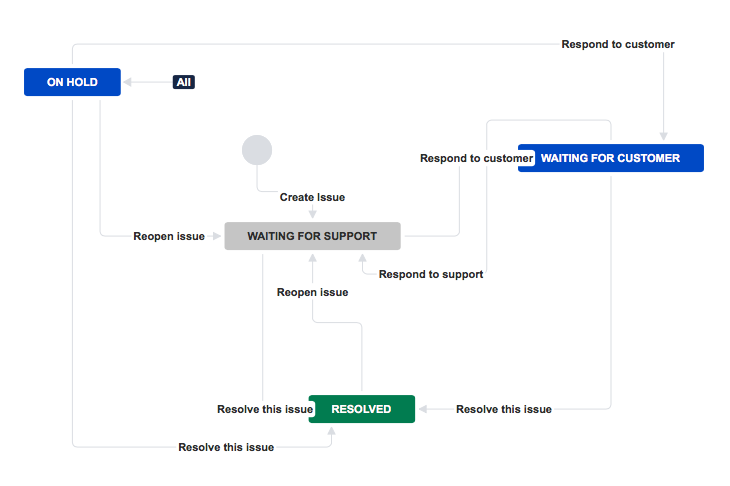
- Workflow – Workflow is the logic that drives movement of issues from inception to resolution. It consists of statuses and transitions. Each of which can have properties, conditions and post functions to achieve the simple to the complex depending on your needs.
- JQL – Jira Query Language is the most powerful and flexible way to search for your issues in Jira. Take some time to learn the basics and then move on to the advanced concepts as needed. There are a lot of references out there but one that I often recommend was written by Maarten Cautreels – Becoming a Jira Search Ninja. The article will start you off using the Basic method and explain how to transition to Advance.

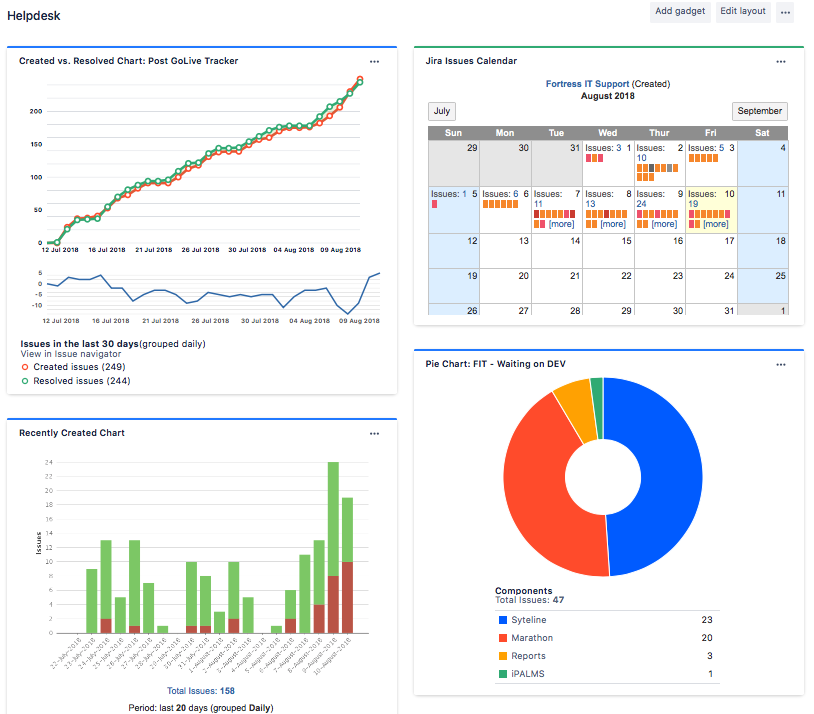
- Dashboards – Once you get your project up and running someone, probably your manager 😉 is going to be asking for a dashboard view of how the team is doing. Dashboards are a component of Jira Core upon which Jira Service Desk sits. When you are ready for some pretty pictures, graphs, activity stream, etc. head over to Configuring Dashboards to get you started. After all, what is the use of a service desk without pictures and conversations?
Down the Rabbit Hole 
Now that you have some terminology under your belt it’s time to set up your service desk and create your first project if you haven’t done so already. Create a test project where you can play and explore, make mistakes and learn from them. Start with a basic project and workflow, create some issues, transition them, assign them, etc. There is no better place to start in my opinion than with Atlassian’s Get started with Jira Service Desk guide. It does a great job of walking your through step-by-step.
I’m Late I’m Late 
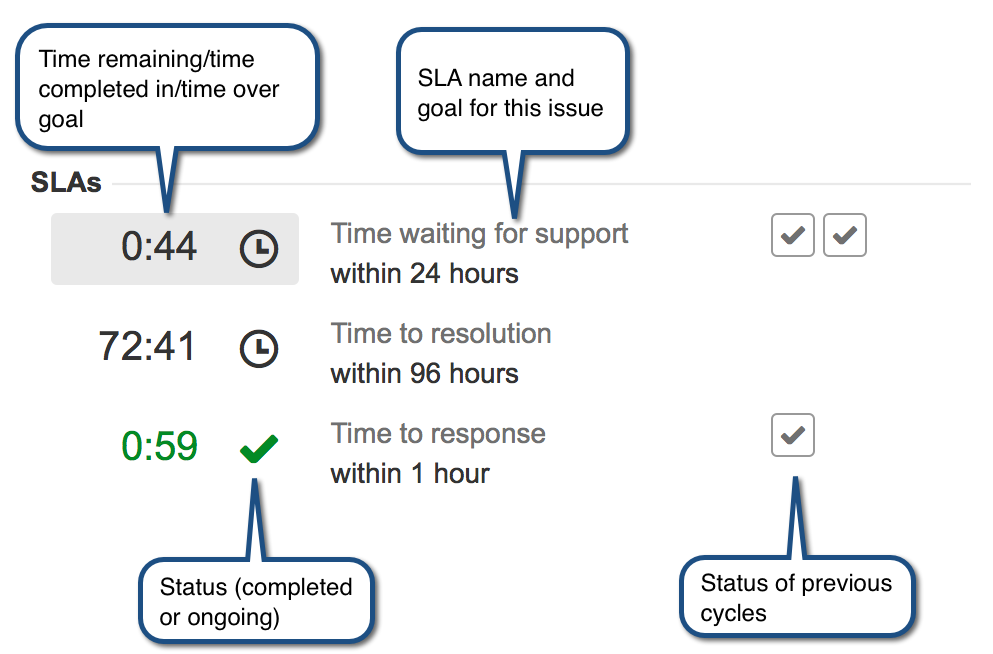
While the SLA (Service Level Agreement) term was shared above in the glossary link, I wanted to single this out as it is a very important component of Jira Service desk. Moreover, it may not be intuitively obvious how to set them up and decipher them. I recommend you start with the article Setting up SLAs and once you have read it thru just give it a try. Twisting one of Aristotle’s quotes into simple terms – you learn more by doing. With that said here are a few things to know:
- The SLA is a countdown timer. Red is bad, Black is ok, Green is good. Read How your team sees SLAs for a better understanding of how to consume what the SLA nomenclature is telling you.
- In addition to the default Waiting for Customer status I often make use of a Hold status that pauses the SLA clock. An example of where we might move an issue into the Hold status is when the agent has ordered the requested PC or when we are waiting on the ISP to look into degraded service.
Automation 
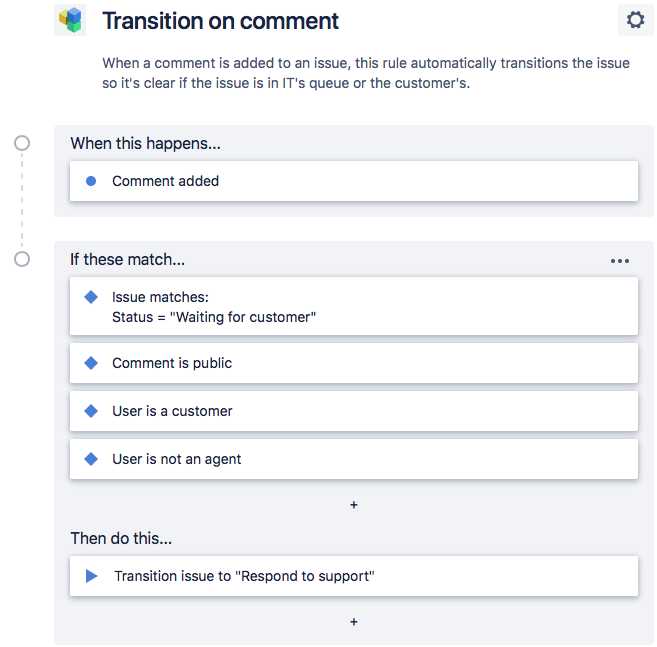
Soon after or even during your study on SLAs you will stumble upon Automation. While wholly separate, Automation will take your SLAs to the next level. Take a peek at Automating your service desk for a quick glimpse at how it can help. Of course, Automation is in no way limited to SLAs. You will find canned SLAs that you can leverage and edit to meet your needs, or you can create a custom rule leveraging various events and JQL to accomplish all sorts of tasks. One word of caution, and this applies to anywhere automation is used in our lives – It will break! Automation relies on specific conditions and invariably you or another admin will make a change one day and something will break. Takeaway – if you see something broken that was working before always have a look at your automation rules for a possible clue.
Waiting by the Little Door 
Jira Service Desk introduces queues into the Jira world. If you peel back the covers Queues are really just filters with a few new twists. With that being said they are the way agents get things done for most users of Jira Service Desk. Here are how the queues are defined for my IT Helpdesk project in case others can benefit.
- Triage Queue – This is the first stop for all new issues which come in unassigned. All agents are responsible for monitoring this queue to ensure that it remains empty. Agents will assess the issue adjust the priority if it doesn’t follow our guidelines and then assign to themselves or others.
- Agent Queues – As I have a small team (4 agents) I have elected to create a queue for each. Given that there is already a default “Assigned to me” queue, these are not so much for the agent as it is for me and my management team, so they can quickly look at individual’s workload and progress. With large teams this really is not practical.
- Waiting on Customer – This is useful to ensure that issues aren’t getting stuck in the customers hands. The issues still belong to an agent and it is there job to work with the customer to keep things moving. We leverage automation to close issues that remain in this state for too long, the length of time is driven by the priority.
- Waiting on Development – Like so many others, we use Jira Service Desk in conjunction with Jira Software. Customer will open product issues and if we determine the need to have the developers work an issue then we move the issue into a Development status and Create a Linked Issue into the Jira Software project. We leverage automation to close the Jira Service Desk issue when the linked product issue is closed.
- Breached – This allows us to quickly look across all agents and find any breached issues.
Issues by email 
If you are adding Jira Service Desk to your Jira Software, you may quickly become confused with setting up the email channel to allow customers to create issues via email. Don’t be confused into thinking that you leverage Jira Software’s email channel configuration. Jira Service desk has its own method of setting up email request for each project. For details on how to setup your project to support email request please see Receiving requests by email.
Some final words 
- You can always correct mistakes so don’t be afraid to give things a try. Your test project is a great place to trial things.
- If you get stuck, you have an awesome Community to help you out.
- While many of the Atlassian documentation links above are associated with the Cloud instance you can easily navigate to the Server version of your choice by simply clicking on “Server” in the top right of the article.
- Hats off to Lewis Carol for inspiration.

I hope that this article will prove beneficial as you begin standing up your first or next Jira Service Desk project. Thanks for taking the time to see your way to the end.
See you all in the Community,
Jack-