I have a single-choice custom field with values A1, A2, B1, B2.
In the project I have two issue types, A and B.
The field is associated with both issue types.
When I'm creating issue type A, I want to see only the A1 and A2 as the choices.
Similarly, for issue type B, B1 and B2 only.
I went by the book and created two contexts in the custom fields.
- Context A is for issue type A and has options A1 and A2;
- Context B is for issue type B and has options B1 and B2.
I defined context A to apply to my project only.
Now in the context B, I cannot associate it with my project, so it becomes global (=all projects).
When creating issue of type A, I indeed see only options A1 and A2.
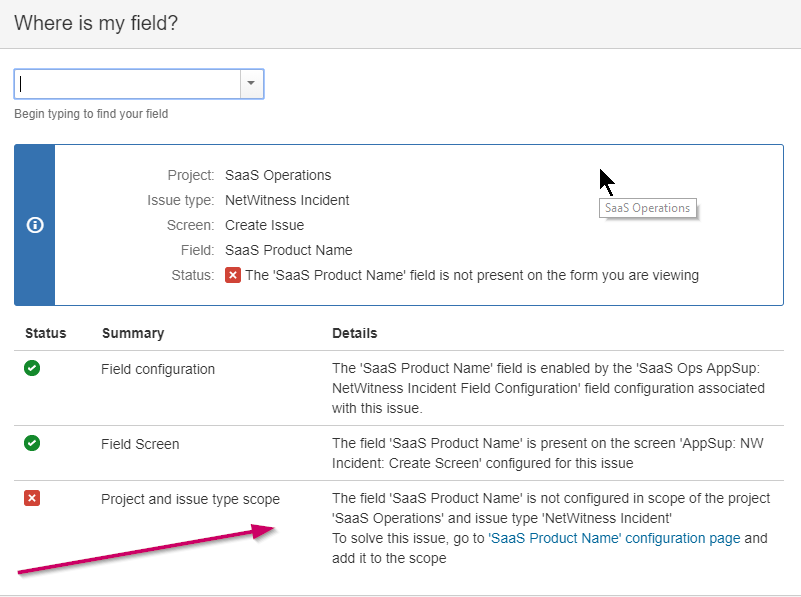
But when I try to create an issue of type B, I do not see the field. When I look for it, I get the error below. It seems that the project scope of context A won, as they say in the custom field config page:
You can configure a custom field differently for each project context or in a global context. Moreover, project level schemes will over-ride global ones.
I wonder if this is exactly the case in here: https://jira.atlassian.com/browse/JRASERVER-6851
Anyone has an idea? I can probably use ScriptRunner Behaviour to dynamically modify the choices based on the issue type, but that's a really ugly hack.