An efficient enterprise content management system, or ECM, is a must-have for companies that create work online (cough cough, all companies). If content calendars, marketing plans, and business forms are allowed to build up and clutter inboxes without an ECM in place, hours of company time are wasted and mayhem ensues!
In this post, you can expect to learn about three common challenges teams have when managing content and to discover some handy app solutions across cloud and server platforms. Hopefully, this info will save you precious time so you can focus on what really matters––watching the World Cup!
Ensuring Access Across Platforms
Problem: Tons of teams using tons of tools (Confluence, Sharepoint, Google Docs).
Solution: Confluence integration apps allow users to embed external documents and folders into Confluence.
Popular integrations:
- Google Drive Embed Google Drive files and links into any Confluence page (see example below).
- Box app integration allows links to Confluence pages to appear in Box files; Box files and folders can also be embedded in Confluence pages
- OneDrive and Office 365 Organize and embed OneDrive folders and files in Confluence
- Evernote Create Evernote notes from a Confluence page, or bring Evernote notes into your Confluence page
- SharePoint Unite your Sharepoint and Confluence instances with federated search and bi-directional content embedding
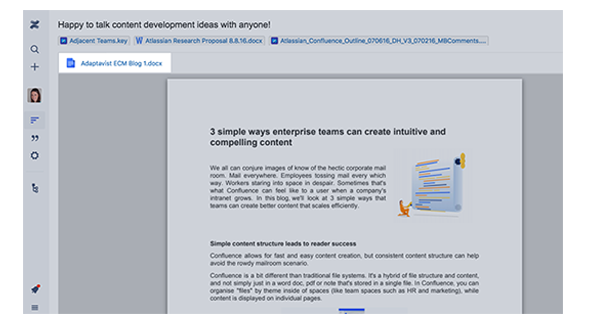
The beauty of integrations! Embed a Word doc, stored in Google Drive to Confluence
Streamlining Your Approvals
Problem: Keeping the editorial approval process organized is difficult, as the volume of documents is split across several different platforms.
Solution: Comala Workflows Lite for Cloud lets you assign approvers to documents, view approved docs, and easily review and track the status of pages in one place. Since Confluence serves as your home base for content across several platforms, everything stays organized.
Other approval apps to check out: Approval Macro for Confluence and Page Approval.
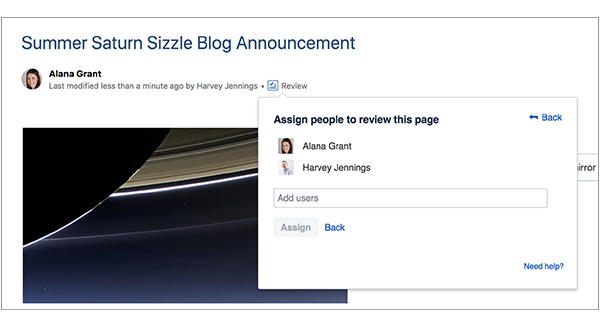
Assign Reviewers for specific documents with Comala Approvals for Confluence
Managing and Customizing Workflows
Problem: It's hard to manage various workflows––depending on the content type, audience, and platform, you need a consistent, clear editing and approval process in place.
Solution: Comala Workflows for on-premise Confluence instances allows you to manage page status from the first draft to publication. It offers customized workflows, in addition to assigning approvers and giving you access to workflow reports. With simple controls, your workflows can be as simple or complex as you’d like.
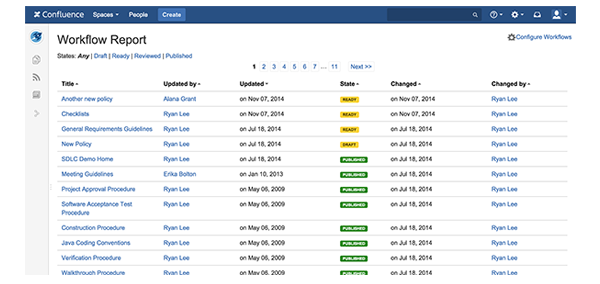
With Comala Workflows you can easily generate and filter reports to see who has done what
For the full version of this post and to read more like it, head on over to the Atlassian blog.

