Hello, I'm setting up a custom workflow for purchase requests in Jira Service Desk. Here's a screenshot of the workflow:
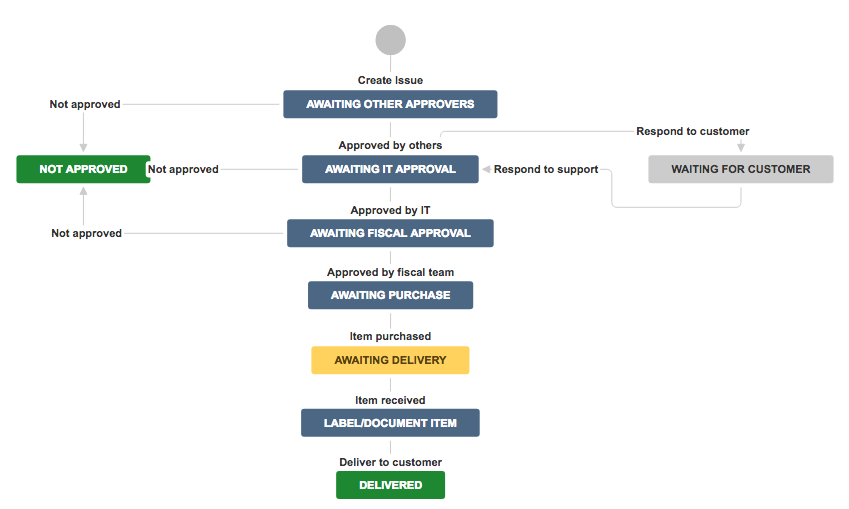
I have three stages of approvals that I have set up. One is "Other approvers", which is a field specified by the user on creation of the ticket. This is where the user can include a supervisor if they need to. This field is totally optional, they can leave it blank if they don't need supervisor approval. The second stage is IT approval (field is hidden and auto-defined) where the IT team can verify the request is warranted, and the third stage is the fiscal team (field is hidden and auto-defined) that verifies the purchase is within budget. It's staged in this manner so people don't need to be bugged to approve something if it doesn't make it past the previous stage.
The problem is, when the "Other approvers" field is left blank by the user, the ticket sits on the "Awaiting other approvers" status with no way to transition to the next status. In the sidebar of the ticket, there's an approval section that says:
"Awaiting other approvers
1 approval needed
No approvers selected"
Is there a way to skip that status if there are no approvers selected? I'm pretty new to all this, so I appreciate the help!


