
The Atlassian Email Marketing team's goal is to deliver incredible customer experiences with equally positive business results. To bolster this mission, they created an Email Playbook to help all Atlassians deliver the best marketing experience through increased email engagement that drives customer lifetime value.
In the following post, you'll learn the ins and outs of how the Atlassian Email Marketing team uses Confluence, Jira Service Desk, and Jira to send all the right messages.
Confluence
The Email Marketing team's first step in helping Atlassian send emails is to send them to The Email Playbook Confluence page which serves as a hub for everything an email requester would need to know about sending an email, start to finish.
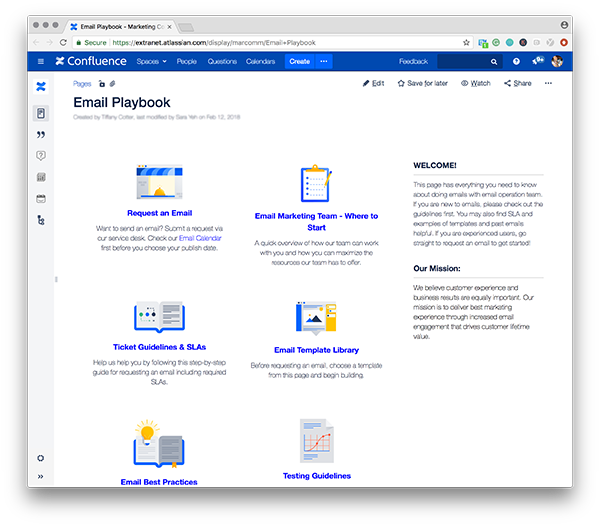
This page links out to 10 pages, detailed below:
- Request an email This links to a JSD page where hopefuls can put in a request to send an email to Atlassian customers. Requesters are prompted to input information for the email’s summary, goals, type (events, webinar, marketing, etc.) requested date and time, elements subject to testing, content urls, campaign key, group requesting email, target audience, platform, list provider, email send platform, and additional comments.
- Email Marketing team - where to start This page is broken down into three section: Planning, execution, and team. The planning section lays out the types of things that the email team can help with (best practices, timing, etc.). The Execution sections contain information on how/when/where to file a ticket as well as the approval process. The Team section lists all members of the email team and what they’re responsible for (operations, analytics, producers, etc.).
- Ticket guidelines and SLA This page includes the Email Marketing SLA which is a timeline of what actions you need to take 10+, 7+, 5+ etc. before you send. There’s also a helpful flow chart that helps a requester determine if their content is ready for send or not.
- Email template library This page contains templates that email requesters should select before creating a ticket for their email. The templates are designed to serve occasions such as surveys, webinars, product announcements, etc.
- Email best practices This page contains both Atlassian and Industry best practices for email marketing.
- Testing guidelines This page is an overview of how to run effective a/b tests––starting with a hypothesis, picking your target metric/s and advice on how to continually improve aspects of your campaign to up performance
- Email campaigns we support This page has past examples of emails by type (drip campaigns, newsletters, events) and emails by-product (Trello, Stride, Jira, etc.)
- Email dashboard Link to email analytics dashboard
- FAQs
- JSD Email request Takes you to JSD to request an email
Jira Service Desk
As mentioned above, the Email Playbook (Confluence) links out to JSD for those who are ready to submit a ticket request to send an email. When a user clicks on the first icon, Request an Email, they're linked to a JSD page that looks like this:
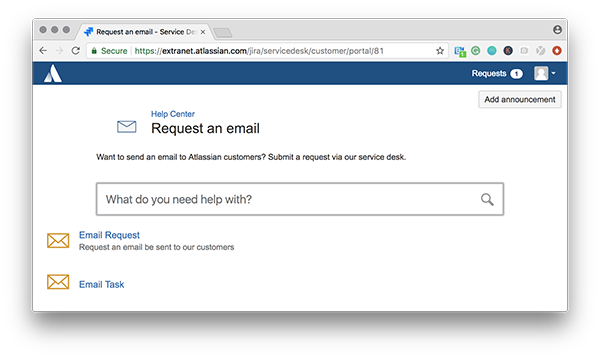
The user can either search for their help topic or create a request for an email or an email task. (An email task could be analyzing an email test, querying a list to determine its size, etc.)
If they select Email Request, they will be prompted to fill out fields (summary, goals, email type, requested send, content urls, etc.) about their email:
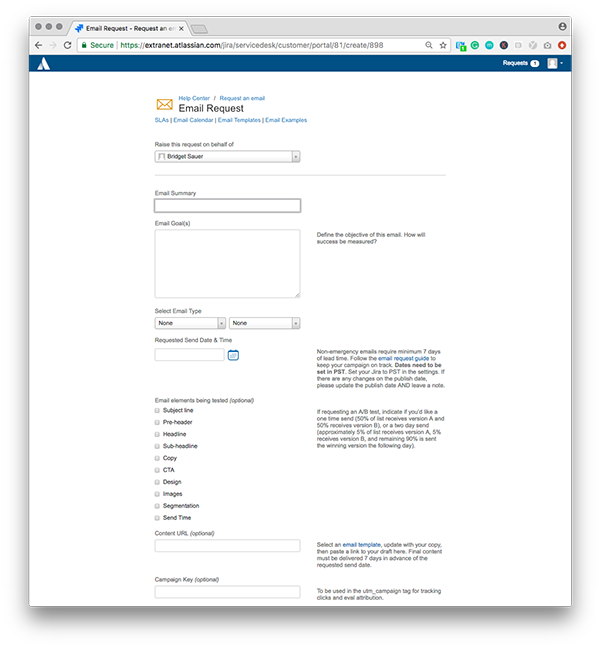
If they request an email task, (for example help to analyze an email test or to query a list to determine its size), they will be taken to a page that prompts them for information on what they need, when they need it by, description, objective, and success metrics.
Once the JSD ticket is filed, it's reviewed by the email team and if accepted, turned into a Jira ticket.
Jira
Once the email request goes through Jira Service Desk to become a Jira ticket, the ticket filer + the Email team start collaborating, discussing the SLAs for the email and finalizing the design and content. The ticket will include the following fields:
-
Type
-
Status
-
Priority
-
Resolution
-
Component/s
- Labels
- Email Type
- Email elements being tested
- Content URL (Confluence page)
- Functional Group (Department/Product)
- Target Market:
- License Type
- Main send list provided by
- Email Sending Platform:
- Final email (Confluence page)
- Quantity
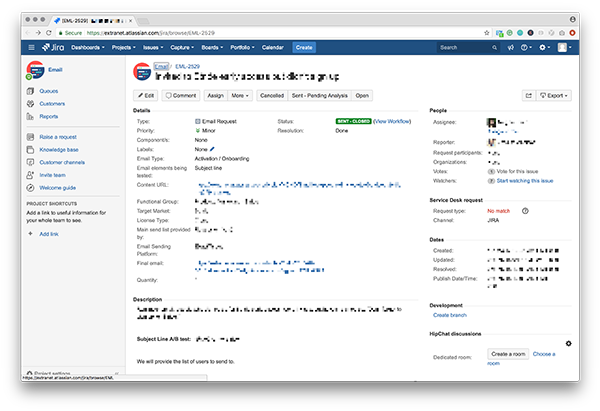
Example of the a Jira ticket with all the fields that the email team needs
...And Confluence again
As noted above, the final Jira ticket will often link out to two more content pages that contain the draft copy/ assets for the email as well as the final copy/design once the email is sent. On the draft Confluence page, an email requester will typically include the following elements:
- Email subject line(s) (Including as many variations as the sender would like to A/B test)
- Subheader
- Body
- Design elements they might already have lined up
Along with the ultimate design of the email, the final Confluence page will include the following information, and is often commented on by a larger group:
- JIRA ticket
- Content page
- Stakeholder
- Send classification
- Publication list
- Subject A
- Subject B
- Pre-header
- Sender profile
- Query & list size
- UTM & campaign key
- Send notes / details
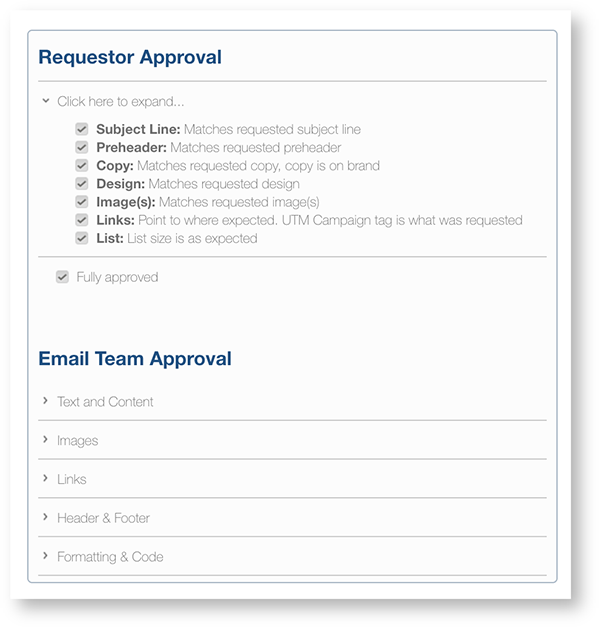
The final page also includes a checklist that ensures the email's design + copy are up to standard:
...and Calendar!
Note: The team also uses Calendars to display what emails are scheduled for the days, weeks and months to come. Each Calendar event is linked to a Jira ticket and includes publish date/time. When a day reaches its send quota, an alert shows that says, “Full Calendar, no new requests."
Questions about the products or process that the Atlassian Email team uses? Ask them in the comments below!


