Perhaps I'm just being obtuse, but I want to set that IssueA blocks IssueB. I'm editing IssueB, so I go to add a link.
But the terminology in the dialog is unclear to me, and I can interpret it either way.
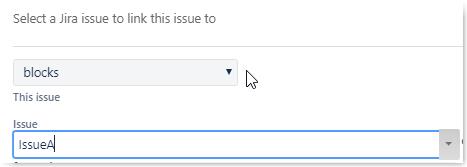
I can read this as:
- This issue blocks IssueA, OR
- Issue 'IssueA' bocks This issue
So I'm left being unsure which issue's perspective this dialog box is coming from, and whether I should therefore choose blocks, or 'is blocked by'.
If the wording was set up like: "The current issue _____________ issue __________" it would be clear, but the way it is, I'm unsure.
Even once you've created the link, the wording around the resulting linked issue displayed can go either way to me, so didn't help me confirm if I chose the correct direction. Under Issue Links, it says: blocks <new line> IssueA. Could mean
- The list of blocks for this issue is: IssueA
- This issue blocks the following issues: IssueA
So... what is the intended usage?


