I needed to publish some Confluence pages and it seems that it's not really designed for print (PDF) publishing because the formatting is a mess.
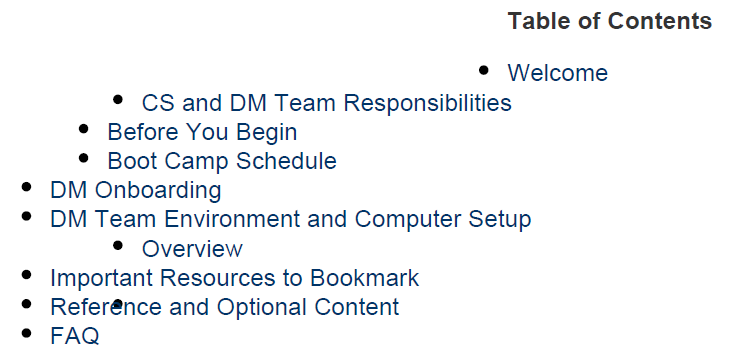
- The TOC is poorly formatted with the first two lines appearing centered on page and an additional bullet overlayed within the text of one line of the TOC.
- Broken images, such as an embedded Draw.io diagram.
- In one section, I inserted a three column page layout and three columns were converted into a single column.
- Panels and Tip/Notes macro boxes are not aligned to the left or right margins.
- Icons in the Tip/Notes macro boxes are missing. Just the box appears.
- Additional embedded icons were rendered in low resolution.
How about Word Export?
Next, I tried a Word export. Although it was marginally better, it had it's own problems, such as:
- Beginning with the top... the output includes the Livesearch macro, which is useless in print. Is there a way to publish without certain macros like Livesearch? The Livesearch macro doesn't appear in the PDF export.
- The TOC looks good.
- Embedded Draw.io diagram is still a broken image.
- There is a perplexing letter "T" in between two paragraphs that doesn't appear in the PDF or the source Confluence! ???
- The Panel macro borders do not appear in the Word output.
- The other icon images appear with better resolution than the PDF export.
- The three column section is still rendered as a single column.
- Why is the Export in the older Word format? Docx format has been available longer than Confluence.
Thanks for your advice.
I don't have access to stylesheets but is it even possible to customize the layout?





