I'm logged in with a "jira-administrators" account but do not see the "Project Administration" option in the bottom left corner when I go to the project browser to view a project I just created.
Supposedly this happens if I don't have the necessary permission, but I verified in the "User Management" section that the account ("jirauser") is in the "jira-administrators" group.
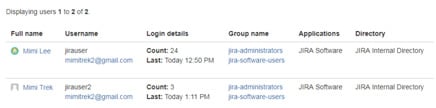
I'm new to JIRA and would greatly appreciate any help on how I can access the "Project Administration" option.
Here are more details:
I just installed it on my Windows PC, and followed the setup instructions in Ch. 2 of the "JIRA 7 Essentials" book. During the JIRA installation I selected to install JIRA as a system service.
I had previously installed MySQL and created a user called jirauser:
grant all on jiradb.* to 'jirauser'@'localhost'
identified by 'jirauserpassword'; When JIRA starts in the the browser, I'm able to log in as "jirauser."

![Photo of Dave Theodore [Coyote Creek Consulting]](https://us.v-cdn.net/6038660/uploads/avatars/be/ad/nbead3954437e7065e4d119624fd7f5e3.png)