- Choose > System.
- In the Import and Export section, click Jira Import and follow the steps to upload your backup file. This process checks URLs in the specified XML backup, and will let you choose whether or not to update URLs to point to the new Jira Cloud application.
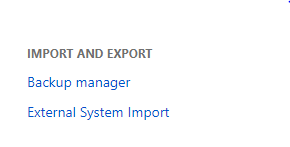
I found this solution to import a zipped file from one instance to migrate projects and issues to another instance of JIRA, but I am not being able to find the "Jira Import" option under Import and Export section.
There are just 2 options available as:
1. Backup Manager and
2. External System Import
I tried using the second option but it did not work as the document specified.
Please help me find a way to import all my data from one JIRA instance to another.