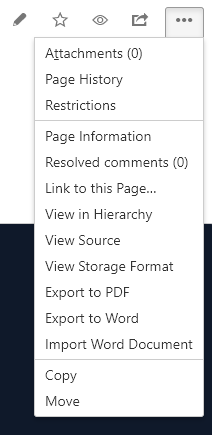
I'm a site admin for our Atlassian account (site-admins, administrators groups) but I cannot seem to find a way to delete a page anywhere in the app. Neither the detail view nor the pages/spaces overview gives any kind of direction as to how to accomplish this.
Am I really that blind? How do you delete a page from Confluence? The docs do not help. It states:
Deleting all versions of a page
To delete a page:
Go to the page and choose Tools > Delete. Confirm the action as prompted.
Note: The 'Delete' option will only appear if you have permission to delete this page.
I'm a site admin, what other permissions to I need?
EDIT
After much digging and help from Nic and Ann, I was able to find a way to do it. For anybody in the future:
- Go to Confluence
- Click "Settings" (not "Site Administration")
- Under "Users & Security" click "Space Permissions"
- Under "Individual Spaces" click "Recover Permissions" for the space you need permissions to.
- Edit Permissions
References
- https://confluence.atlassian.com/conf56/deleting-a-page-658736993.html


