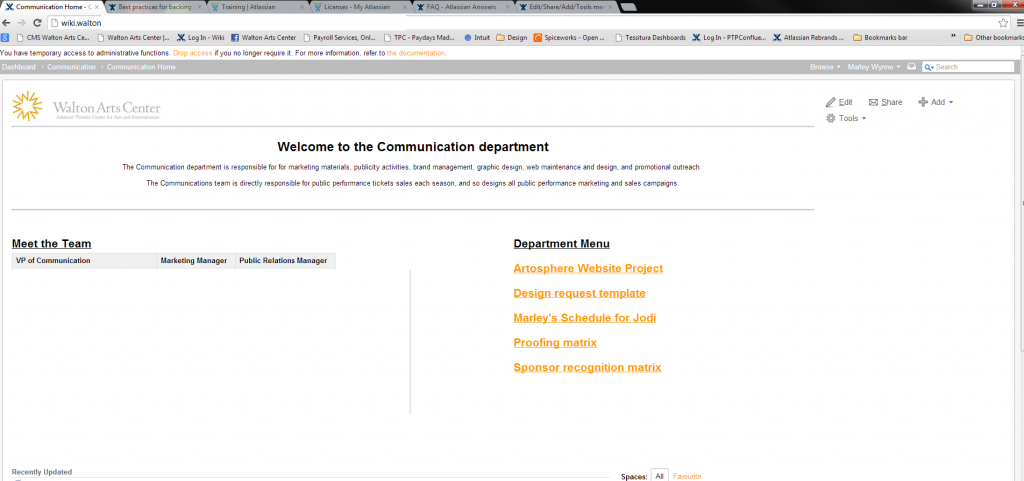
The Edit / Share / Add / Tools menu wraps, with tools showing below edit, in Chrome when using the default theme. The same issue doesn't exist in the documentation theme.
Hi, this problem is different I believe, you can either install this plugin to fix it: https://marketplace.atlassian.com/plugins/com.atlassian.confluence.plugins.editor-height-fix
or update to Confluence 5.1.3 or later that already has the fix for it.
Kind regards,
Peter
Hi,
Could you try to temporarily enable plugin safe mode, that will disable any third-party plugins installed and see if the problem persists? If not, the most likely one of those plugins cause this issue.
You could also try the obvious - emptying browser cache - and see if that helps, but I guess you have already tried this.
Cheers,
This looks like something caused by the rule:
#navigation .ajs-menu-bar {
margin: 10px 0 0 1em;
}
.gadget .gadget-menu ul {
float: right;
margin: 0 0 0 1em;
padding: 0;
width: auto;
}
In the file com.atlassian.gadgets.dashboard:dashboard.css.
This manifests itself in the dashbard widget menu.
Hi Peter! We have the same error in Chrome. Cache has been cleared and enabling plugin safe mode didn't work. Any other ideas (we have a lot of Chrome users)? Cheers!
Could you please attach a screenshot of the issue? I tried to reproduce it using Chrome and 4.3.1 and was unable to do so.
Thanks,
Hope this helps!
Apart from that, please try to revert your customization such as layout, theme, stylesheet and custom html as these could be the cause of this issue too.
I'm not sure what happened, but sometime in the last week this magically got fixed (we did nothing on our end). Thanks for all the responses!
It seems the latest version of Chrome (23.0.1271.64) fixes this.
We have the same problem now. The "edit-mode" is a very ver y small area.
Confluence 5.1.2 (Chrome Version 27.0.1453.116 m)
It looks like you're new here. Sign in or register to get started.