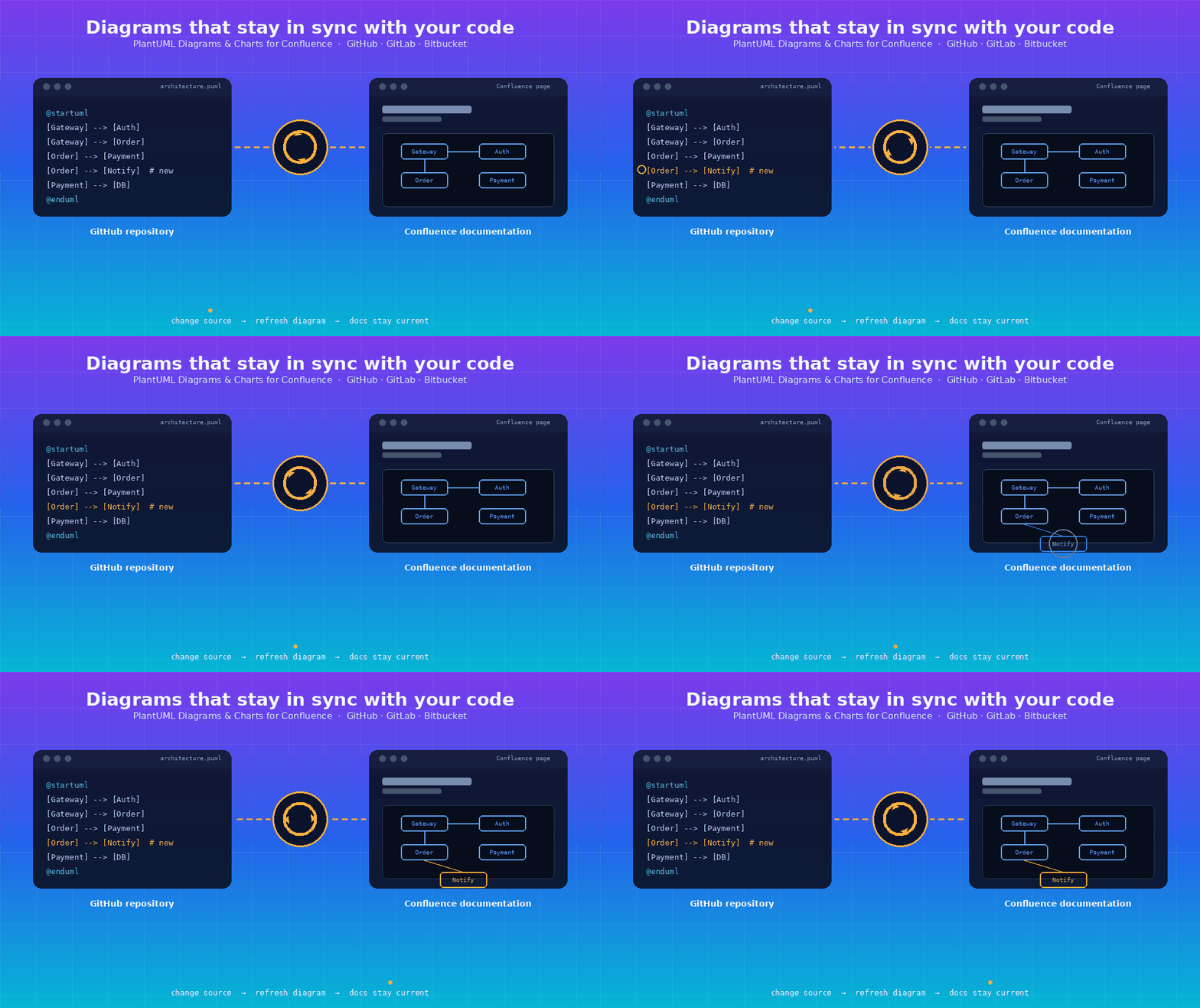
Ever updated a diagram in Confluence... only to find out later that GitHub had already moved on without it?
Yeah. We've all been there.
Your Architecture Never Stops Changing
📈 Your architecture evolves. 🔀 Your workflows change. ➕ Components get added. ➖ Components get removed.
Your GitHub repo? Always current. Your Confluence diagram? …maybe not so much.
📁 GitHub (.puml source)   →   😎 Up to date
📄 Confluence diagram      →   😴 Stuck in the past
That gap is a documentation gap — and it quietly erodes trust in your docs.
💭 So... what if your Confluence diagram could just refresh itself from GitHub?
Meet: Git-Connected PlantUML Diagrams
With PlantUML Diagrams & Charts for Confluence, you can connect your diagrams directly to the source files living in your Git repo — GitHub, GitLab, or Bitbucket, all supported.
No more static, disconnected diagrams. Just:
📁 Repo → 🖼️ Diagram → 📄 Confluence page
One connected line, always pointing back to the truth. ✨
The Problem, Visualized
🐙 GitHub                🖼️ PlantUML Diagram          📄 Confluence
architecture.puml   ➡️        renders           ➡️     documentation
      ✅ current                                        ✅ matches (for now)
Then... a developer pushes a change. 👨💻⌨️
➕ New service added
🔌 API connection changed
➖ Old component removed
🔁 Workflow updated
🐙 GitHub   →   ✅ up to date
📄 Confluence diagram   →   ❌ still the old version
Someone has to remember to update it manually. Spoiler: they usually don't. And that's exactly where docs start falling behind.
The Fix: Connect, Don't Copy-Paste
Instead of treating your diagram as a static screenshot, connect it straight to the PlantUML source in your repo. When the code changes, hit refresh 🔃 and pull the latest version — no manual rebuild required.
The Workflow
1️⃣ PlantUML source lives in GitHub Your team keeps managing code where code already lives.
2️⃣ The Confluence diagram connects to the repo One-time setup — link it and forget it.
3️⃣ A developer updates the PlantUML code New service? New flow? No problem — it happens in GitHub, as usual.
4️⃣ Refresh the diagram in Confluence One click pulls the latest source.
5️⃣ Confluence shows the current diagram Documentation, caught up automatically.
See It in Action
GitHub source → updated PlantUML → refresh → latest diagram in Confluence
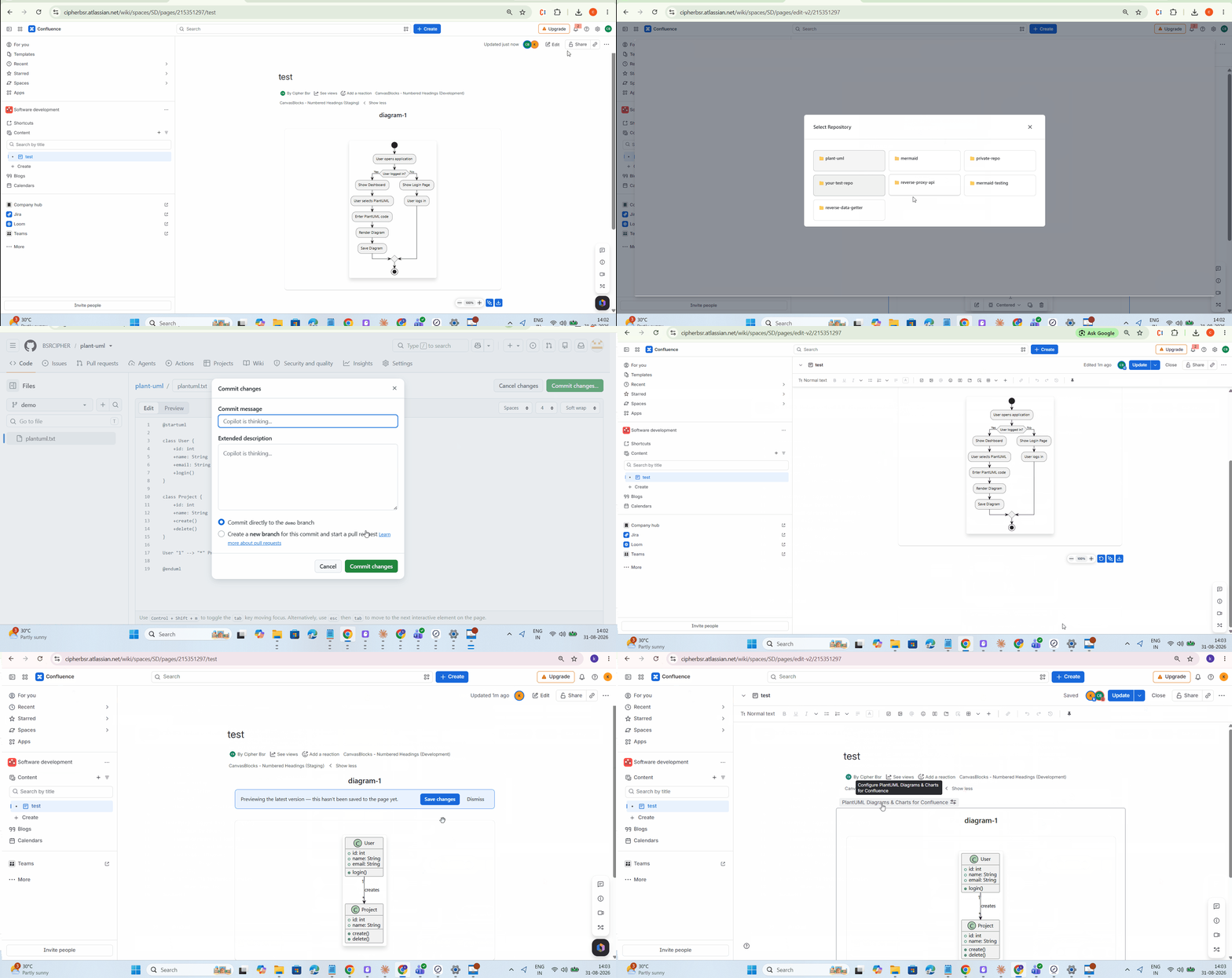
💡 The big idea: you never have to manually rebuild a diagram from scratch again.
Why Development Teams Love This
Developers stay in GitHub — no forced move to a separate diagramming tool
Docs stay close to the source — GitHub for code, Confluence for collaboration
Fewer manual updates — no more copy-paste-redraw cycles
Docs stay relevant — architecture, sequence, and component diagrams refresh with a click
Supports sequence, class, activity, component, state, use-case, deployment, ER, Gantt, mindmap, and WBS diagrams and more...
A Real-World Example
Before 🕐
📦 Application
 ├─ 🚪 API Gateway
 ├─ 🔐 Authentication Service
 ├─ 🛒 Order Service
 ├─ 💳 Payment Service
 └─ 🗄️ Database
Team adds a new Notification Service → developer updates the .puml file in GitHub.
After 🕑
📦 Application
 ├─ 🚪 API Gateway
 ├─ 🔐 Authentication Service
 ├─ 🛒 Order Service
 ├─ 💳 Payment Service
 ├─ 🔔 Notification Service   ⬅️ NEW
 └─ 🗄️ Database
No manual redraw. Just hit refresh 🔄 and the Confluence page catches up.
1️⃣ source. 1️⃣ diagram. 📉 Less drift.
The GitHub + PlantUML + Confluence Combo
📁 GitHub           =  🧠 Source of truth
🖼️ PlantUML         =  🎨 Visualization
📄 Confluence       =  🤝 Collaboration & docs
A clean separation of concerns — everything doing what it's best at.
Who's This For?
- Software development teams
- Solution & software architects
- DevOps teams
- Engineering teams maintaining architecture diagrams
- Anyone using Confluence as a technical knowledge base
- Teams already keeping PlantUML source in GitHub
Stop Letting Diagrams Go Stale
A diagram shouldn't go out of date just because the code moved on without it.
❌ OLD WAY:   Change code  →  forget diagram  →  outdated docs
✅ NEW WAY:   Change source →  refresh diagram →  docs stay current
Try It Yourself
Create PlantUML diagrams directly in Confluence, connect them to your Git repos, and keep your visual documentation as fresh as your codebase. 🌿
👉 Get PlantUML Diagrams & Charts for Confluence on the Atlassian Marketplace
