Disclosure: I work for codefortynine, the Marketplace Partner behind Deep Clone for Jira.
If you have work in Jira that repeats every week, month, sprint, quarter, or release, Jira Automation’s Scheduled trigger is a great way to automate when that work should be created.
For a single recurring work item, the setup can be relatively straightforward. But once your recurring work consists of an Epic, or a larger hierarchy, things can get complicated quickly.
This is where Deep Clone for Jira can simplify the setup. Deep Clone is a Jira cloud app for cloning work items, Jira spaces and work item hierarchies (like Epics) while preserving their structure and relationships.
If you combine Jira Automation, Jira Workflow Actions and Deep Clone a scheduled automation for cloning an entire hierarchy can be as simple as this:
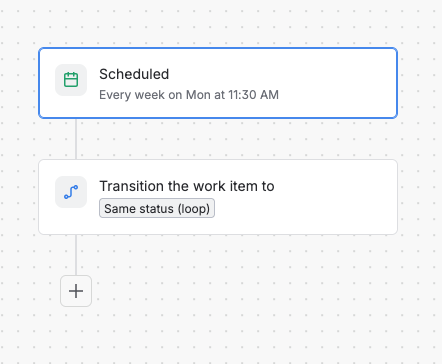
Instead of building the cloning logic yourself with Jira Automation, you can split the responsibility:
- Jira Automation → decides when the recurring work should be created
- Deep Clone for Jira → defines what should be cloned, how fields should be handled, and recreates the hierarchy
Let’s walk through the setup.
1. Create a looping workflow transition
First, add a global looping transition to the workflow of your source Epic: a transition from all statuses to itself.
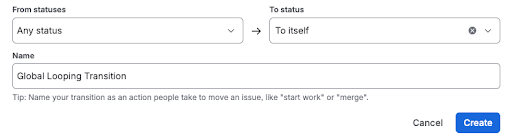
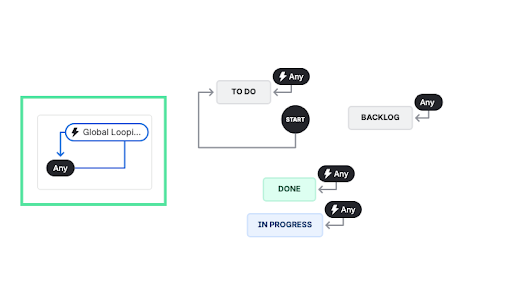
Because the origin and destination are the same, executing the transition doesn't change the Epic's status. Instead, it gives Jira Automation a way to trigger our Deep Clone workflow action.
ℹ️ If you don't want users to see the transition and only let Jira Automation interact with it, you can restrict the transition from all users.
2. Add the Deep Clone Epic/Tree workflow action
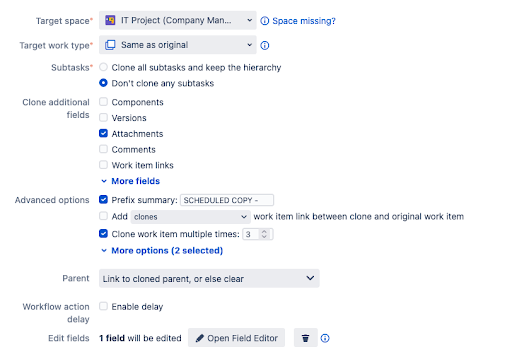
Select the looping transition and add the Deep Clone (Epic/Tree) Action.
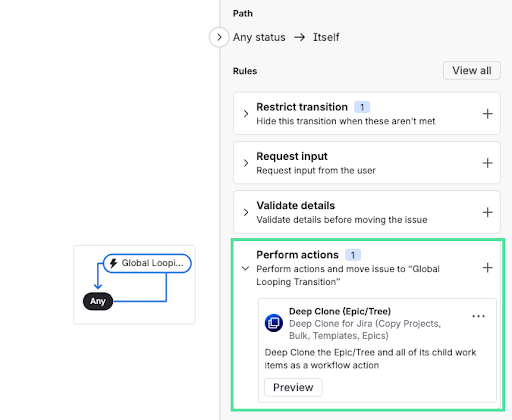
In the Deep Clone workflow action, you can configure:
- Which Jira space the hierarchy should be cloned to
- Which fields should be copied
- Which fields should be updated/edited
- Which fields should be cleared
- How work item links should be cloned
3. Schedule it with Jira Automation
Now, create a Jira Automation rule using the Scheduled trigger.
- Set the schedule for your recurring process—for example, every Monday, on the first day of each month, or once per quarter.
- In the JQL field, enter the issue key of the Epic or Parent work item whose hierarchy you want to clone.
Then add the Transition work item action and select Same status (loop).
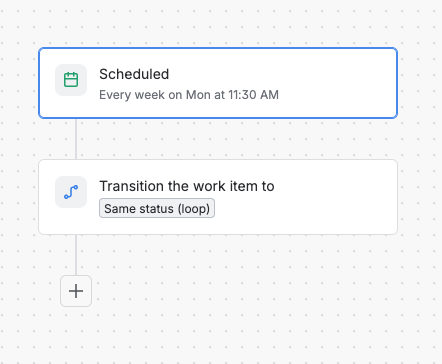
Your recurring process is now:
- Scheduled Jira Automation >>
- Same-status workflow transition >>
- Deep Clone (Epic / Tree) >>
- New Epic + Stories/Tasks + Subtasks (or more complex hierarchies)
Why should you use Deep Clone alongside Jira Automation?
I’ve seen some in-depth discussions here in the Atlassian Community about how to recreate hierarchies with Jira Automation.
One thing that becomes clear when following these discussions is that implementing this process entirely with Jira Automation can require a fairly sophisticated setup.
Deep Clone for Jira can simplify that by recreating the hierarchy. On top of that, our app provides an interface where you can configure your cloning settings without building additional automation logic.
This keeps your Jira Automation rule lean while Deep Clone takes care of the complex cloning logic.
In practice, the responsibilities look like this:
|
Jira Automation
|
Deep Clone
|
|
Schedule recurring work
|
Clone the hierarchy
|
|
Select source work with JQL
|
Recreate parent/child relationships
|
|
Define conditions and triggers
|
Copy configured fields and content
|
|
Decide when
|
Handle what gets copied how
|
ℹ️ Deep Clone's Epic/Tree workflow action supports up to 10,000 work items in one Epic/Tree workflow action.
Where can you use this?
This pattern works whenever your recurring work follows a repeatable Jira hierarchy. For example:
- Regression testing — recreate a standard set of tests for every release or sprint.
- Monthly or quarterly reviews — automatically recreate compliance, security, finance, or operational review activities on a regular schedule.
- Recurring IT operations — generate your standard maintenance, infrastructure, or system administration tasks every month.
- Release processes — recreate the complete set of QA, documentation, security, and deployment activities for every release.
🧩 Do you have another use case where this setup could help? It’d be great to hear about it in the comments.
