As your jira instance grows so do your costs .
Inactive users continue consuming licenses even through they no longer access Jira . At the same time storage fills up with outdated work items and large attachments that are no longer needed.
Reviewing users manually and cleaning old data can quickly become overwhelming and result in a significant waste of time .
License Cost Optimizer for Jira helps you reduce these unnecessary costs while keeping complete control over your Jira environment
Reclmaim Unused Licenses Automatically
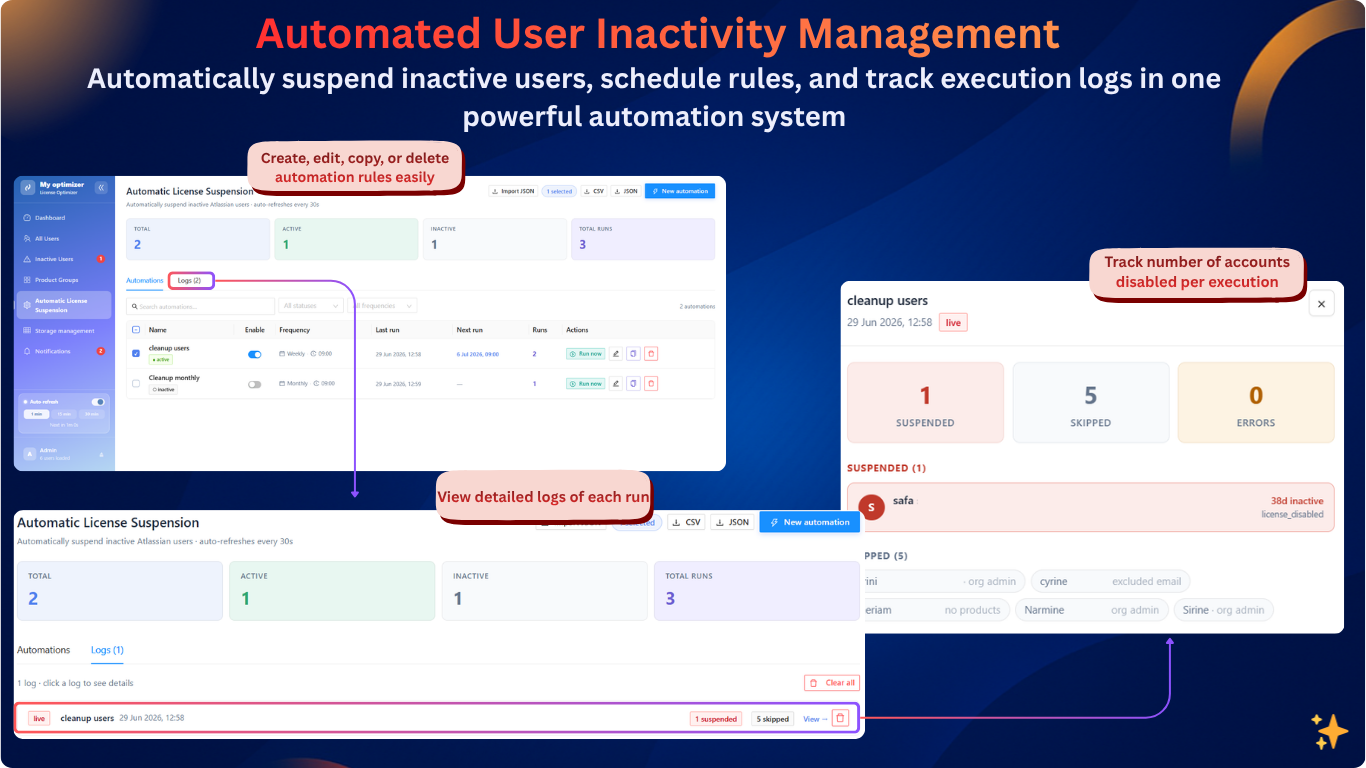
With License Cost Optimizer for jira , you can instantly identify users haven't logged in for days , weeks or months from a centralized dashboard . Instead of reviewing users one by one , you can manage them in bulk or automate the entire process.
Create automation rules based on you own inactivity criteria for example users who haven't logged in for 30 days and you can exclude users also from this automation . The app will automatically suspend their licenses helping you reclaim licenses as soon as they become unused .
Less manual work , Lower licensing costs.
Optimize Jira Storage
License cost optimizer for jira lets you clean up your instance safely with bulk actions :
- Delete obsolete work items in bulk when they are no longer needed.
- Remove attachments from work items without deleting the work items , allowing you to free up storage while preserving project history.
This gives you full control over what stays ans what goes helping you keep your jira instance clean and efficient .

Whether your goal is to optimize licenses , reclaim storage or reduce administrative effort , License cost optimizer for jira provides the tools to do it quickly .
What about you ? How do you manage licenses and storage for you instances ? Leave a comment below and share your experience with us !
