As I publish this article, the new Rovo Studio (incl. Apps) is newly available, while Forge has introduced the AI development toolkit and Forge Realtime (Preview).
These are exciting times and a good reminder to stay curious in this rapidly evolving eco-system, I’m sure there’s a solution for your challenges.
North Star…?
Our validation question is deliberately narrow yet motivates further directions of exploration:
“Can we capture a visual selection on an asset and attach it to a Jira work item in such a way that another engineer could re-open later?”
We wish to achieve a visualisation approach, integrated with the Atlassian platform, enriched by data from our use case context, which can extend across other tools (think Loom, Rovo Chat) in future.
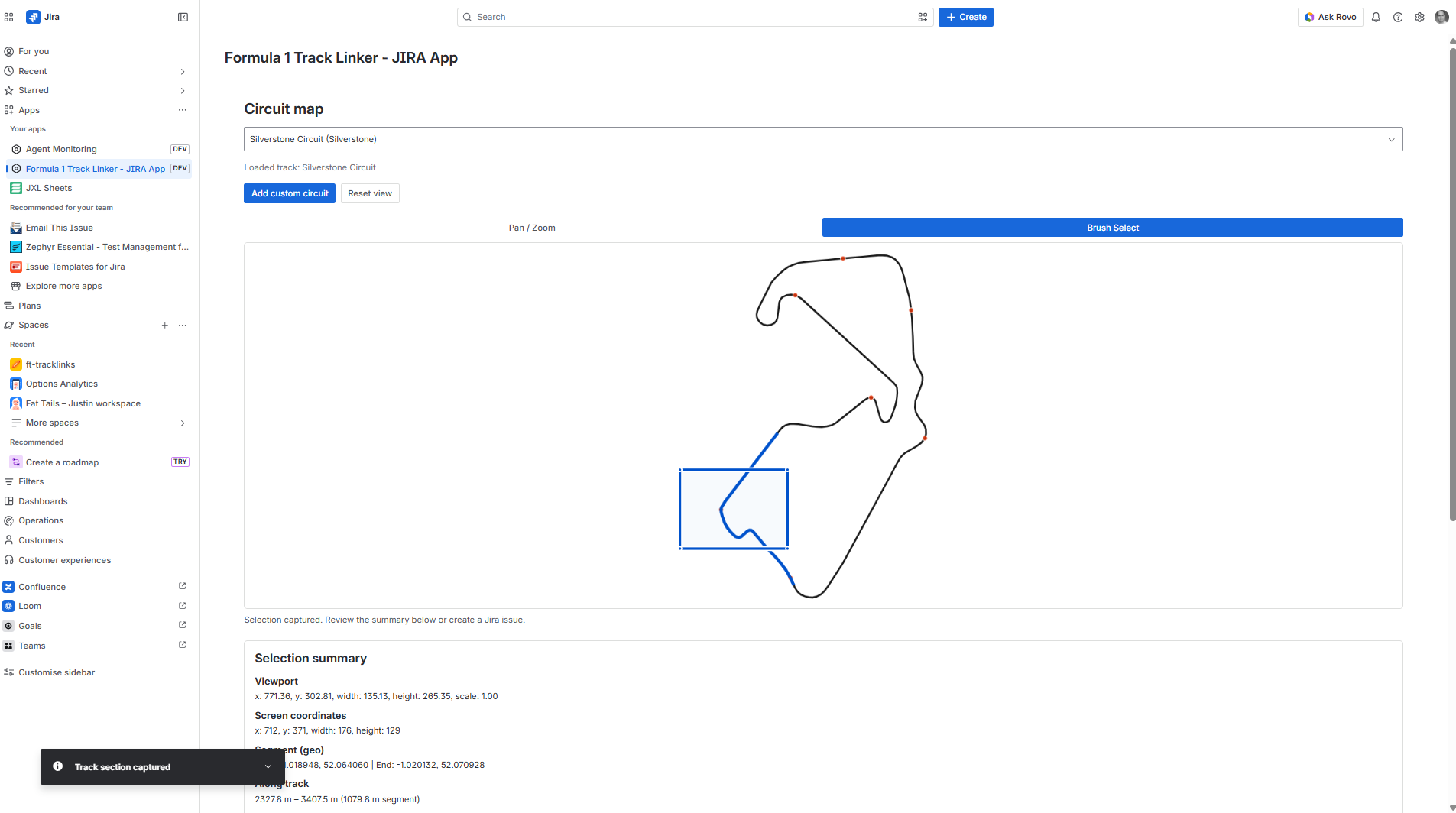
The Approach
Charting and graphics inside Atlassian, as well as established marketplace apps have their place, but can someone point at a place on a circuit map inside Jira and turn that into a work item the rest of the team can find later?
With co-ordinates and a picture, not just a verbal description?
We recognise there are many technical possibilities here, but choose to work under these constraints:
- Context is deepened via the use of a custom visualisation, linking to the work item
- Lightweight integration is explored with simple interactions initially (Pan / Zoom, Brush), to demonstrate possibilities of more demanding integration in future
- As far as is possible, the design explores the boundary between UI Kit and Frame
- Libraries external to Forge, are bundled with the app (in stricter development settings the library would be approved for use)
- Design is constrained by the conditions of ‘Runs on Atlassian’. If you are an Atlassian customer, you’ve perhaps already dealt with a security vetting process, this app does not add another
We are mindful the use case is demanding of features and performance, so opportunities exist to optimise the solution in a future phase.
What the Solution Does
**Track Linker** lives inside Jira as a Forge app. A user opens the app, sees a circuit map, selects a region, and creates a Jira issue that carries:
- Summary of what they are reporting
- Structured location data derived from the selection
- Thumbnail image of the brushed area as visual evidence
The end-to-end loop — **see → select → record → create work** — is the product kernel. Later phases improve precision, workflow fit, and polish; they do not replace this loop.
Data stays in the customer’s Atlassian environment. There is no separate map portal, no external ticket system, and no need to send details around the team.
Phase 0 Features and Trade-Offs
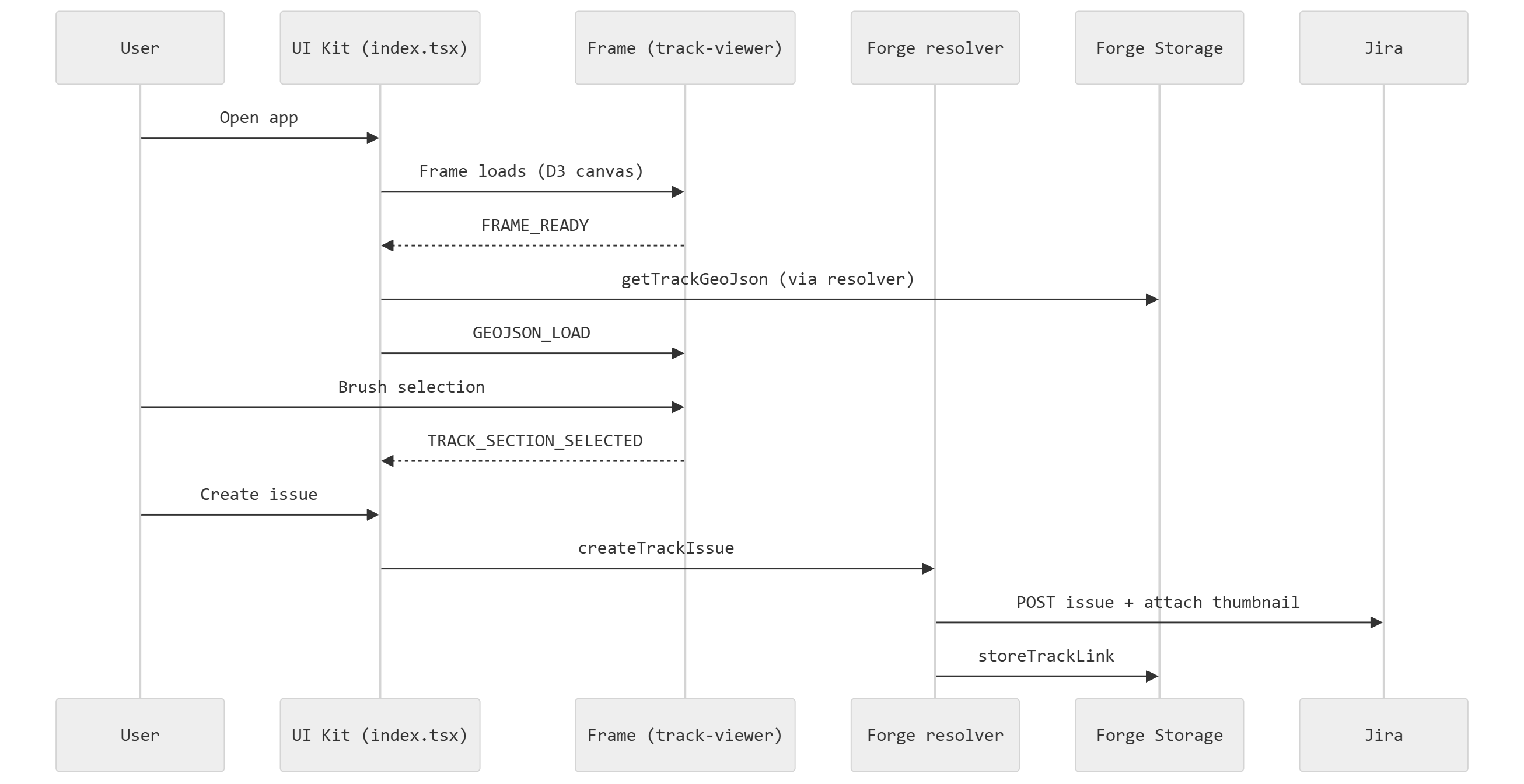
For a first demo, features below were sufficient to show core value: **location on a map becomes the origin for work item creation in Jira**.
Features
| Step | Experience |
| 1 | Open **Formula 1 Track Linker** from a Jira global page |
| 2 | Upload a circuit map file, or use data already stored from a prior upload |
| 3 | Pan and zoom the map; switch between navigation and selection modes |
| 4 | Select (brush) a rectangular region on the map |
| 5 | Review a summary of the selection |
| 6 | Fill in issue summary, project, and type; **create a new Jira issue** |
| 7 | App attaches a **thumbnail** of the selection and stores link metadata for future use |
Trade-Offs
Prove the full loop before refining precision
Prioritised **create issue + thumbnail + stored metadata** over perfect location semantics. That validated Jira integration and the “see → select → record” experience quickly. The trade-off: a brushed rectangle on the map is not the same as “47 metres after Turn 3” — engineers think in the latter. Phase 4 addresses that.
Create-new-issue as the only write path
Every selection created a **new** Jira issue. That proved the attachment pipeline without designing link-to-current-issue UX yet. The trade-off: someone triaging an **existing** incident still had to create a separate issue and mentally associate it — the wrong workflow for race-day ops. A future phase makes “link to this issue” the primary path.
One circuit at a time
Only the most recently uploaded circuit was active. That kept setup simple. The trade-off: switching between Silverstone and Yas Marina required re-upload; no library or metadata. A future phase introduces a proper circuit catalogue.
Thumbnail as selection (audit) evidence
Every selection produced a **picture** attached to the issue. Humans trust images; a crop of the brushed region closes “what did you mean?” loops in stand-ups and handoffs. The trade-off: the image alone does not encode arc-length or corner number — structured fields improve that in later phases.
Admin upload rather than pre-loaded circuits
Demos required uploading a circuit file first. That validated custom-circuit and admin workflows early. The trade-off: extra setup for first-time demos; later phases seed bundled circuits automatically.
After Phase 0, what’s next?
- **Link to the issue you already have open** — the issue action was a second door into the same create flow.
- **Circuit catalog** — no picker, no multi-circuit library.
- **Track-relative metres** — selection was map-space, not distance along the centreline.
- **Restore saved segments** — data was stored on create; the UI did not reload it.
- **Native Jira look and feel** — functional layout, not yet fully aligned with Jira light/dark themes.
- **Fields visible on the issue screen** — circuit and segment detail only inside the app.
- **Natural language entry** — no conversational “log debris at Turn 3” path yet.
- **Automated releases** — `v0.0.0` was a manual GitHub release; automation arrives with the release workflow.
Lessons for Delivery
- **Prove the loop before refining the model.** Jira integration and visual evidence could be validated before precision geometry and workflow polish.
- **Separate “map expertise” from “system of record.”** Classical separation-of-concerns, the map handles visual selection; Jira handles work. That split scales to richer workflows without rebuilding either side from scratch.
- **Runs on Atlassian rewards early discipline.** Thoughtful choices under constraints in early phases are more likely to pay rewards for broader adoption / rollout.
- **A honest demo creates an honest backlog.** The roadmap is largely any gaps from the Phase 0 proof, prioritised — not a hypothetical wish list (see above).
- **F1 is a stress test, not the only application.** The pattern — visual location → traceable work — transfers wherever teams describe problems in spatial language.
Phase 0 codebase can be found here. In the next post we explore why each layer exists in the solution(s) architecture more deeply.
