
Jira is one of the most widely used project management platforms, helping teams organize work, manage backlogs, and track delivery. But as organizations grow, many teams discover that planning work is only part of the challenge. Understanding who can actually do the work, when they can do it, and whether capacity exists across multiple projects requires more than Jira's native planning capabilities.
This guide explains what Jira Planner offers, where its limitations appear, and how ActivityTimeline extends Jira into a complete planning and resource management solution.
What Is Jira Planner?
Jira Planner refers to Jira's native planning capabilities, including boards, backlogs, sprint planning, timelines, and Jira Plans (formerly Advanced Roadmaps).
Using these tools, teams can:
-
Create and prioritize work items
-
Plan sprints and releases
-
Assign tasks to team members
-
Track progress across projects
-
Visualize dependencies
-
Build high-level roadmaps
For many teams, these features are enough to organize work and monitor delivery. However, Jira focuses primarily on work management rather than resource management.
The question Jira answers well is:
"What work needs to be done?"
The question it struggles to answer is:
"Do we have the capacity to deliver it?"
Native Jira Planning Features
Boards and Backlogs
Jira boards provide a visual way to manage tasks through different workflow stages. Teams can prioritize backlogs, estimate work, assign owners, and monitor progress throughout a sprint.
This works well for day-to-day task management but provides limited visibility into overall workload and resource availability.
Sprint Planning
For Scrum teams, Jira supports sprint planning, velocity tracking, and backlog management.
Teams can estimate stories, build sprint commitments, and monitor progress throughout the iteration. While this helps organize work, sprint planning often relies on assumptions about team availability rather than actual capacity.
Jira Plans (Advanced Roadmaps)
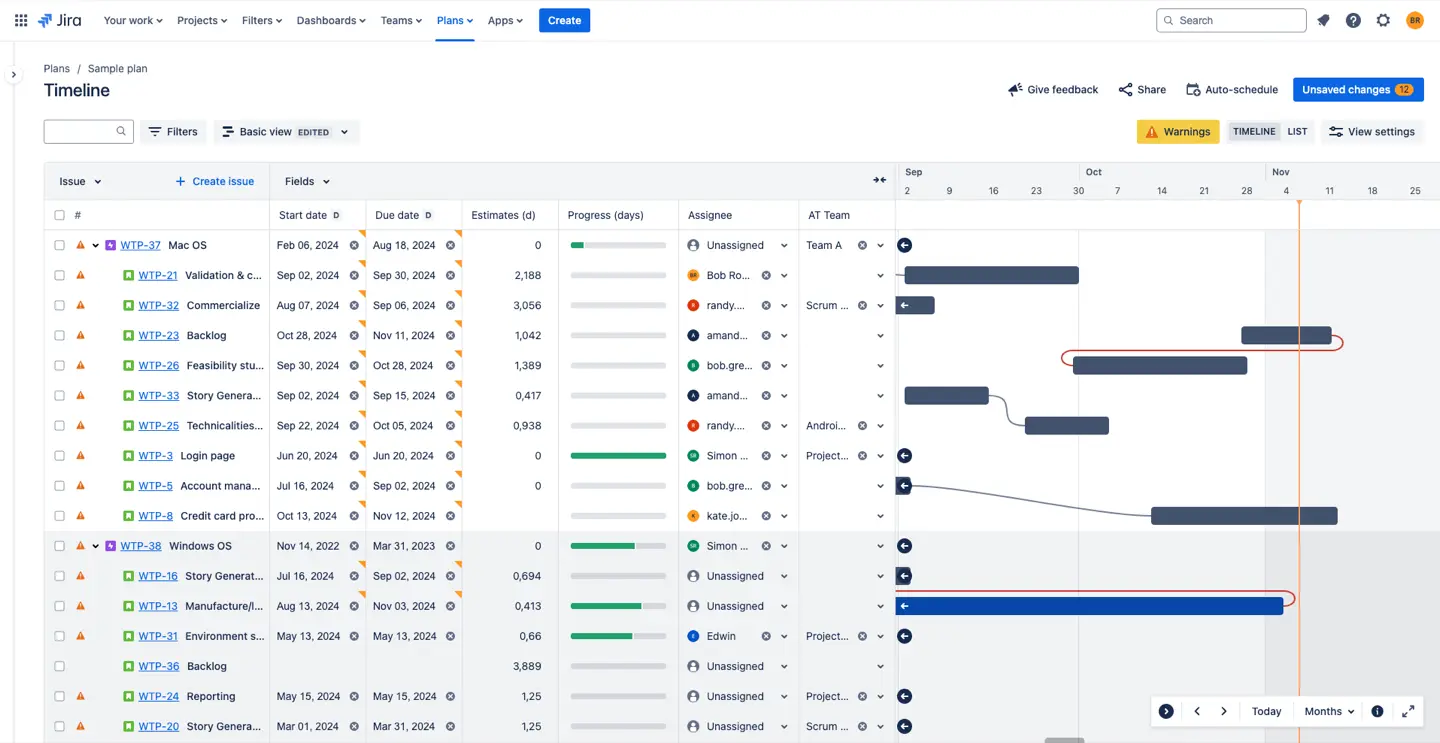
Jira Plans extends Jira with higher-level planning capabilities.
Key features include:
Jira Plans is particularly valuable for portfolio planning and strategic roadmapping because it connects long-term initiatives with day-to-day execution.
However, even with Jira Plans, capacity management remains relatively high-level.
Where Jira Planner Falls Short
As teams scale, planning challenges become less about tasks and more about people.
No Clear Individual Capacity View
Jira does not provide a practical view of how much capacity each person has available.
A developer may appear assigned to several projects, but Jira does not clearly show whether that workload exceeds their available hours.
As a result, resource conflicts often become visible only after deadlines begin slipping.
Limited Cross-Project Visibility
Many employees contribute to multiple teams and projects simultaneously.
In Jira, workloads are often distributed across different boards and projects, making it difficult to understand a person's total commitments.
Managers must manually combine information from multiple sources to identify resource bottlenecks.
Manual Workload Balancing
Reassigning work based on team capacity is often a manual process involving filters, boards, spreadsheets, and planning meetings.
Native Jira lacks a visual workload-balancing interface that allows managers to quickly redistribute work based on availability.
No Built-In Availability Management
Vacations, public holidays, sick leave, training, and internal meetings significantly affect delivery capacity.
Jira does not natively incorporate these factors into planning calculations, creating a disconnect between planned work and actual availability.
Limited Scheduling Functionality
Although Jira supports due dates and timelines, scheduling work across calendars often requires significant manual effort.
Managers frequently need additional tools to answer questions such as:
-
Who is available next week?
-
When can this project realistically start?
-
Which team has spare capacity?
-
What happens if priorities change?
These gaps explain why many organizations complement Jira with dedicated resource planning solutions.
How ActivityTimeline Enhances Jira Planner
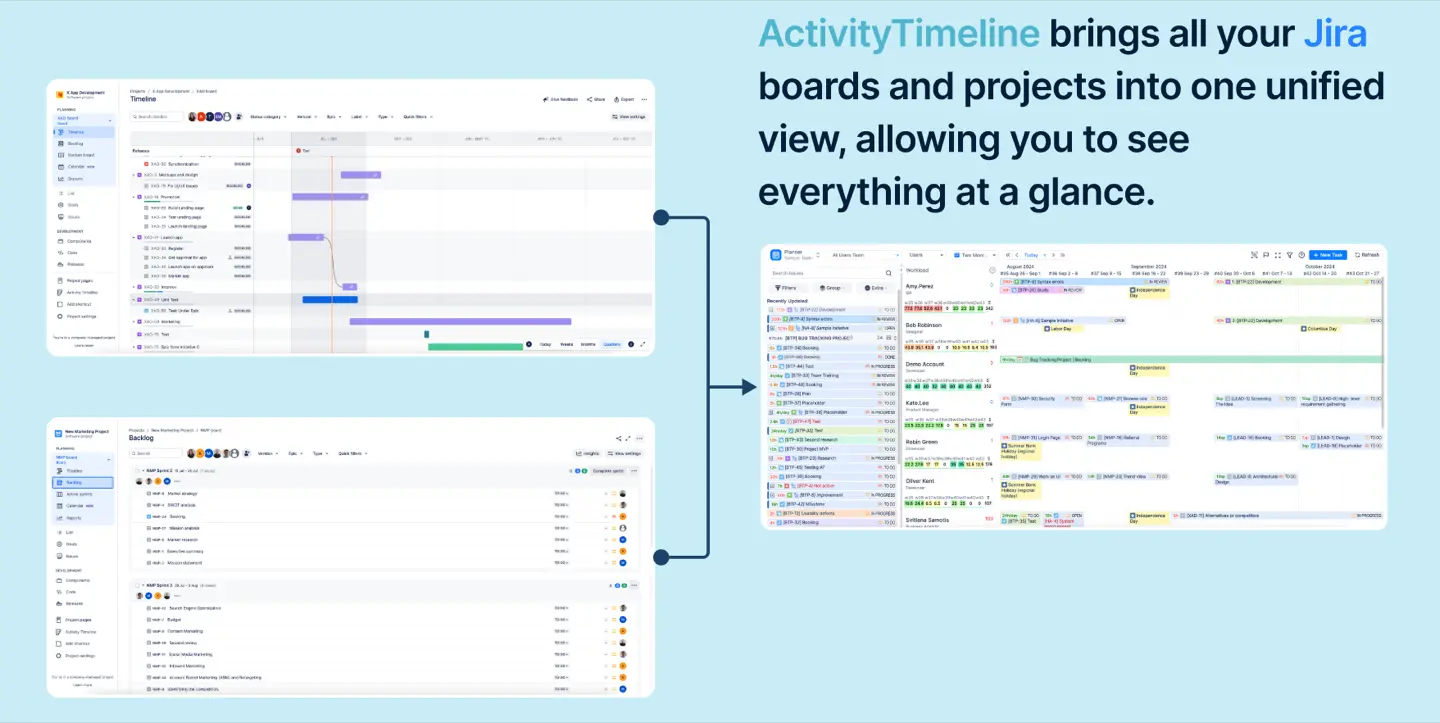
ActivityTimeline extends Jira with resource management, capacity planning, and scheduling capabilities while keeping all data synchronized with Jira.
Instead of replacing Jira, it builds on top of it.
Visual Resource Planning
ActivityTimeline introduces a planner view where managers can see people, projects, and tasks on a timeline.
Issues can be scheduled using simple drag-and-drop actions directly from Jira.
Rather than navigating through multiple screens, managers can instantly see:
-
Current workload
-
Availability
-
Future commitments
-
Scheduling conflicts
Planning becomes visual instead of administrative.
Unified Cross-Project Visibility
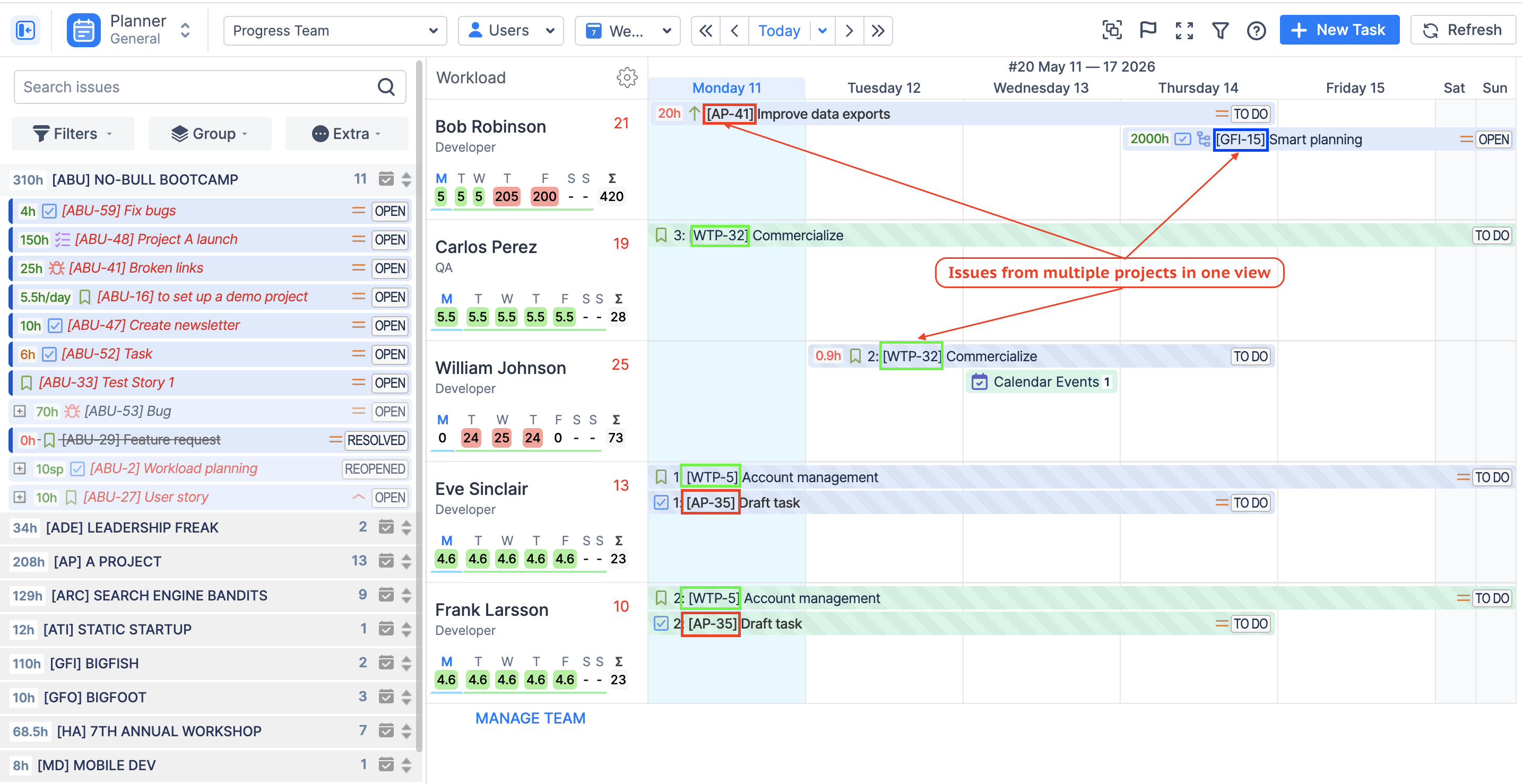
Unlike Jira's project-centric structure, ActivityTimeline provides a unified view of resources across all projects.
A developer working across multiple initiatives appears once, with all assigned work displayed in a single timeline.
This visibility makes it much easier to identify competing priorities and resource conflicts.
Capacity-Based Workload Management
One of the biggest advantages of ActivityTimeline is capacity awareness.
Every team member has defined availability, and workload calculations reflect actual capacity rather than assumptions.
Managers can immediately identify:
This helps teams make better planning decisions before problems occur.
Smart Task Scheduling
Scheduling Jira issues becomes significantly faster through drag-and-drop planning.
Managers can place work directly into available time slots and immediately see the impact on capacity.
Changes automatically synchronize back to Jira, ensuring both systems remain aligned.
Splitting Work Across Resources
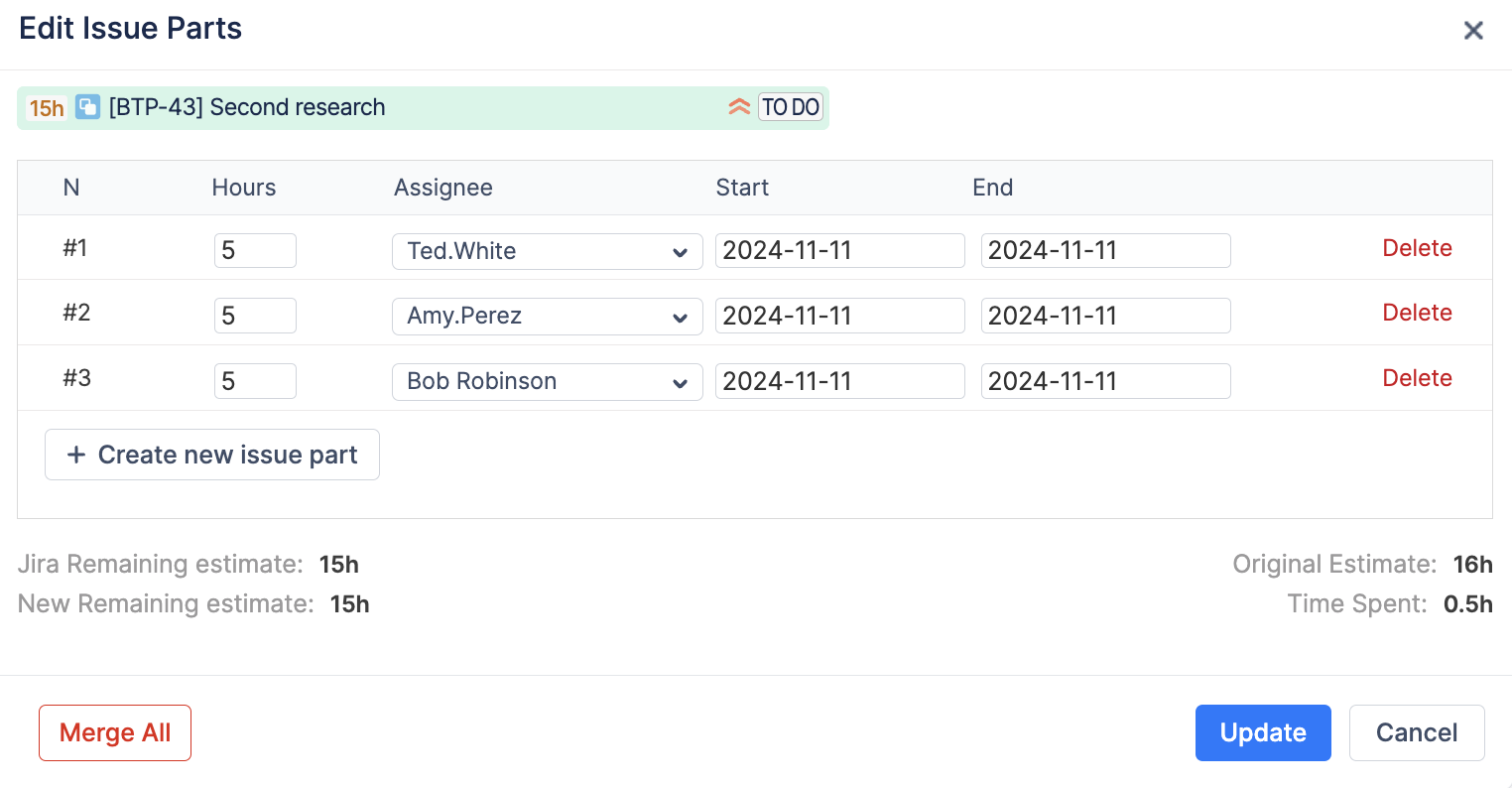
Large tasks often need to be distributed across multiple people or multiple days.
ActivityTimeline allows managers to split work without creating unnecessary Jira sub-tasks.
This provides more flexible scheduling while keeping Jira projects clean and manageable.
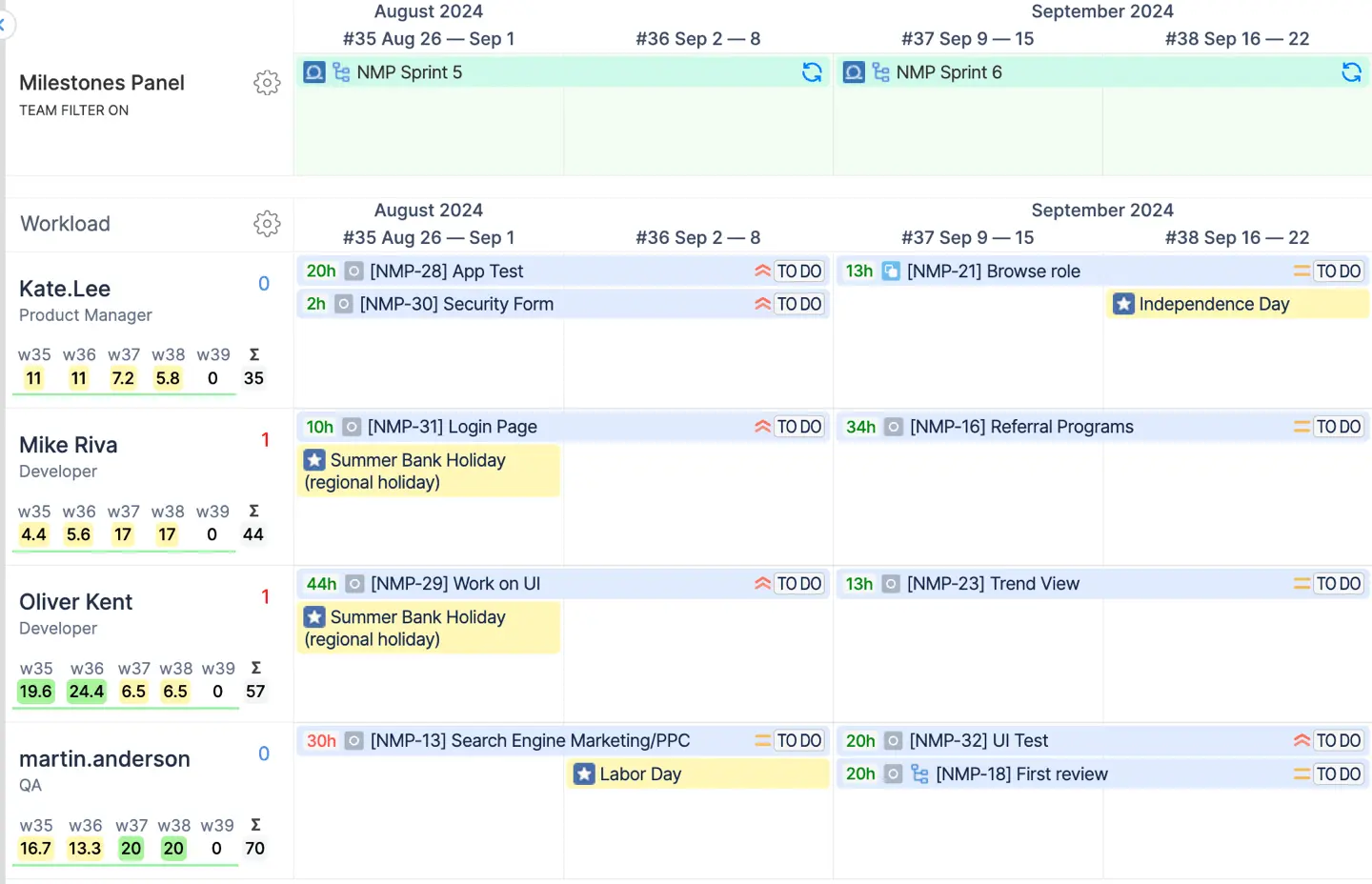
Better Sprint Planning in Jira
For Scrum teams, ActivityTimeline adds an operational layer to sprint planning.
Sprint tasks can automatically appear on timelines based on sprint dates, giving teams a visual representation of upcoming work.
Managers can see:
This creates a clearer picture of whether sprint commitments are realistic before work begins.
Scenario Planning Before Work Starts
Many planning decisions happen before Jira issues even exist.
ActivityTimeline addresses this through placeholders.
Placeholders reserve future capacity without creating actual Jira tasks.
This enables teams to:
Once plans are approved, placeholders can be converted into Jira issues while preserving schedules and assignments.
Team and Skill-Based Planning
Resource planning isn't only about availability. It's also about assigning the right people.
ActivityTimeline includes skill management functionality that allows managers to tag employees with specific competencies.
When planning new initiatives, teams can quickly identify:
This helps improve both delivery quality and resource utilization.
Managing Time Off and Non-Project Work
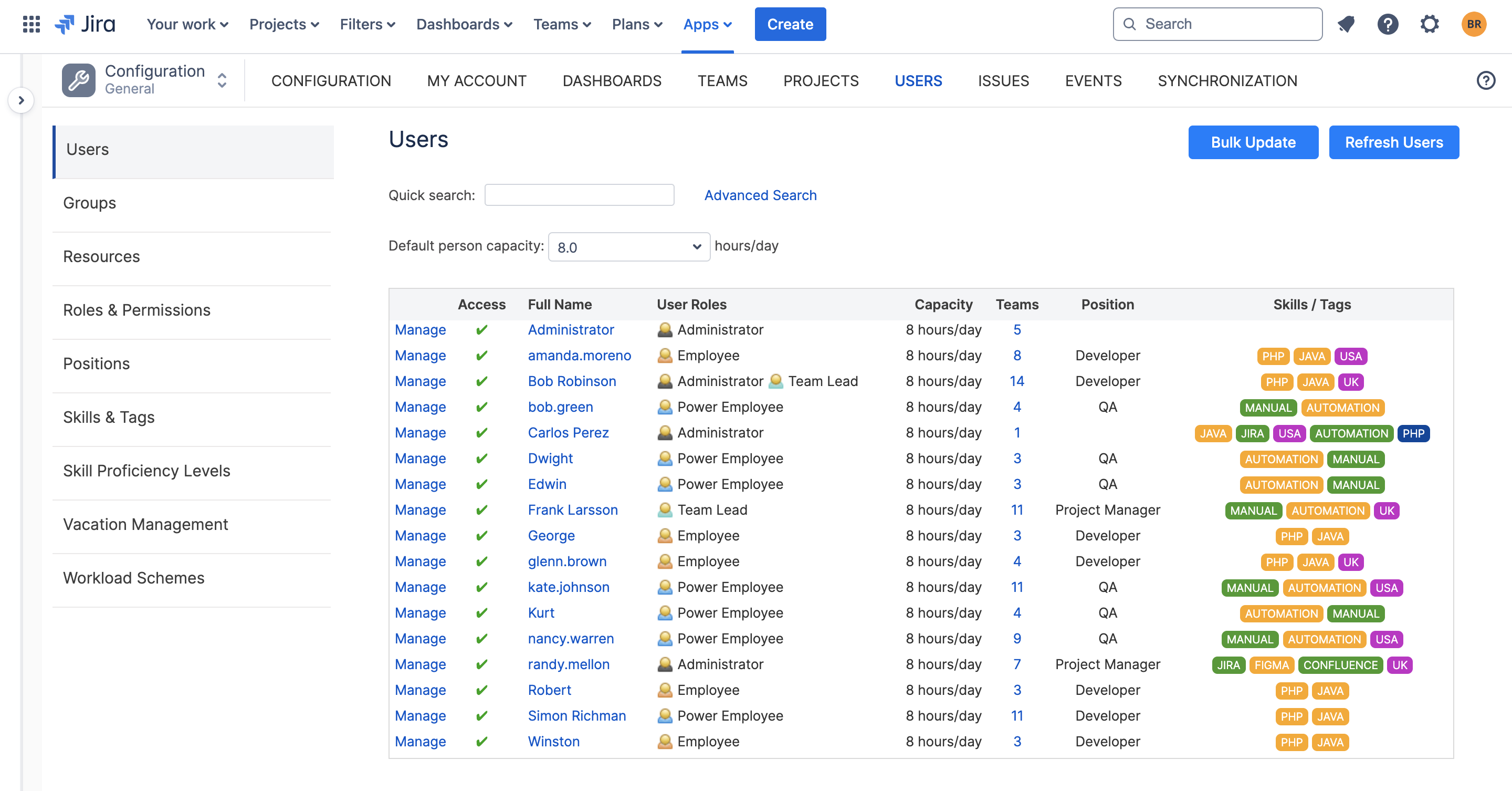
One of the most overlooked planning challenges is accounting for work that isn't tracked in Jira.
ActivityTimeline includes:
-
Vacation management
-
Sick leave tracking
-
Public holiday calendars
-
Training events
-
Meeting reservations
-
Internal activities
These events automatically affect capacity calculations, ensuring plans reflect reality rather than ideal assumptions.
For distributed teams, country-specific holiday schemes help maintain accurate resource forecasts across regions.
Jira Planner vs ActivityTimeline
| Capability |
Jira Planner |
ActivityTimeline |
|---|
| Task Management |
✓ |
✓ |
| Sprint Planning |
✓ |
✓ |
| Roadmaps |
✓ |
✓ |
| Dependency Management |
✓ |
✓ |
| Individual Capacity Planning |
Limited |
✓ |
| Workload Visualization |
Limited |
✓ |
| Cross-Project Resource View |
Limited |
✓ |
| Time-Off Management |
No |
✓ |
| Skill Management |
No |
✓ |
| Scenario Planning |
Partial |
✓ |
| Drag-and-Drop Scheduling |
Limited |
✓ |
| Placeholder Planning |
No |
✓ |
Conclusion
Jira Planner provides a strong foundation for project planning, sprint management, and roadmap creation. For many teams, it serves as the central source of truth for work management.
However, as organizations grow, planning becomes increasingly dependent on resource visibility, capacity management, and scheduling accuracy. Native Jira tools provide only limited support in these areas.
ActivityTimeline fills that gap by transforming Jira into a complete planning environment. With visual timelines, capacity tracking, workload balancing, availability management, and scenario planning, teams can move beyond task planning and build realistic delivery plans based on actual resource availability.
For organizations that rely on Jira but need deeper planning capabilities, ActivityTimeline provides the missing layer between strategic plans and day-to-day execution.
