For service organizations—agencies, consultancies, and delivery teams—budget control and profitability are not just financial metrics; they are operational signals that guide day-to-day decisions. COOs and Operations leaders are expected to understand, in real time, whether client projects are on track, over budget, or at risk.
Many of these organizations rely on as their core delivery platform. It is where work happens, time is tracked, and projects are managed. However, when it comes to budgeting, cost tracking, and profitability, Jira alone often falls short.
As a result, teams frequently turn to spreadsheets or external tools to fill the gap. While this may work initially, it introduces fragmentation—data is copied, synced, or manually adjusted across systems. Over time, this leads to inconsistencies, delays in reporting, and limited visibility into real-time financial performance.
Understanding how to manage budgets and profitability directly in Jira—without relying on disconnected tools—has become increasingly important for modern service organizations.
Why Budgeting and Profitability Matter in Jira
Managing budgets and profitability within Jira is critical because it connects financial performance directly to delivery execution.
When done effectively, it enables:
- Real-time visibility into project health (spent vs remaining budget)
- Accurate billing based on actual worklogs and billable time
- Improved margin control, with clear insight into cost vs revenue
- Faster decision-making, without waiting for end-of-month reports
Without this integration, organizations risk operating with delayed or incomplete data. Financial insights become retrospective rather than actionable, making it harder to adjust scope, resources, or priorities in time.
Questions to Ask
When evaluating how to manage budgets and profitability in Jira, consider the following:
- Can we clearly distinguish between billable and non-billable work?
- Do we have real-time visibility into budget consumption and remaining amounts?
- Are we able to track costs, revenue, and profitability per project or client?
- How easy is it to generate invoice-ready reports from Jira worklogs?
- Can we adjust billable hours or rates before invoicing with a few clicks?
- Is there a clear and manageable approval process for timesheets or worklogs?
- Do our reports reflect accurate, up-to-date data, or are they delayed?
- Can we trace financial data back to specific Jira issues or worklogs?
These questions help identify whether your current setup supports operational decision-making or simply provides retrospective reporting.
Challenges of Managing Budgeting and Profitability in Jira
While Jira excels at task and project management, it was not originally designed as a financial management tool. This creates several challenges:
- Limited native support for budgets and financial tracking
- No built-in real-time visibility into cost, revenue, or profitability
- Dependence on manual processes for financial calculations
- Difficulty linking time tracking directly to billing and invoicing workflows
As a result, many teams export Jira data into spreadsheets or external tools, introducing delays and potential errors.
Approaches to Managing Budgeting and Profitability in Jira
1. Using Spreadsheets
Spreadsheets remain one of the most common approaches for managing budgets and profitability alongside Jira.
Pros:
- Flexible and customizable
- Familiar to most teams
- Easy to start with minimal setup
Cons:
- Manual data exports from Jira
- Prone to errors and inconsistencies
- No real-time updates
- Difficult to scale across multiple projects or teams
Over time, spreadsheets often become complex and fragile, especially as organizations grow.
2. Using External Tools (e.g. Harvest)
External tools such as Harvest are designed for time tracking, budgeting, and invoicing, and are often integrated with Jira.
Pros:
- Purpose-built for financial tracking and billing
- Structured workflows for time tracking and invoicing
- Reporting capabilities for profitability
Cons:
- Disconnected workflow from Jira
- Data synchronization challenges
- Users must switch between systems
- Limited real-time alignment between delivery and financial data
While these tools offer strong financial features, the separation from Jira can create friction in day-to-day operations.
3. Using Jira Add-ons (Example: Worklog360)
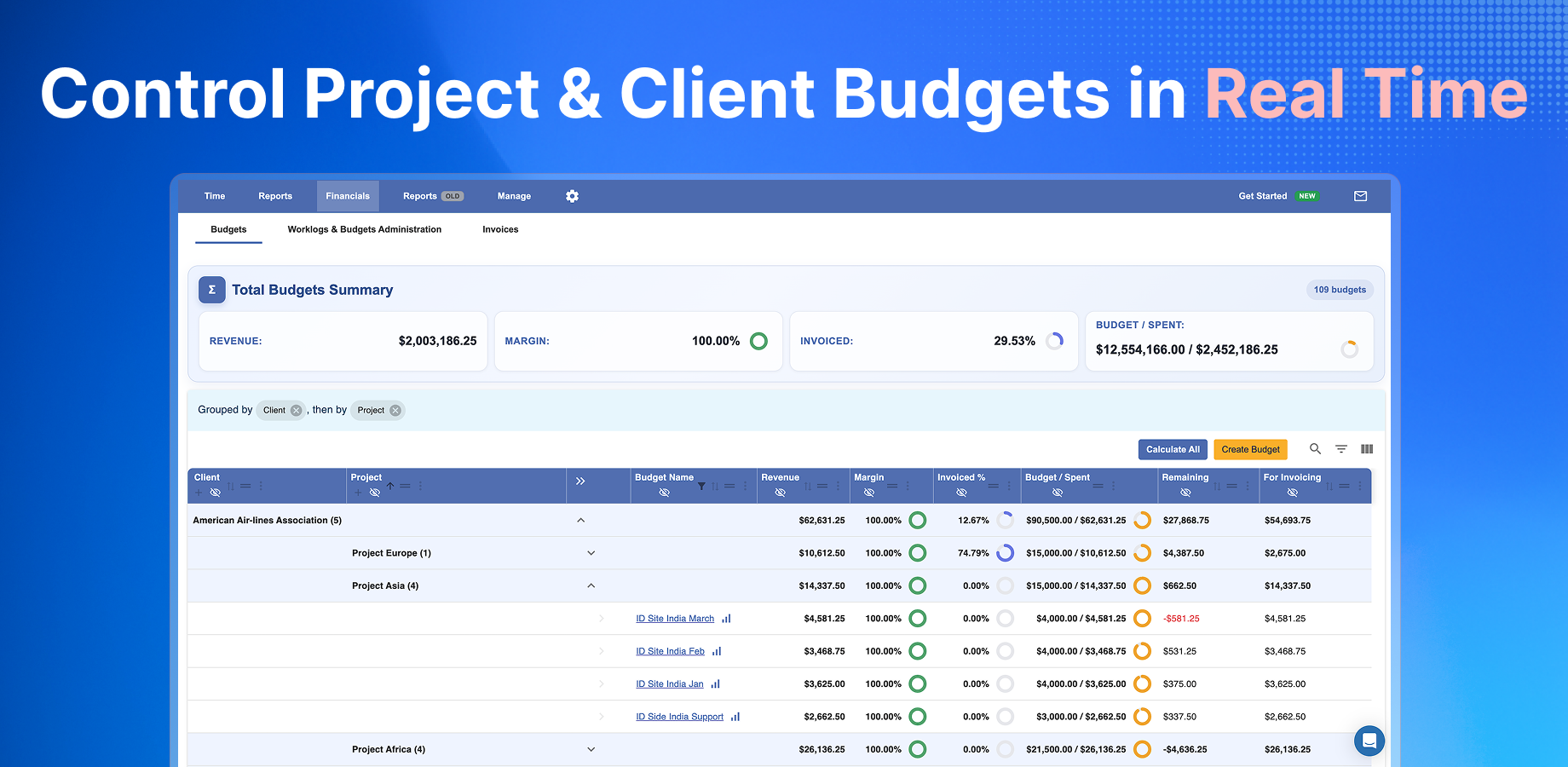
Jira add-ons extend the capabilities of by bringing budgeting, cost tracking, and profitability directly into the platform.
A Jira-native approach - such as with Worklog360 - keeps time tracking, reporting, and financial data within a single workflow.
Pros:
- Real-time visibility into budgets and profitability within Jira
- Direct connection between worklogs and financial data
- Reduced reliance on spreadsheets or external tools
- Unified workflow from time tracking to reporting and invoicing
Cons:
- Requires setup and configuration within Jira
- May involve additional licensing costs
- Feature depth varies across different add-ons
This approach is increasingly adopted by teams looking to centralize operations and reduce data fragmentation.
Comparison Overview
| Approach |
Real-Time Visibility |
Integration with Jira |
Ease of Use |
Scalability |
Risk of Errors |
|---|
| Spreadsheets |
❌ |
❌ (manual export) |
Medium |
Low |
High |
| External Tools |
⚠️ Partial |
⚠️ Integration-based |
Medium |
Medium |
Medium |
| Jira Add-ons |
✅ |
✅ Native |
High |
High |
Low |
Best Practices for Managing Budgeting and Profitability in Jira
- Track time consistently across all projects using Jira time tracking
- Define clear billable vs non-billable rules at project or role level
- Use real-time reporting dashboards instead of static exports
- Implement approval workflows for timesheets or worklogs
- Regularly review budget vs actuals to catch deviations early
- Keep financial data as close as possible to delivery data within Jira
In Conclusion
For agencies and service organizations, managing budgets and profitability is most effective when it is closely tied to delivery operations. While spreadsheets and external tools can support this process, they often introduce delays and fragmentation.
A growing number of teams are moving toward more integrated approaches within , where time tracking, reporting, and financial insights coexist in a single environment.
Ultimately, the goal is not just to report on profitability—but to understand and act on it in real time.
