Managing a team in Jira isn’t just about moving tickets across a board. True resource management is the process of planning, assigning, monitoring, and improving how your team’s time and skills are used across projects. Done well, it keeps work moving forward without exhausting your people.
To make it work, focus on five fundamentals:
-
Plan resources — define the work and required effort.
-
Allocate resources — assign the right people to the right tasks.
-
Balance workloads — ensure no one is overloaded or underutilized.
-
Track time — compare estimates with actual effort.
-
Review and improve — use data to refine future planning.
This is the difference between simply tracking tasks and actually managing capacity.
Why Resource Management in Jira Is Critical
When you move beyond ticket tracking and start managing resources intentionally, project outcomes change.
Here’s what effective resource management delivers:
-
Full visibility — You see what everyone is working on across all projects.
-
Control — You prevent overbooking and idle time.
-
Efficiency — You maximize your team’s real capacity.
-
Predictability — Deadlines become realistic and achievable.
-
Sustainability — Balanced workloads reduce burnout.
Without structured resource management, you’re guessing. And guessing leads to missed deadlines and frustrated teams. ActivityTimeline is an invaluable tool for resource management that fills this gap.
Common Resource Management Challenges in Jira
Jira is excellent for issue tracking — but it wasn’t originally built for capacity planning. Teams typically run into these problems:
1. No native workload overview
You can see ticket statuses, but not whether someone is overwhelmed or sitting idle.
2. No cross-project visibility
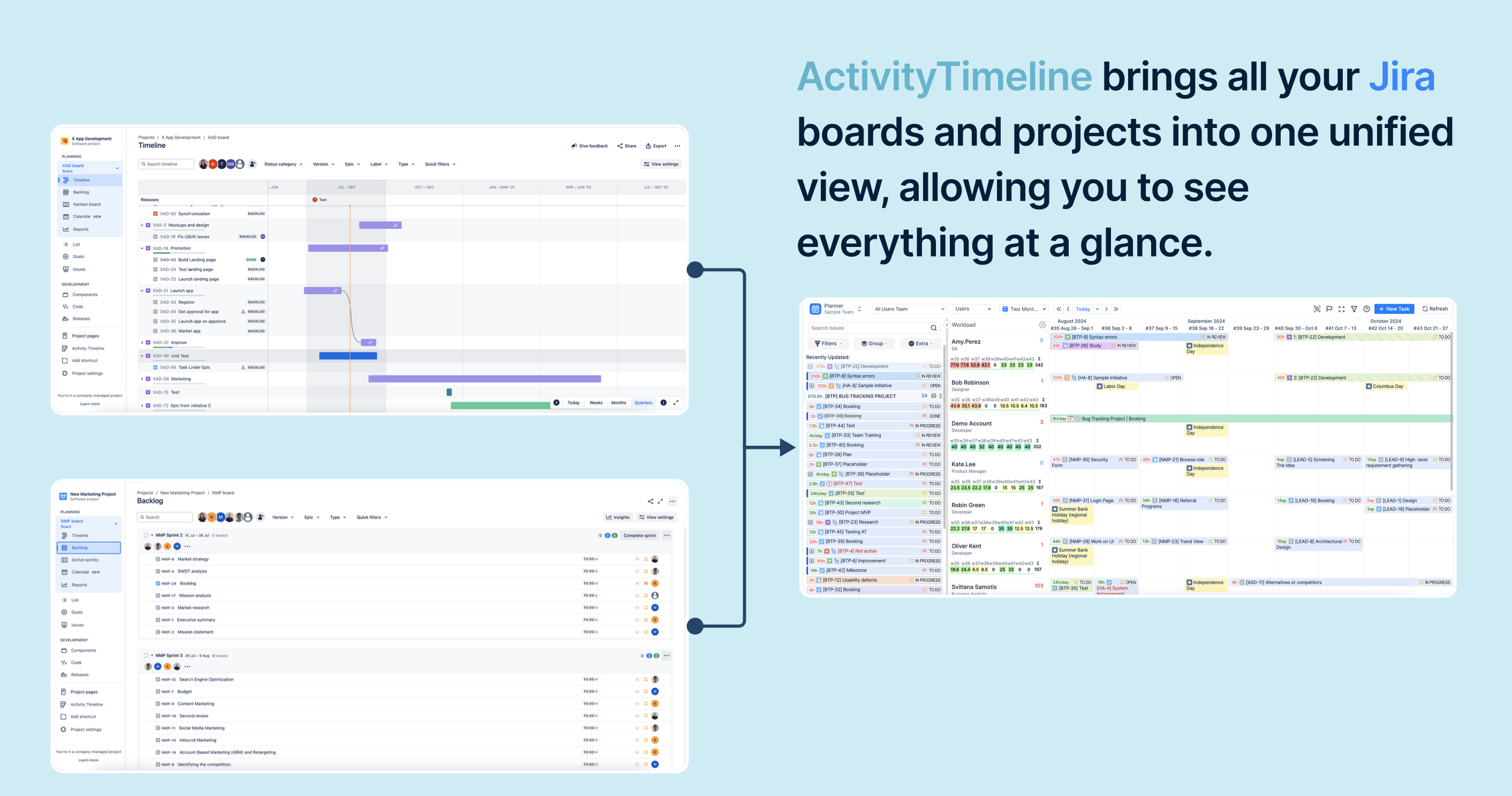
Most team members contribute to multiple projects. Jira doesn’t naturally show their total workload in one unified view.
3. Limited availability tracking
Vacations, sick days, and non-working time aren’t easy to factor into planning.
4. Spreadsheet dependency
Because of these gaps, managers often rely on external tools just to stay aligned.
5. Planning disconnected from execution
Plans live in one document, execution lives in Jira. The two rarely match perfectly.
The 5 Stages of Effective Jira Resource Planning
Strong delivery depends on managing time intentionally. These five stages take you from a chaotic backlog to predictable execution.
Stage 1: Resource Planning
Before assigning tasks, define scope, estimate effort, and identify required skills.
The challenge? Visibility.
Standard Jira views scatter issues across boards and projects. You don’t clearly see future impact.
With a centralized timeline view like ActivityTimeline, you can:
-
See workloads across weeks or months
-
Identify availability gaps
-
Understand how new work affects delivery dates
Planning shifts from reactive to predictive. You stop guessing and start validating estimates against real capacity.
Stage 2: Resource Allocation
Even with accurate estimates, poor assignment creates bottlenecks.
Allocation requires:
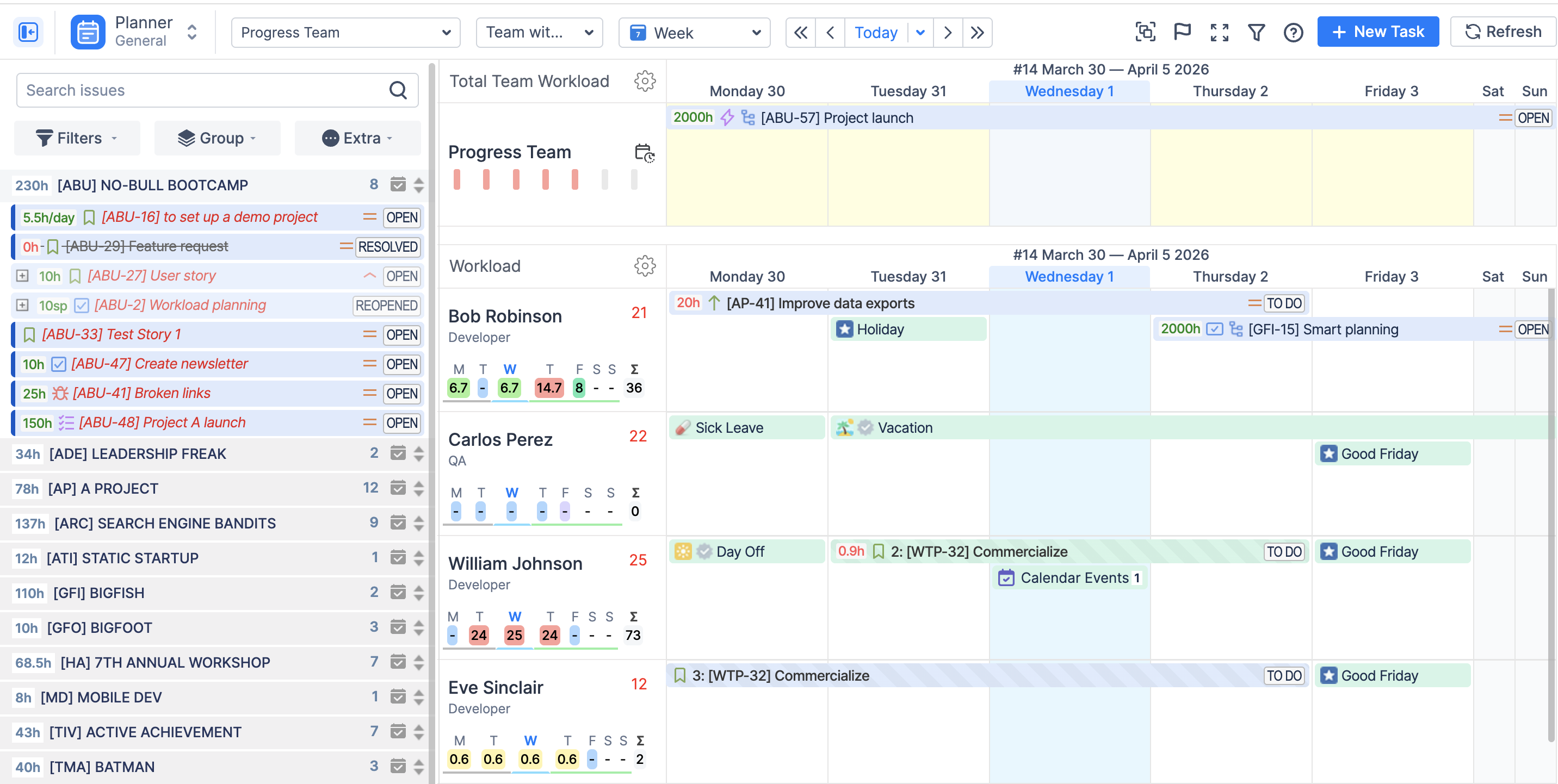
A visual timeline makes workload impact immediately visible. When you assign or move a task, you instantly see whether someone becomes overbooked.
Because all projects appear in one place, you avoid the classic mistake of assigning work based on incomplete visibility.
Stage 3: Workload Management
Work isn’t static. Priorities shift. Scope grows. Deadlines move.
Workload management is continuous.
Key actions:
-
Identify overloaded team members
-
Reassign tasks to those with capacity
-
Adjust quickly when plans change
Color-coded workload indicators make risk obvious without digging through reports. Real-time data allows proactive adjustment instead of post-sprint damage control.
Some systems also offer different workload calculation modes:
Automatic schedule adjustments (for example, when someone is sick) help you see deadline impact immediately.
Stage 4: Time Tracking and Execution
Execution must be measurable.
Teams should:
Individual workspaces help team members manage their own schedules and log time easily — whether via manual entry or built-in timers.
Managers can review and approve timesheets to ensure accuracy. Locking verified logs maintains reliable project data.
Without tracking actual time, planning becomes fiction.
Stage 5: Monitoring and Optimization
The final stage is learning.
You should regularly:
Reports such as utilization summaries and planned-versus-actual comparisons reveal where estimates failed and where capacity constraints exist.
This data informs better hiring decisions, sharper estimation practices, and more accurate sprint planning.
Improvement comes from measurement — not intuition.
Features Needed for Effective Jira Resource Management
To manage capacity properly, you need:
1. Unified timeline view
Switching between boards wastes time and hides capacity conflicts. A single view across projects is essential.
2. Non-working event tracking
Vacations, holidays, and sick leave must be visible or your schedule won’t reflect reality.
3. Clear workload indicators
You should instantly see who is overloaded and who has room for more work.
4. Role and team-level planning
Managing by roles or departments allows long-term strategic planning instead of micro-managing individuals.
5. Automatic schedule adjustments
If someone is unavailable, the system should shift work accordingly and show the impact immediately.
6. Individual workspace
Team members should be able to plan their own day and log time without waiting for managerial updates.
7. Historical performance data
Comparing planned hours to actual time improves estimation accuracy over time.
How to Manage Resource Allocation in Jira with ActivityTimeline
ActivityTimeline adds a visual planning layer to Jira, turning it into a complete resource management system.
A structured workflow looks like this:
-
Connect relevant Jira projects.
-
Define team structure by roles, skills, or departments.
-
Set capacity rules (including part-time schedules).
-
Add holidays, vacations, and sick leave.
-
Estimate task effort in hours.
-
Assign tasks using drag-and-drop scheduling.
-
Balance workload using visual indicators.
-
Track execution through time logging.
-
Analyze reports to refine future planning.
This creates a closed feedback loop between planning and execution.
Common Mistakes in Jira Resource Management
Even organized teams fall into these traps:
-
Using boards for capacity planning (boards show status, not workload).
-
Ignoring vacations and meetings during planning.
-
Assigning tasks without seeing full workload.
-
Skipping time tracking.
-
Managing projects in isolation.
-
Failing to define project scope clearly.
If you can’t see total capacity, you can’t manage it effectively.
Conclusion
Jira handles issue tracking well — but true resource management requires visibility into people, capacity, and time.
ActivityTimeline extends Jira with structured planning, allocation, workload balancing, and reporting in one environment. It helps you create realistic schedules, use capacity efficiently, and prevent burnout.
Resource management isn’t about moving tickets. It’s about managing time deliberately — and that’s what drives predictable delivery.
