In many Jira environments, configuration changes are often made directly in production.
While this approach may seem fast and convenient, it introduces significant risks — especially in complex or enterprise setups.
This article explores why making changes in production can be risky, and how teams can reduce those risks using better practices.
⚠️ The risk of making changes directly in production
Jira configurations are highly interconnected.
Changes to one element can affect multiple parts of the system, including:
- automation rules
- workflows and transitions
- custom fields and screens
- dashboards and filters
Because these dependencies are not always visible, even small updates can lead to unexpected issues.
🔍 Common production risks
1. Breaking automation rules
A change in:
- field configuration
- status names
- issue types
can cause automation rules to:
- stop triggering
- fail silently
- produce incorrect results
2. Workflow inconsistencies
Updating workflows directly in production may result in:
- invalid transitions
- missing statuses
- inconsistent behavior across projects
3. Hidden dependency impact
Jira does not provide a centralized view of dependencies.
As a result:
- changes are applied without full visibility
- issues are often discovered after deployment
🧪 Using a sandbox environment
To mitigate these risks, many teams use a sandbox environment.
A sandbox allows administrators to:
- test configuration changes safely
- validate automation behavior
- simulate real scenarios
👍 Benefits of sandbox
- reduces production incidents
- improves change confidence
- allows safe experimentation
⚠️ Limitations of sandbox
However, sandbox environments also introduce challenges:
- changes need to be synchronized manually with production
- environments can become out of sync
- testing may not fully reflect real production usage
Because of this, sandbox alone is not always sufficient.
🧠 Improving change safety with impact visibility
Another important aspect of safe configuration management is understanding impact before applying changes.
This means knowing:
- where a field is used
- which workflows depend on a status
- which automation rules reference a configuration
Without this visibility, both production changes and sandbox testing remain incomplete.
🛠️ Using impact analysis as a complementary approach
To address this, some teams use tools focused on impact analysis.
These tools help identify dependencies across Jira configurations and provide better visibility before making changes.
🚀 Example: Impact Analysis for Jira
My name is Mir I am the founder of Stable Point IO, the company behind the Impact Analysis for Jira Marketplace app.
Impact Analysis for Jira (Stable Point IO Marketplace app) helps administrators:
- visualize dependencies across configuration elements
- understand where fields, statuses, and issue types are used
- identify potential risks before applying changes
It provides visibility into:
- custom fields
- statuses
- issue types
- users (incoming dependencies)
- automation rules
- workflows and filters
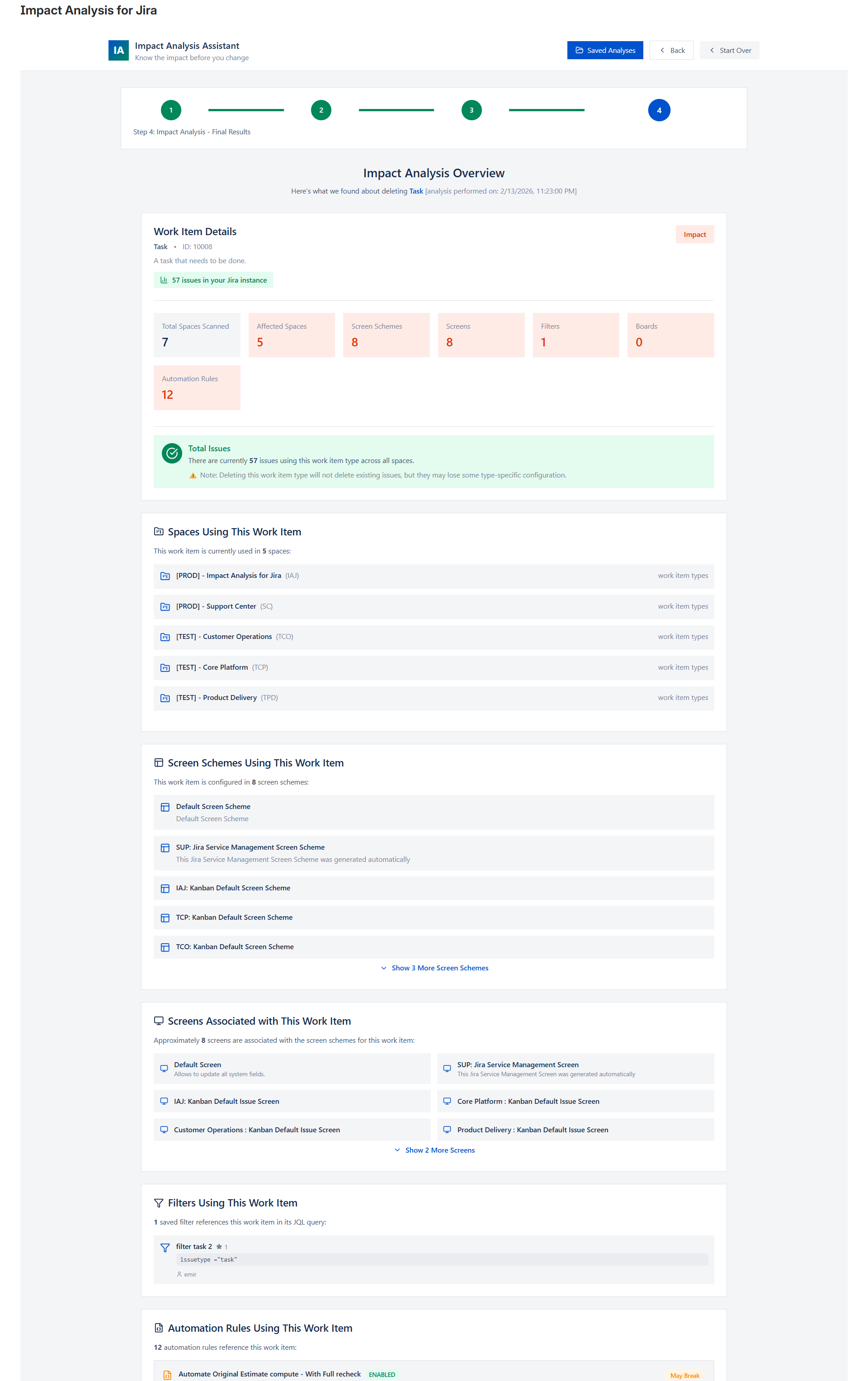
This allows teams to make more informed decisions, whether they are working in production or preparing changes in a sandbox.
Marketplace link:
https://marketplace.atlassian.com/apps/4251492671/impact-analysis-for-jira?hosting=cloud&tab=overview
🎯 Key takeaways
- Making changes directly in production introduces real risks
- Sandbox environments help, but require maintenance and synchronization
- Dependency visibility is essential for safe Jira administration
- Impact analysis complements both production and sandbox workflows
🧩 Conclusion
Jira configuration changes are rarely isolated.
Understanding dependencies before applying changes is critical to maintaining a stable and scalable environment.
By combining sandbox usage with better visibility into configuration impact, teams can significantly reduce the risk of unexpected issues.
