In large Jira setups, automation rules are widely used to streamline workflows. However, they can easily break when underlying configurations change, often without immediate visibility.
This article explains the common causes of automation failures and how to better manage dependencies in Jira.
The hidden challenge behind Jira automation
Jira automation relies heavily on configuration elements such as:
- Custom fields
- Statuses and workflows
- Issue types
- Users and groups
- JQL filters and smart values
The main challenge is that these dependencies are often distributed across the system and not centrally visible.
As a result, simple configuration changes can unintentionally break multiple automation rules.
Common causes of automation rule failures
1. Custom field changes
Automation rules may break when:
- a field is deleted
- field context is changed
- field options are removed
This can lead to:
- null values in smart conditions
- broken JQL queries
- failed update actions
2. Status and workflow updates
Statuses are often referenced in:
- transition triggers
- automation conditions
- workflow-based logic
When statuses are renamed or removed:
- rules may stop triggering
- transitions may fail silently
- workflows may behave inconsistently
3. Issue type modifications
Issue types are commonly used in:
- rule conditions
- project-specific automation logic
- JQL filters
Changes can result in:
- rules not matching expected issues
- incomplete automation execution
4. User and permission changes
Automation involving users can fail when:
- users are deactivated
- permissions are updated
- group memberships change
This may lead to:
- failed assignments
- broken notifications
- incomplete rule execution
Why these issues are hard to detect
One of the main challenges in Jira administration is that dependencies are not visible in a single view.
They are often spread across:
- automation rules
- JQL filters
- workflows
- dashboards and boards
Because of this, it becomes difficult to understand the full impact of a change before applying it.
Improving visibility of Jira dependencies
Jira administrators typically rely on:
- manual audits
- searching through configurations
- reviewing automation rules individually
However, this approach becomes inefficient in large or complex instances.
Using impact analysis to reduce risk
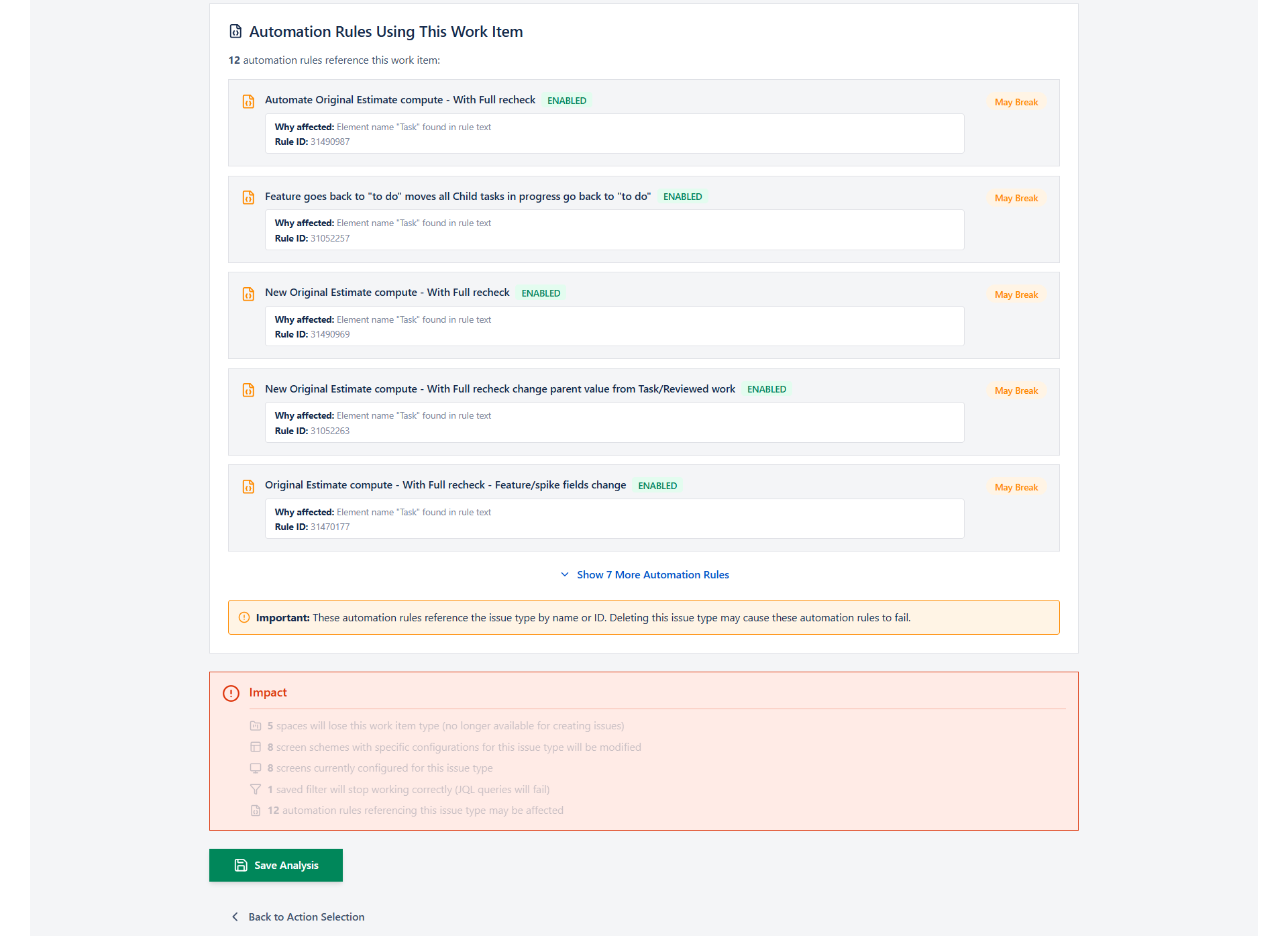
I am the founder of Stable Point IO, the company behind the Impact Analysis for Jira Marketplace app.
Impact Analysis for Jira helps Jira administrators understand configuration dependencies across their instance and reduce the risk of breaking changes in complex environments.
To improve visibility, many teams use tools that help identify where Jira configuration elements are referenced.
Impact Analysis for Jira (Stable Point IO Marketplace app) provides visibility into dependencies across:
- custom fields
- statuses
- issue types
- users (incoming)
- automation rules
- workflows and filters
It helps teams understand not only where an element is used, but also what could be impacted before making any change. This is especially useful in large Jira environments where dependencies are not always obvious or centrally documented.
👉 Marketplace link:
https://marketplace.atlassian.com/apps/4251492671/impact-analysis-for-jira?hosting=cloud&tab=overview
This helps administrators understand the impact of changes before they are applied, reducing the risk of breaking critical automations.
Key benefits for Jira administrators
With better dependency visibility, teams can:
- reduce broken automation rules
- safely clean up Jira configurations
- improve change management processes
- avoid unexpected production issues
Conclusion
Most Jira automation failures are not caused by automation itself, but by hidden dependencies in Jira configuration elements.
Having visibility into these dependencies is essential for maintaining a stable and scalable Jira environment, especially in enterprise setups.
