
Accurate tracking of billable hours and budgets is crucial for maximising profitability in service-oriented organisations.
Unfortunately, when using external tools like Harvest alongside Jira, organisations often face challenges in connecting delivery work with financial tracking. Time tracking, budgets, and invoicing are handled across separate systems, which introduces inefficiencies and increases the risk of lost revenue.
This is why many Jira-based teams start looking for alternatives within the Atlassian Marketplace, where a number of Jira add-ons provide time tracking, budgeting, and billing capabilities directly inside Jira.
This comparative review will look at how Harvest compares to Jira-native add-ons. We will evaluate key functionality areas and outline important questions your organisation should consider when choosing between an external tool and a Jira-based solution.
Questions to Ask
When searching for a Harvest alternative for Jira, here are some essential questions to consider:
Will time tracking be quick and easy for team members?
It is important that time tracking is intuitive and easy to use. This increases adoption across teams and ensures that hours are logged accurately and consistently.
Solutions that work directly inside Jira reduce friction, as users do not need to switch between tools.
Will team members be able to mark hours as billable or non-billable easily?
Capturing billable hours correctly is critical for revenue.
Your organisation should ensure that:
- Billable and non-billable hours are clearly distinguishable
- Adjustments can be made easily before invoicing
Will it be easy to log time against specific clients or projects?
For agencies and consultancies, team members often work across multiple projects.
It is important that:
- Time can be logged or assosiated against the correct Jira issue/project
- Work can be associated with the correct client or account
Can we track budgets in real time?
One of the most common challenges with external tools is budget visibility.
Ask whether:
- Budget consumption updates automatically
- Project managers can see remaining budget without leaving Jira
Can we track if work is delivered efficiently?
Tracking time alone is not enough.
You should be able to:
- Compare estimated vs actual time
- Identify tasks that exceed expectations
- Monitor overall project efficiency and health
Can we track missing or unlogged hours?
Even with good processes, some hours may be missed.
A good solution should allow:
- Visibility into incomplete timesheets
Can we ensure all billable work is invoiced?
A common issue when using disconnected tools is:
👉 Logged hours ≠ Invoiced hours
Your system should allow you to:
- Track billable vs invoiced time
- Ensure no billable work is missed
Can teams submit timesheets for approval?
Some organisations require validation before invoicing.
An approval workflow allows:
- Managers to review submitted time
- Errors to be caught early
- Greater confidence in billing accuracy
Harvest vs Jira Add-ons – A Comparison Overview
Now that we’ve outlined the key questions, let’s compare Harvest with Jira-native add-ons across these areas.
| Functionality |
Harvest |
Jira Add-ons (General) |
|---|
| Quick and easy time tracking |
✅ |
✅ |
| Works directly inside Jira |
❌ |
✅ |
| Billable vs non-billable tracking |
✅ |
✅ |
| Time tracking against Jira issues |
⚠️ Integration-based |
✅ Native |
| Real-time budget tracking |
✅ sync needed |
⚠️ Depends on add-on |
| Project profitability insights |
✅ sync needed |
⚠️ Limited to specific tools |
| Timesheet approval mechanism |
⚠️ Limited |
⚠️ Available in some tools |
| Tracking missing hours |
⚠️ Limited |
⚠️ Available in some tools |
| Invoice generation |
✅ |
⚠️ Available in some tools |
| Invoice generation from Jira worklogs |
❌ |
⚠️ Available in some tools |
| Unified workflow (time → budget → invoice) |
❌ |
⚠️ Limited to specific tools |
Harvest
Pros:
Harvest is a well-established time tracking tool known for its simplicity and ease of use. It offers solid time tracking functionality, basic invoicing, and a clean user interface. It is particularly suitable for freelancers and smaller teams that do not rely heavily on Jira.
Cons:
Harvest operates as an external system. This means:
- Time tracking is not fully integrated into Jira workflows
- Budget tracking is not visible inside Jira
- Invoicing is not directly connected to Jira worklogs
As a result, teams often rely on additional tools such as spreadsheets to manage budgets and financial tracking.
Jira Add-ons (Example: Worklog360)
There are several Jira add-ons available that aim to address the limitations of external tools by bringing time tracking and financial management inside Jira.
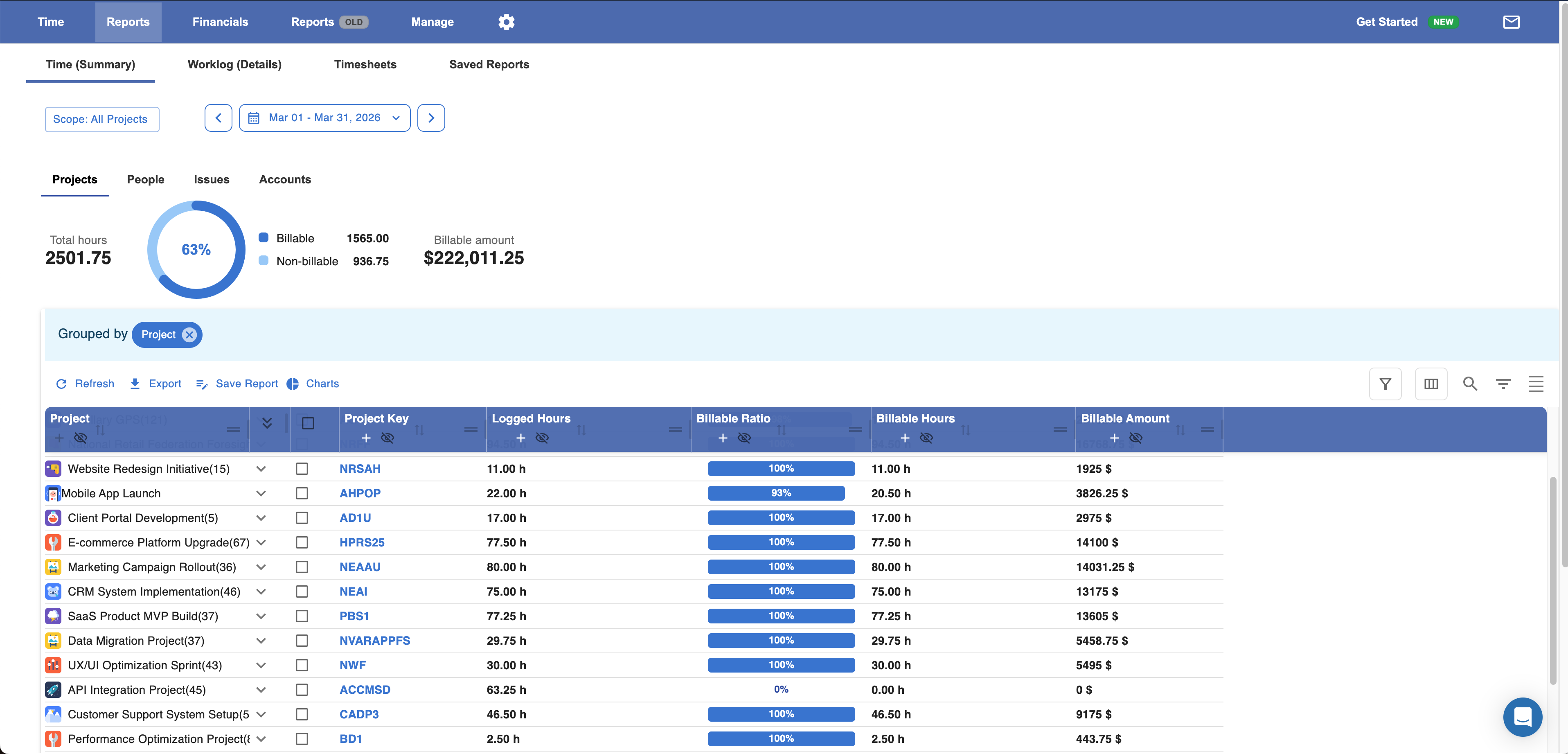
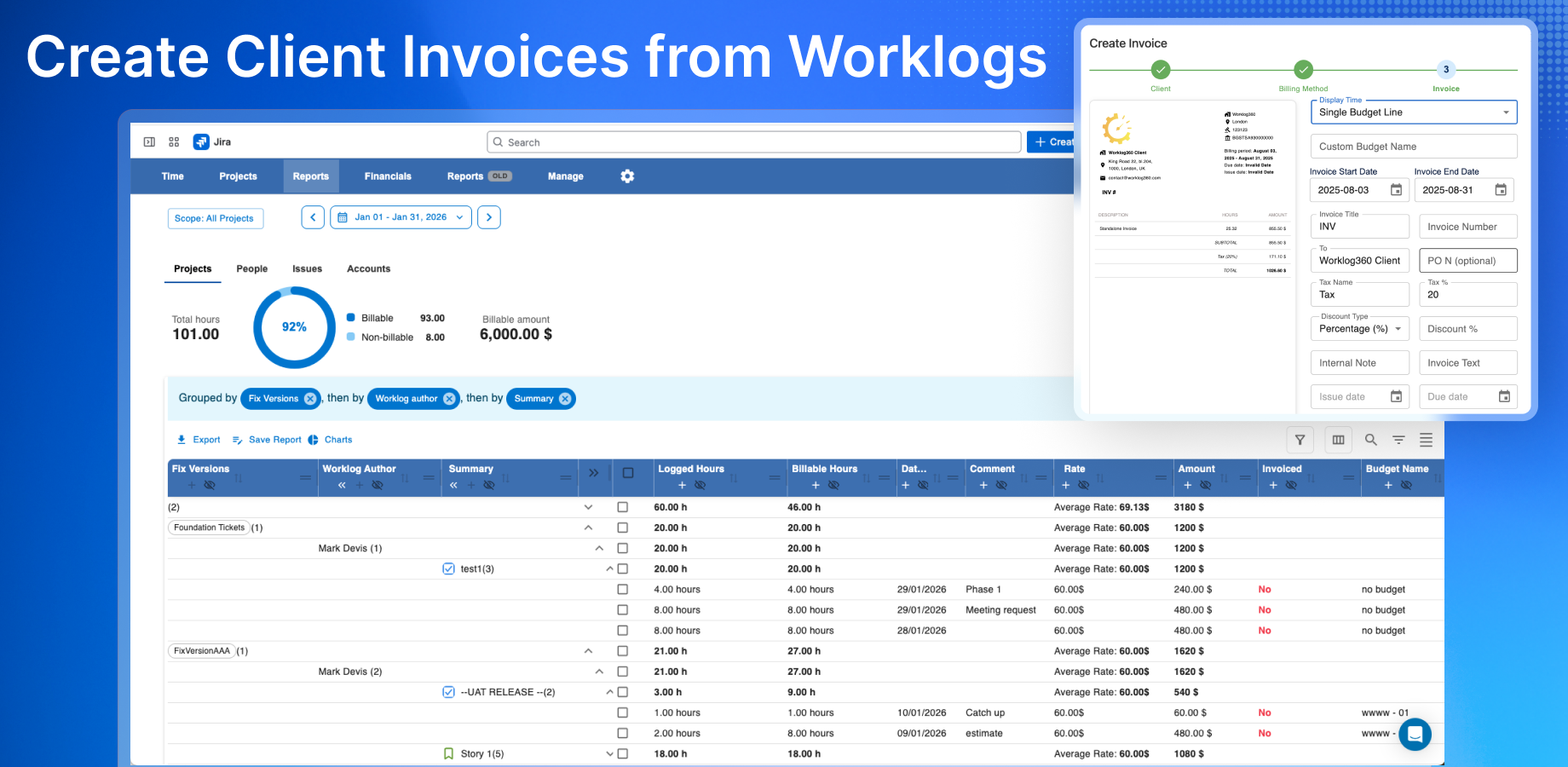
One example is Worklog360, which combines time tracking, budget management, and invoicing in a single solution.
Pros:
Jira-native solutions like Worklog360 allow organisations to:
- Track time directly within Jira
- Manage client budgets in real time
- Connect worklogs to billing and invoicing
This reduces the need for external tools and provides better visibility over project performance and financials.
Cons:
Functionality can vary across different add-ons, and some solutions may require configuration to match specific workflows.
Key Differences
The main difference between Harvest and Jira add-ons lies in their approach:
- Harvest is a standalone tool that integrates with Jira
- Jira add-ons are built within Jira, extending its capabilities
This difference affects:
- Workflow efficiency
- Data consistency
- Real-time visibility
In Conclusion
Harvest remains a strong option for teams looking for a simple and standalone time tracking solution.
However, for organisations that rely heavily on Jira, Jira-native add-ons provide a more integrated approach.
By bringing time tracking, budgets, and billing closer to delivery work, these solutions can help:
- Improve billing accuracy
- Reduce manual processes
- Increase visibility over project performance and profitability
Choosing the right solution depends on your organisation’s needs, particularly how closely you want to align financial tracking with your Jira workflows.
