Hello Atlassian Community! I’m Derya from Appfire. 👋
If you’ve ever managed SLAs, you know the pain: teams don't always work a standard 9-to-5. Whether it’s planned overtime, on-call incident response, or a one-time system migration, these "off-calendar" hours can be a configuration nightmare.
Until now, handling these required "messy workarounds," such as creating temporary calendars or manually adjusting global business hours.
Introducing: Calendar exceptions in Time to SLA
We’ve launched the Exceptions feature so you can handle these cases cleanly without touching your core settings.
Why this changes the game for your team
-
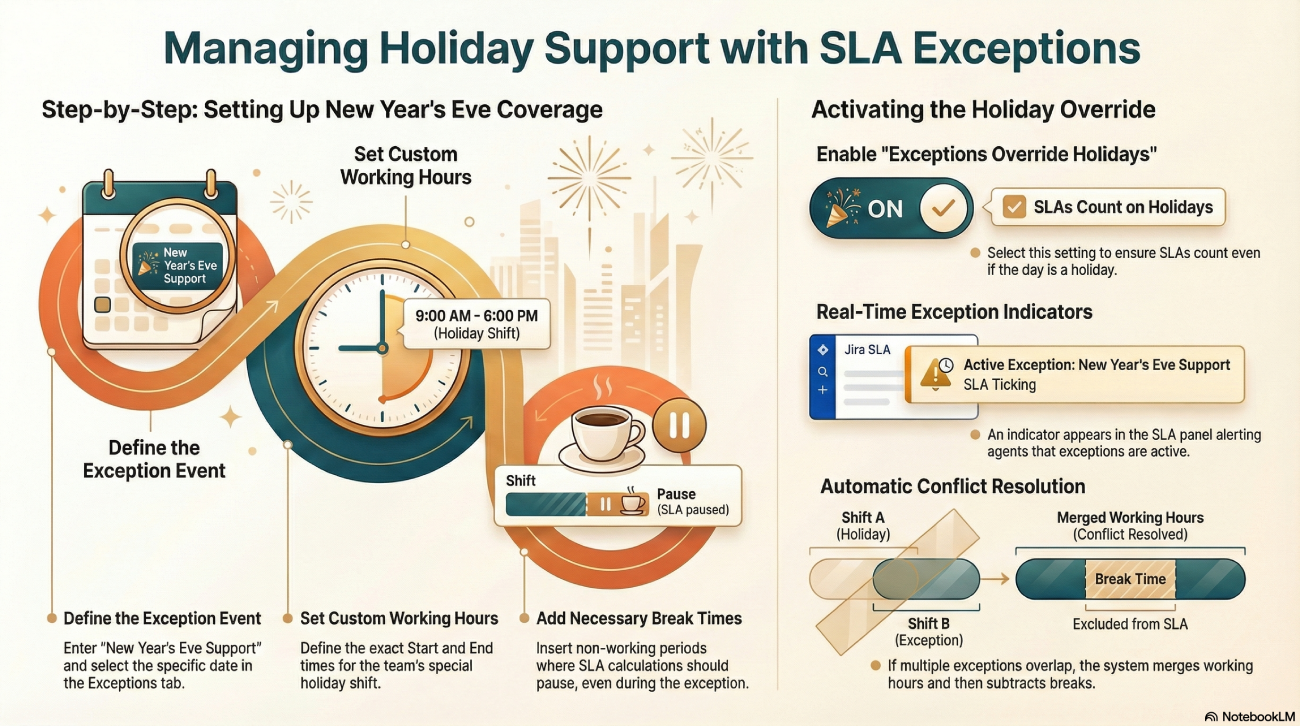
Total flexibility: Easily add one-time or recurring exceptions for special coverage.
-
Built-in breaks: Add specific break times even within your exception hours to pause SLA calculations.
-
Agent visibility: A clear indicator appears in the SLA panel so agents know exactly when an exception is active.
Let’s discuss
How is your team currently handling on-call or overtime SLAs? Are you still using "temporary" calendars, or have you found a better way? Let’s talk in the comments!
