Estimated time to read: 6 minutes
TL; DR: When a rule runs unexpectedly, check if "Allow Rule Trigger" is enabled and working as designed.
Disclaimer: I neither have nor claim specific knowledge of the implementation of the automation rule engine. My thoughts are based upon what I have read, observed, and hypothesized about rule processing.
The happy path...
Let's begin with a quick refresher on rule processing...
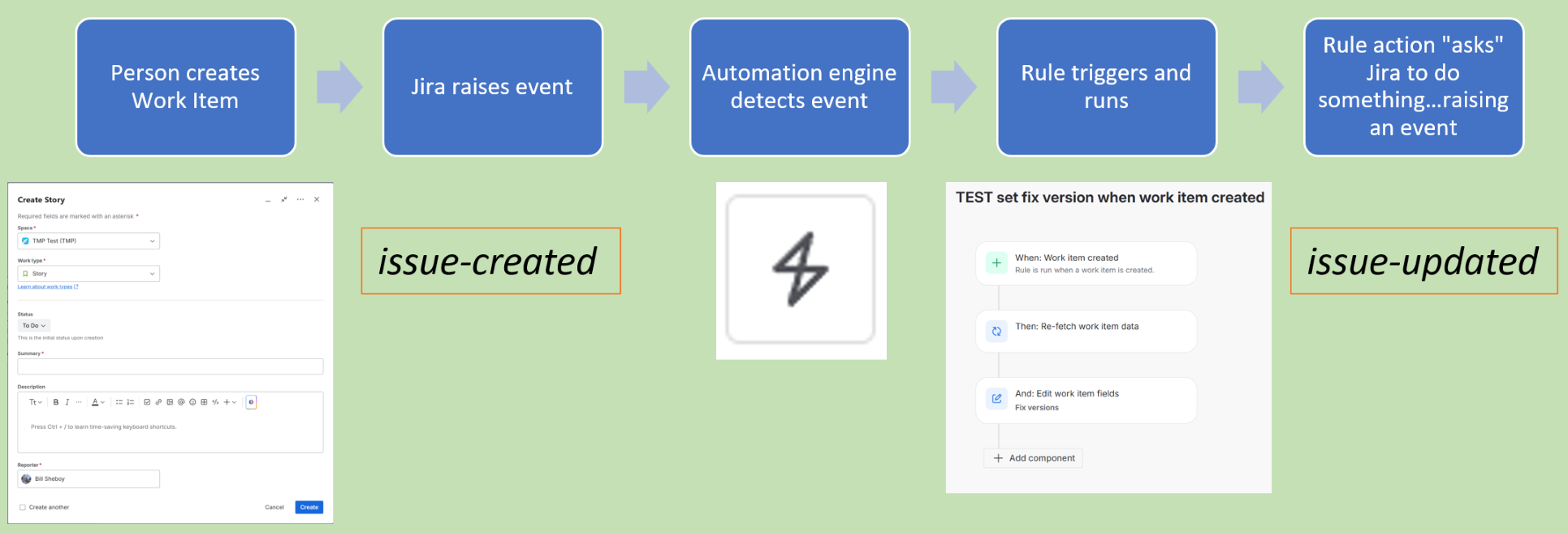
- Automation rules trigger based upon something happening: an event (such as described for webhooks)
- For example, when I create a work item with the UX, an issue-created event is raised
- Apps may listen, or "subscribe", when the event raises so the app does something useful
- When I build and enable a rule triggered on Work Item Created, the automation engine is listening for an event for the rule to start running
- Please note this is a simplified explanation of event handling, and the specifics are handled by Atlassian's design and code
- Automation rules use actions to do useful things
- For example, my rule may use Edit Work Item to set the Fix Versions field
- When Jira performs the field edit for the rule, that raises the issue-updated event...for which other things may listen
- Some things which happen in Jira do not raise publicly-documented events, and automation rules cannot detect all such possible events
- And, the automation engine seems to re-interpret / capture some events using code
- For example, Jira Product Discovery (JPD) delivery work item linking versus non-JPD linking detection
If you are thinking ahead, you realize:
Umm...doesn't that mean my rule actions could trigger another rule? And that could do the same to another rule, perhaps leading to a long chain of events, and back to the original rule. Yikes; have I built an endless loop of rules? What will I tell my Product Admin when we run out of monthly usage limits? Argh!
Don't worry; automation rules have this handled in two ways: options and service limits.
Options and Service Limits
There is an option in the rule details to prevent accidently looping, and it is disabled by default to prevent looping problems. It was originally named "Allow Rule Trigger", and is currently named in the UX as:

Occasionally, we want that option enabled. One common scenario is when a field updates in a parent work item, we may want the child or linked work items to do something also. And so in a "downstream" rule, we enable the option Allow Rule Trigger so the first rule's actions can trigger the later, downstream rule. (Please note: the scenario I describe can also be solved with one rule, but that is not true with all possible scenarios.)
Additionally, Atlassian has service limits for automation rule processing. If we accidentally create a rule looping path, the automation engine detects that to halt the rule after it tries to loop more than 10 times to itself or other rules. ("To itself? I can make recursive rules?" Yes, you can...but that is beyond the scope of this article.)
Looks like we are covered: the option is disabled by default and I can enable it when I want it. If I make a mistake, the service limits will eventually protect me. Correct?
The possible, not so happy path...
Every few weeks, I review the new defects and suggestions in the JAC backlog tool. This helps me learn what may change and any defect symptoms others see...particularly with automation rules. I recently saw a puzzling defect:
"Form Submitted Trigger" ignores "Check to allow other rule actions to trigger this rule" option
This defect observes the automation engine's mechanism to prevent an event raised by a rule action (e.g., change form status) from triggering another rule does not cover all cases when "Allow Rule Trigger" is disabled. A workaround in the defect describes adding a condition to the trigger of the downstream rule, helping limit / mitigate any impacts. My first reaction to that defect was, "Yikes!"
What does this all mean?
That is an excellent question! Is this a one-off defect only for Jira Forms or is this a symptom of unfound "gaps" in the mechanism to prevent looping? I do not know the answer to that question. There is no public documentation on how Allow Rule Trigger does what it does.
Although I wonder...Many, many, new features recently and continually are being added to handle third-party app integrations and Premium / Enterprise level automation features. How are their events managed relative to the "Allow Rule Trigger" option? That is, do they or do they not abide by the setting? What about the new Advanced Component features?
My recommendations with all automation-related things is:
- experiment / test to validate when using new features, such as these new actions and triggers;
- periodically read any new items in the JAC backlog to be better informed; and
- when you see something in your rule's audit logs which does not make sense, take the time to investigate and learn the root cause...asking Atlassian Support for help when needed.
Remember, automation rules are a great feature to save time, effort, and reduce errors in repeatable tasks. AND, they can process quickly, potentially causing irreversible harm to your site data and content when there is a problem. Take care to effectively manage rule looping.
I hope this article helps you learn more about rules. Please let me know your feedback, and...Happy rule writing!

