Hey, Jira Admins!
I hope your 2026 is off to a great start! We're back with another round of fresh tips and helpful content for you and the users within your organization. If you haven't started sharing some of these tips and resources with your teams yet, consider starting this new practice for the year!
(And if you’re looking for more, we also have an archive of past volumes for you to explore here!)
Now on to the good stuff...
 |
💡 Empower your users
As a Jira Admin, you play a key role in helping your teams manage projects, track progress, and complete tasks. We're here to support you!
Choose a tip to share weekly over the next month with your organization’s Jira users via Slack, Teams, your company wiki, or email.
|
| |
Tip #1: Turn notifications into a “signal, not noise” system
⭐️ Help your users fine‑tune what actually pings them so they don’t tune Jira out altogether.
Instructions to share:
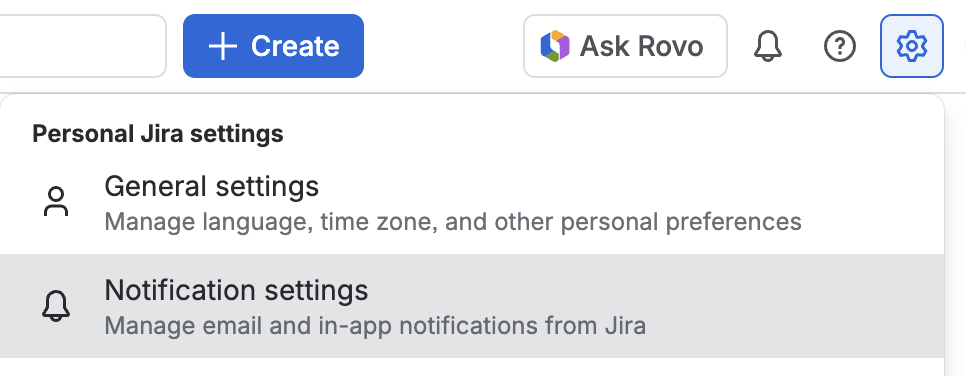
-
Under Notification Settings, turn off the notifications you never look at.
-
Turn on (or keep on) high‑value signals such as:
-
Work items assigned to you
-
Work items you’re watching
-
@mentions of you or your team
-
Encourage teams to use @mentions instead of DMs when they need input, so everything stays on the work item and is traceable.
This helps users feel less overwhelmed and more confident that when Jira does ping them, it matters.
|
| |
Tip #2: Everyday Jira power habit: Keep your “Now / Next / Blocked” statuses real
⭐️ The most impactful habit for everyday Jira users is keeping a clear, honest status on each work item they own.
Instructions to share with users:
-
For every work item that’s yours, make sure it clearly fits one of these:
-
Now – I’m actively working on this.
-
Next – I own this, but I haven’t started yet.
-
Blocked – I can’t move this forward until something else happens.
-
When your focus changes, update the Status (e.g., move to In Progress or a blocked/waiting status) and add a short comment if helpful, like:
-
Once a day, quickly review your issues so anyone can see what you’re doing now, what’s next, and what’s stuck.
This keeps Jira boards trustworthy, makes standups faster, and reduces time spent explaining status in meetings.
|
| |
Tip #3: Make comments scannable with three small habits
⭐️ Instead of “wall of text” comments, teach users a simple structure so teammates can quickly act.
Instructions to share:
-
Start comments with a one‑line summary, like:
-
Use bullets for details, not long paragraphs:
-
End with a clear ask + owner, and @mention them:
-
If you’re replying to a long thread, quote or reference the specific point you’re responding to instead of “see above.”
This helps keep Jira issues readable as they grow, and reduces follow‑up questions like “What do you actually need from me?”
|
| |
Tip #4: Reduce duplicate work by checking for similar issues first
⭐️ Before logging “yet another ticket,” teach users a 30‑second habit to avoid duplicates.
Instructions to share:
-
When creating a new issue, pause before you type the summary.
-
In the global search bar, type 2–3 key words for your request (for example, “invoice export bug” or “mobile login 500”).
-
Filter to your relevant project and issue type.
-
If you find an issue that already describes your problem:
-
Open it, click Start watching, and
-
Add a short comment explaining your use case or impact.
-
Only create a new issue if:
-
The problem is clearly different, or
-
Your team has agreed on a separate ticket for your specific customer / region / product area.
This keeps backlogs cleaner and helps teams focus on fixing problems once instead of juggling multiple near‑identical tickets.
|
 |
Learn how to turn vague work items into clear, actionable tasks in seconds. In this tutorial, we’ll show how Rovo to enriches your work items with intelligent context and descriptions so your team knows exactly what to do

|
 |
Courses for your Jira users:
Admin-focused learning experiences:
|
 |
What makes a perfect Jira ticket? Community Champion @Daria Kulikova shares her POV, and invites us to share ours. Jump in and join the conversation! |
Let us know if you share any of these resources with your users, how they're received, and what you'd like to see included in future editions as we continue this series. We're all ears!


