A common challenge when analyzing work in Jira is answering a simple but often unsupported question:
“What did this issue look like at a specific point in time?”
Jira provides detailed change history, but it does not offer a native way to view the complete state of an issue — across all fields — as it existed on a chosen date.
To address this gap, Issue History Reporter for Jira, released by our team, now includes a new report: Issue Snapshot.
What is the Issue Snapshot report?
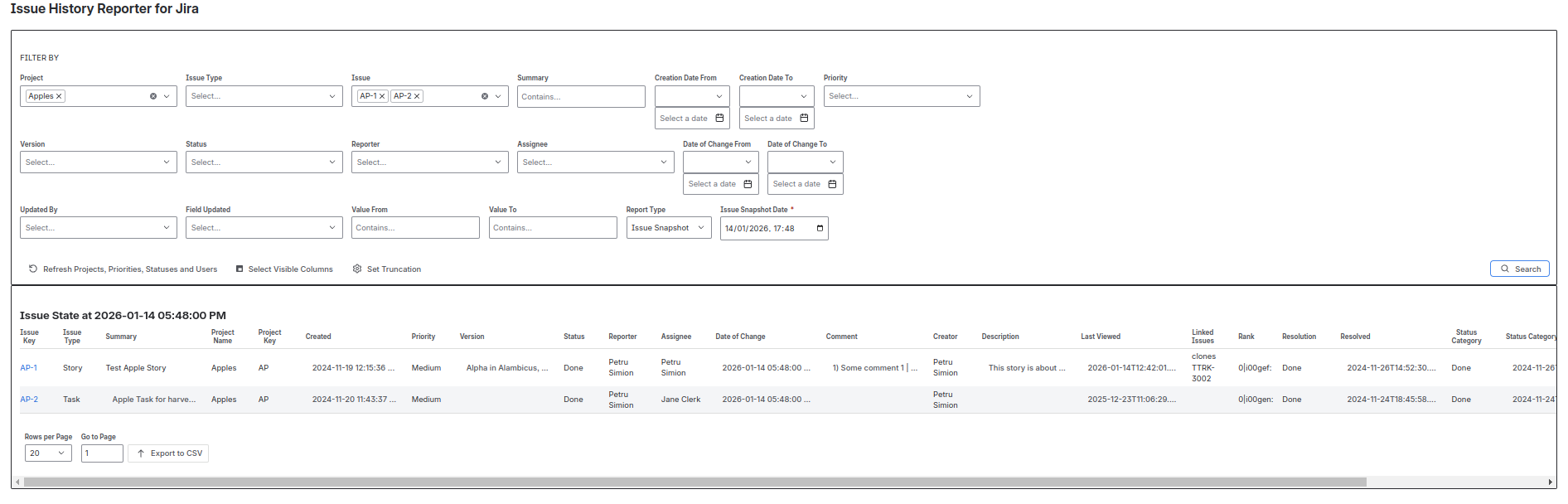
The Issue Snapshot report reconstructs and displays the full state of issues at a selected date and time.
For each issue, the report shows the field values exactly as they were at that moment, including:
-
Status and status category
-
Assignee, reporter, priority
-
Versions, resolution, due date
-
Description, comments, attachments
-
Custom fields and system fields
The report answers the question:
“If I had opened this issue on that date, what would I have seen?”
Why this is useful
Many reporting and audit scenarios require understanding state, not just events. Examples include:
-
Compliance and audit reviews
-
Incident post-mortems
-
Contractual or regulatory evidence
-
Historical analysis beyond workflow transitions
While issue history explains how things changed, the Issue Snapshot report shows what the issue looked like at a specific point in time.
How it works
Users select their usual filters (project, issue type, users, fields, etc.) and provide a required Issue Snapshot Date.
The report reconstructs the issue data as of that timestamp and displays the results in a tabular format.
As with other reports in Issue History Reporter, the data can be exported to CSV for further analysis or archival purposes.
Complementing existing history reports
The Issue Snapshot report complements existing history-based reporting rather than replacing it:
Together, they provide a more complete understanding of how work evolved over time in Jira.
![Photo of Petru Simion [Simitech Ltd.]](https://us.v-cdn.net/6038660/uploads/avatars/c7/df/nc7dfc3cdcefb50b8aef7269c429d3d29.png)