Hello Atlassian Community!!
Confluence Cloud has rolled out an exciting new feature: Live Docs. This feature allows teams to collaborate on documents in real time, making brainstorming, planning, and documentation more efficient and interactive.
What Are Live Docs?
Live Docs are a new type of Confluence page that support real-time collaborative editing. Multiple users can work on the same document simultaneously, with changes appearing instantly for everyone.
Key features include:
-
Real-Time Collaboration: Everyone with edit access can update the document at the same time.
-
Inline Comments and Reactions: Add comments or emoji reactions directly within the Live Doc.
-
Jira Integration: Link or create Jira issues directly from highlighted text within the Live Doc.
Why Live Docs Matter
Live Docs transform team collaboration:
-
Faster Co-Creation: Teams can work on meeting notes, project plans, or requirements simultaneously.
-
Reduced Duplication: No more juggling multiple drafts or merging changes manually.
-
Seamless Updates: Changes to embedded Jira issues, tables, and macros update in real time.
Getting Started
-
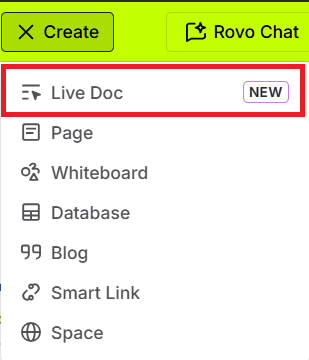
Click “Create” in a Confluence space: Live Docs appear as an option alongside regular pages.
-
Select Live Doc: Choose this to start a new collaborative document.
-
Start Editing: Invite teammates with edit access to collaborate in real time.
Tips for Effective Collaboration
-
Use Space Permissions: Only users with 'add' permission for live docs in the space can modify the Live Doc.

-
Leverage Comments: Leave inline comments to provide feedback and acknowledge contributions.
-
Check Version History: Live Docs automatically maintain version snapshots after each unique edit session.
Your Turn
-
Have you started using Live Docs yet? What’s the first document you created collaboratively?
-
If you’re new, what type of team document would you like to try first as a Live Doc?
Share your experiences and tips in the comments!

