🌟 Project Context & Objectives
A leading transportation company in Oceania, with over 5,000 employees across operations, engineering, planning, and maintenance, was facing a challenge: they were modernizing internal workflows by adopting Jira and Tempo Timesheets for time tracking but still relied on a legacy SAP system for HR and finance.
Manually transferring timesheet data from Jira to SAP created an operational burden—introducing errors, delays, and audit risks. The internal IT team set out to build a seamless, automated solution.
Key goals:
-
Automate the sync of timesheet create/update/delete actions from Jira to SAP
-
Generate daily and weekly timesheet reports for managers
-
Design a smart retry mechanism for integration errors
-
Leverage native Jira Automation together with Tempo, ensuring minimal cost and a straightforward setup.
🧠 Solution Architecture
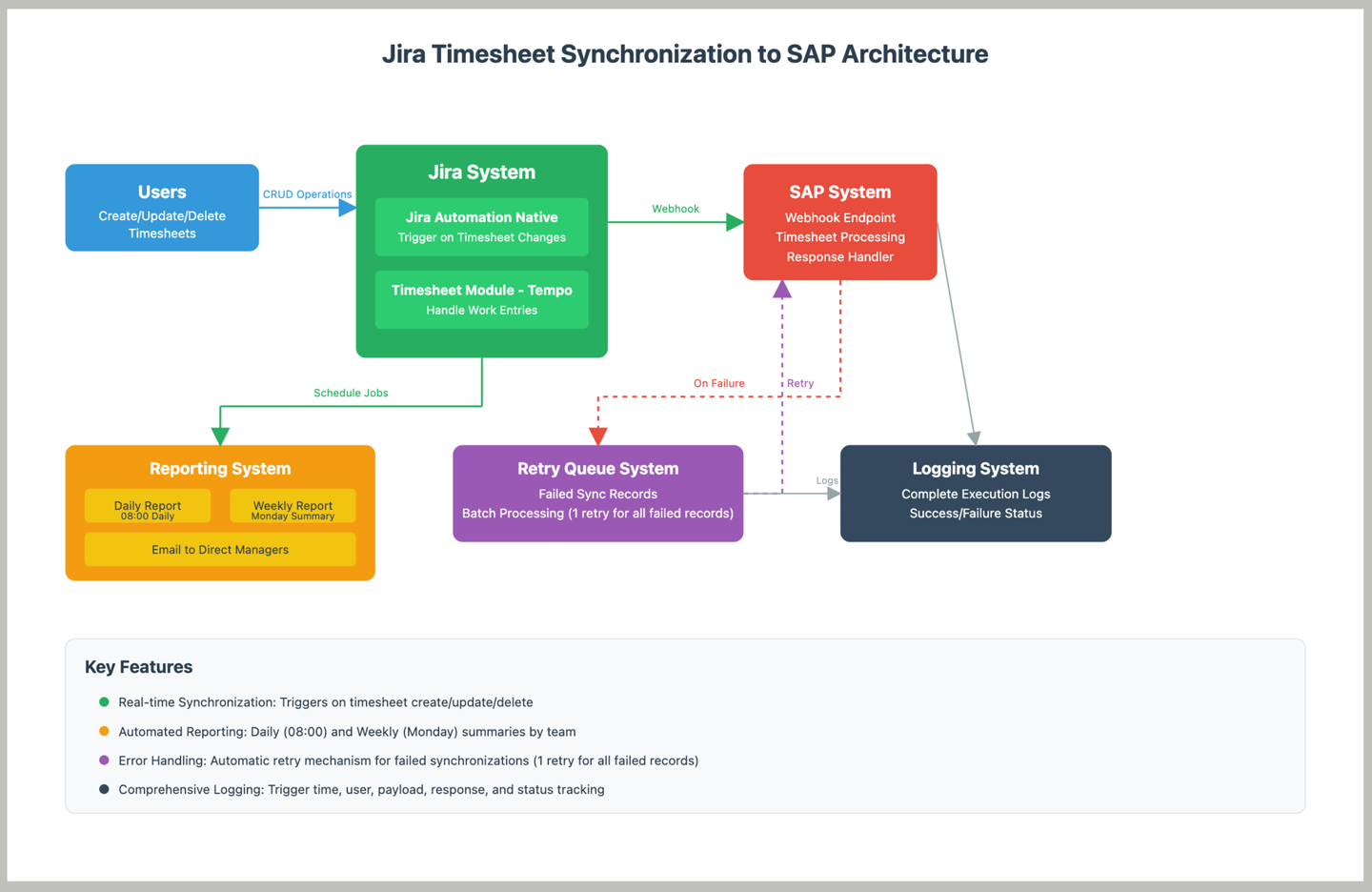
The team built an end-to-end solution using native Jira Automation, combining webhooks, scheduled triggers, and detailed logging.
🧠 Key Functionalities Breakdown
|
Function
|
Description
|
|---|
|
🔧 Timesheet Sync
|
Triggered when a user creates/updates/deletes a timesheet. Sends a webhook to SAP system.
|
|
📩 Daily Report
|
Every day at 8 AM, aggregates previous day’s logged hours and sends an email to the direct manager.
|
|
📊 Weekly Report
|
Every Monday, compiles and sends team-level time log summaries from the previous week.
|
|
🔁 Sync Error Retry
|
System Retry (Automatic):
-
Immediately retries if SAP returns an error (e.g., 500), within the same execution.
👨💼 Batch Retry (Manual, multiple records at once):
-
Admin can go to Jira → Logs → Retry Now to resend all failed records without waiting for the next trigger.
📌 Example:
If SAP returns a 500 error for a new record, the system retries instantly. If it fails again, it’s queued. Admin can go to Jira → Logs → Retry Now to manually resend all queued records.
|
|
📄 Full Execution Logging
|
Logs key details: trigger time, user, sent payload, returned response, success/failure status.
|
|
🧩 Extended Feature: Configuration & Mapping via Assets
|
In addition to the above, the system leverages Assets (available in Jira Service Management Premium and Enterprise) to manage mappings between Tempo Accounts and SAP Work Breakdown Structure (WBS) codes.
-
Admins manage mappings directly in Assets
-
Flexible control over which Jira projects are synced to SAP
-
Reduces maintenance effort when SAP changes occur; audit-friendly and transparent
|
Why this worked:
🧪 Testing & Quality Assurance
The team adopted a proactive testing strategy:
-
Created detailed test cases before rollout
-
Validated across scenarios: valid/invalid data, non-SAP users, and SAP API errors
-
Logging allowed for traceable execution and fast issue resolution
Error handling:
-
Immediate auto-retry when SAP returns an error
-
Retry queue for unresolved records
-
Admins can manually retry from the Logs tab in Jira
📘 Documentation as a Long-Term Asset
Technical (As-Built) Docs
-
Automation rules: triggers, conditions, actions, and Smart Values
-
API payload formats and variable mappings
-
Retry and rollback logic
-
Tempo-to-SAP field mappings in clear, auditable format
Admin User Guide
-
How to check logs and interpret failures
-
Understanding and reading daily/weekly reports
-
Quick checklist for handling sync errors
-
Manual retry instructions for failed batches
🌍 Deployment Challenges & Lessons Learned
Differing System Philosophies
-
SAP can operate in batch mode; Jira triggers events in real time
-
Some actions (e.g., deleting timesheets) required aligning expectations—delete or mark inactive.
Cross-Functional Collaboration
-
Teams involved: HR, IT, SAP, QA, and mid-level management
-
Clear ownership was key: who makes decisions, who maintains post-deployment
SAP Integration Constraints
✅ Results & Real-World Impact
🗺️ Ideas for Scaling
✍ Final Thoughts
"You don’t always need expensive software to solve complex problems. With the right mindset and full use of available tools, native Jira Automation can take you far."
If your organization is exploring a similar solution:
-
Start with high-impact processes
-
Define clear goals and test scenarios early
-
Maintain robust documentation and logging from day one
If you're exploring a similar solution, we’d be happy to share anonymized insights, example documentation, or discuss implementation strategies that can be adapted to your organization’s context.
*Note: Client names and identifiers have been anonymized for confidentiality.


