If you’re a spreadsheet power user working in Confluence, you’ve probably been here:
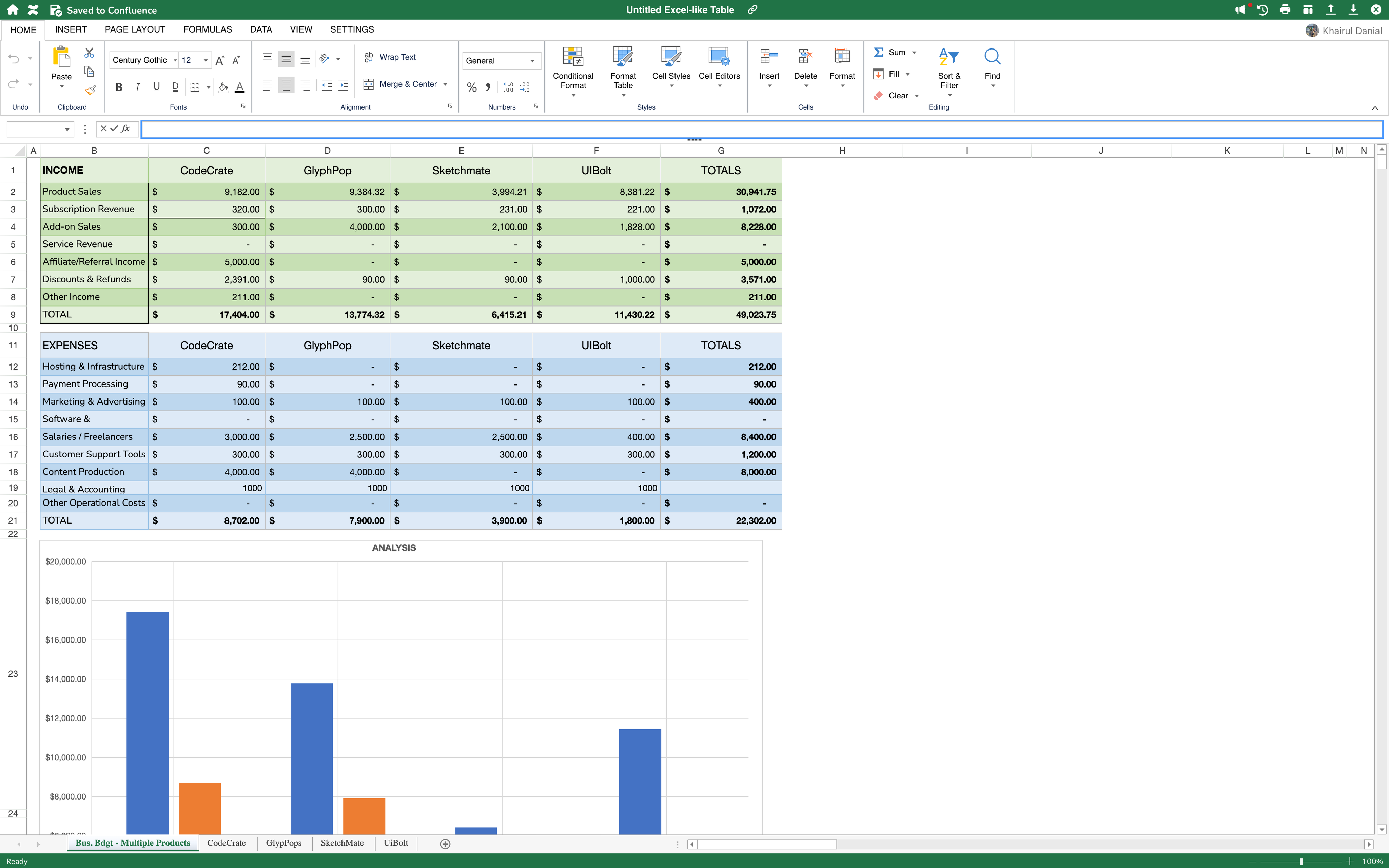
You’ve built a sophisticated financial model in Excel or Google Sheets. It has multi-tab logic, advanced formulas, beautiful charts, the works. But when it’s time to share that data with your team in Confluence?
You’re stuck doing this:
-
Copy a giant table into a Confluence page
-
Screenshot a chart (and pray it stays relevant)
-
Add comments like “see tab 3 for breakdown”
-
Leave yourself a reminder to re-update everything next week

And suddenly, your powerful spreadsheet becomes a clunky, static artifact.
That weekly report you spent hours fine-tuning? It’s now just a snapshot of a moment in time; disconnected from your source data and hard to maintain.
Spreadsheets are great for analysis. But terrible for storytelling.
Why this is a real problem
Let’s be honest: Confluence wasn’t built for spreadsheets. But spreadsheets weren’t built for collaboration.
When you’re juggling multiple product lines, revenue streams, or budget categories, your reporting needs to be:
-
Dynamic. Data should update as numbers change.
-
Visual. Trends should be obvious at a glance.
-
Relevant. The right insight in the right place.
Instead, you’re stuck in a vicious cycle:
-
Update your spreadsheet
-
Screenshot or re-export the chart
-
Paste it into Confluence
-
Repeat is all over again, every time the data changes

It’s inefficient, it’s error-prone. And it turns reporting into a maintenance nightmare.
When data is buried behind outdated screenshots and massive tables, it loses its impact. You're doing all the work, but the story gets lost in translation.
🧠 The Fix: Excerpt Macro
Our new Excerpt Macro lets you insert a cell, a selected range or a chart from an existing Excel-like Table into any Confluence page — and it stays synced with the data.
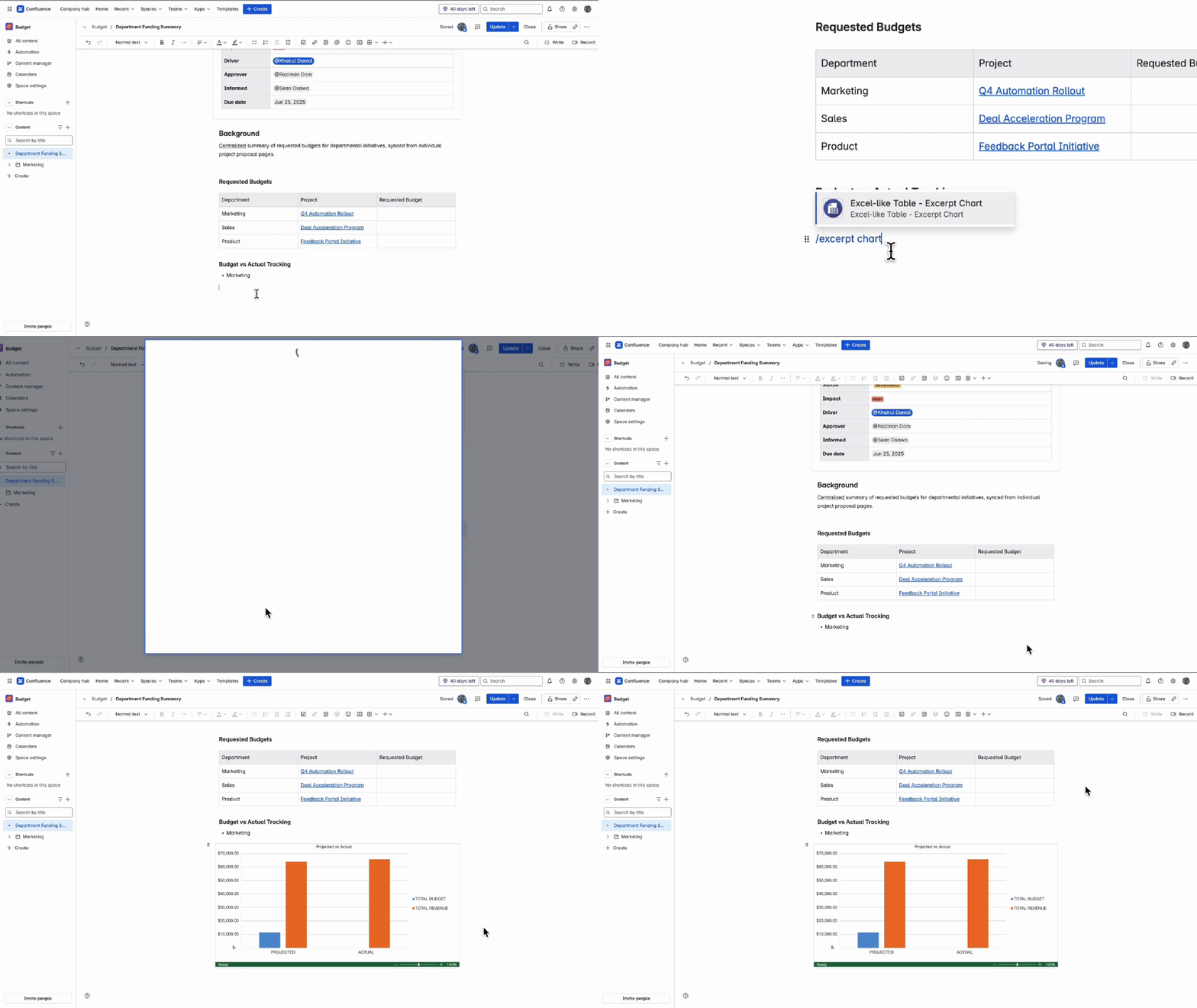
Here’s how it works:
-
You are on any Confluence page
-
Insert the Excerpt Macro
-
Choose the Excel-like Table on your space (you can create one anywhere)
-
Select the chart you want to display
That’s it! Now, when the table is updated, your chart updates too.
No more screenshots!
No more “edit → switch tab → check chart → copy again” routine.
Just one place to view, share, and stay in sync.
Example: My Multi-Product Digital Revenue Sheet
As a Product Manager in Ricksoft, I manage multiple products:
-
CodeCrate
-
GlyphPop
-
SketchMate
-
UiBolt
Each has income types like product sales, subscriptions, add-ons, and affiliate revenue. The spreadsheet has:
-
A top-level summary
-
Individual sheets for each product
-
Detailed breakdowns of refunds, discounts, and revenue
All charts are built directly in the table.
Then, from my report page, I:
-
Insert the Excerpt Chart Macro
-
Select my Excel-like Table
-
Pick charts like AddOnBreakdown, RevenueByProduct, or RefundsVsSales
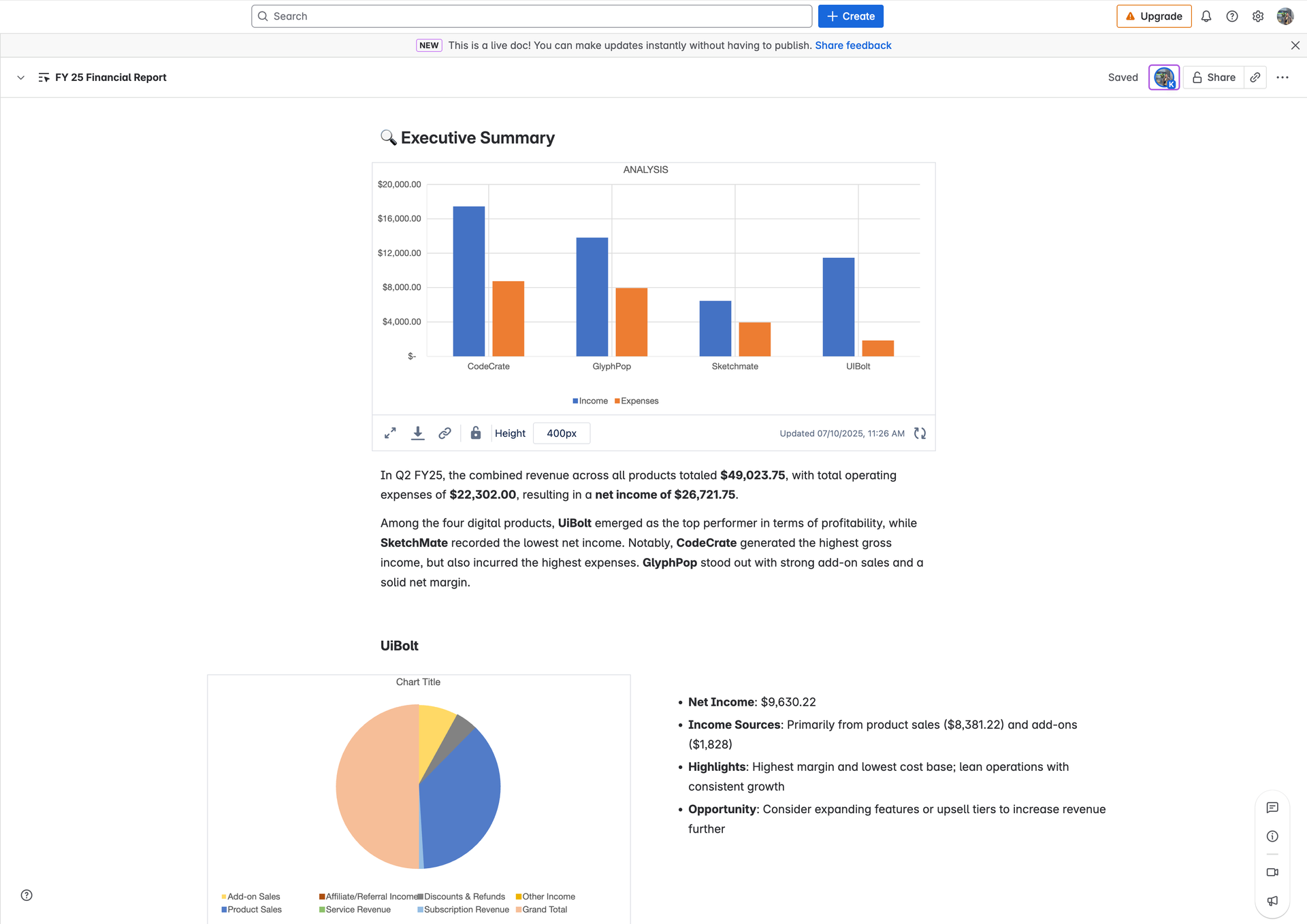
💥 Boom — clean, visual, and accurate reporting with zero duplication.
Why this matters for Excel power users
You don’t need to change how you work. You just stop duplicating effort.
|
Without Excerpt Chart Macro
|
With Excerpt Chart Macro
|
|---|
|
Screenshot charts repeatedly
|
Pull live charts directly
|
|
Manually sync across tabs/pages
|
One update updates all
|
|
Share full tables
|
Share just the insight
|
|
“See tab 4”
|
See what matters, right here
|
TLDR
If you’re building powerful spreadsheets inside Confluence, your data already has value.
Now you can finally show it properly — no noise, no copy-paste loops.
The Excerpt Chart Macro gives you:
-
The power of Excel-like logic
-
The clarity of Confluence presentation
-
And none of the maintenance mess
One chart. One macro. Endless clarity.

While this post focused on charts (because let’s be honest — they’re the easiest way to see impact), the Excerpt Macro isn’t limited to visualizations.
You can also use it to embed:
Whether it’s a number, a table snippet, or a chart — it stays synced and always up to date.
Supercharge your reporting
The Excerpt Macro is a new feature in Excel-like Tables for Confluence, built to transform the way teams share insights in Confluence.
👉 Try Excel-like Tables for Confluence on the Atlassian Marketplace
