Hi everyone,
Is there a way in Trello to view all my cards where I'm tagged, from all my boards, in a single, consolidated view, and then rearrange them within that view?
Thanks!
Hi @oscar.aaltonen
Welcome to the community!
Using Workspace Views, you can see cards from multiple boards across your Workspace. Simply apply the "Cards assigned to me" filter to consolidate them into one view and save the view.
Unfortunately, Trello doesn't have a native feature that shows all cards where you're tagged across all boards in a single consolidated view where you can rearrange them.
Trello's "Cards" tab in your profile:
Click your avatar → "Cards" to see all cards assigned to you
This shows cards where you're a member, but not necessarily all @mentions
No drag-and-drop rearrangement in this view
Using the search feature:
Search for @yourusername in the global search bar
@yourusername
This will show cards where you're mentioned across all boards
Still no rearrangement capability
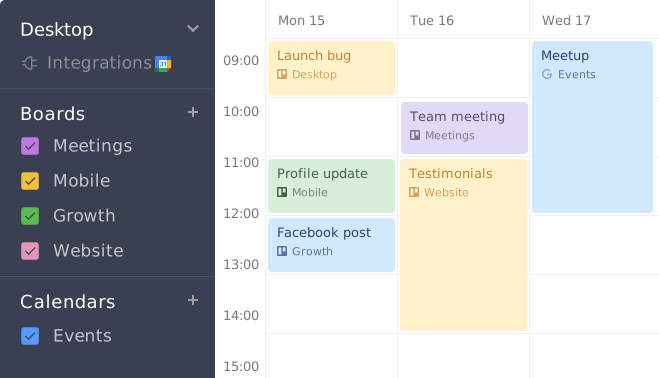
I'd recommend Planyway as a solution. It's a Trello power-up that offers:
✔️ Consolidated view of all your assigned cards across boards✔️ Calendar and timeline views for better planning✔️ Drag-and-drop functionality to rearrange tasks✔️ Time tracking and workload management✔️ Filtering options to see only @mentioned cards
Planyway essentially gives you the portfolio view you're looking for while maintaining all your Trello data.
Thank you for your response! I've been using the "Cards assigned to me" view, which has been helpful. However, I would love the ability to rearrange the cards within that view. If this feature could be developed, it would be fantastic!
Hi @oscar.aaltonen ,
Thank you for your feedback!
When you mention the ability to rearrange cards within this view, could you please clarify what you have in mind? Currently, Trello offers a sorting option based on due date. Are you looking for the ability to manually reorder cards according to your own preference or perhaps another filtering or sorting method?
Your additional details will help us better understand your needs and consider potential enhancements. Thank you for your insights, and we look forward to hearing more about what you envision.
Thank you for the quick reply! Yes, I would like to be able to manually rearrange the cards in a custom order. Sometimes there are cards without due dates that I still want to prioritize and move to the top of the list.
It looks like you're new here. Sign in or register to get started.