Resource management is a critical aspect of project management, ensuring that teams work efficiently without overloading individuals or missing deadlines. It involves planning, allocating, and tracking resources—such as time, people, and capacity—to maximize productivity.
While Jira is a powerful tool for project tracking, many teams struggle with its native resource management capabilities. Fortunately, with the right strategies and add-ons, Jira can be optimized for resource planning, workload balancing, and capacity forecasting.
In this guide, we’ll explore best practices for Jira resource management, including native features, recommended plugins, and solutions to common challenges.
1. Setting Up Jira for Effective Resource Management
Use Custom Fields to Track Effort and Availability
Jira’s custom fields help tailor the platform to your team’s needs. For resource management, consider adding:
-
Original Estimate (to log expected effort in hours/days)
-
Time Spent (to compare estimated vs. actual work)
-
Team Member Availability (to track capacity and prevent overbooking)
Define Workload Schemes
Set standard working hours per team member to prevent overallocation. Jira allows you to configure:
This ensures realistic task assignments and balanced workloads.
2. Visualizing Workload and Capacity in Jira
Leverage Jira Dashboards for Real-Time Monitoring
Custom dashboards provide instant insights into resource allocation. Useful gadgets include:
-
Two-Dimensional Filter Statistics (tasks per assignee)
-
Burnup/Burndown Charts (progress tracking)
-
User Workload Reports (capacity vs. assigned work)
Utilize Roadmaps for Long-Term Planning
While Jira offers basic roadmaps, plugins like Planyway enhance cross-team visibility with: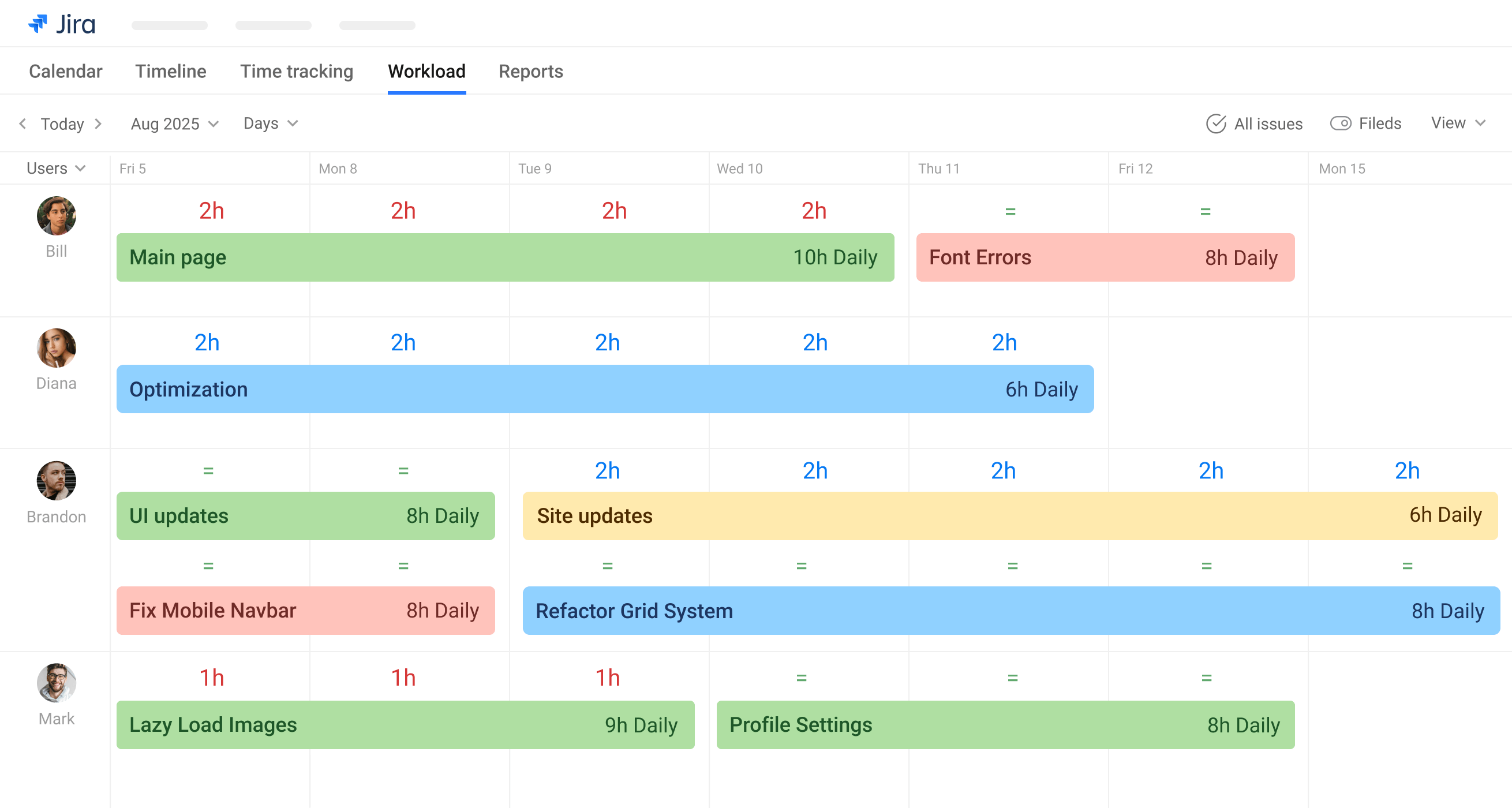
3. Advanced Resource Planning with Jira Add-ons
Integrate Time Tracking Tools
For deeper insights, connect Jira with time-tracking tools like: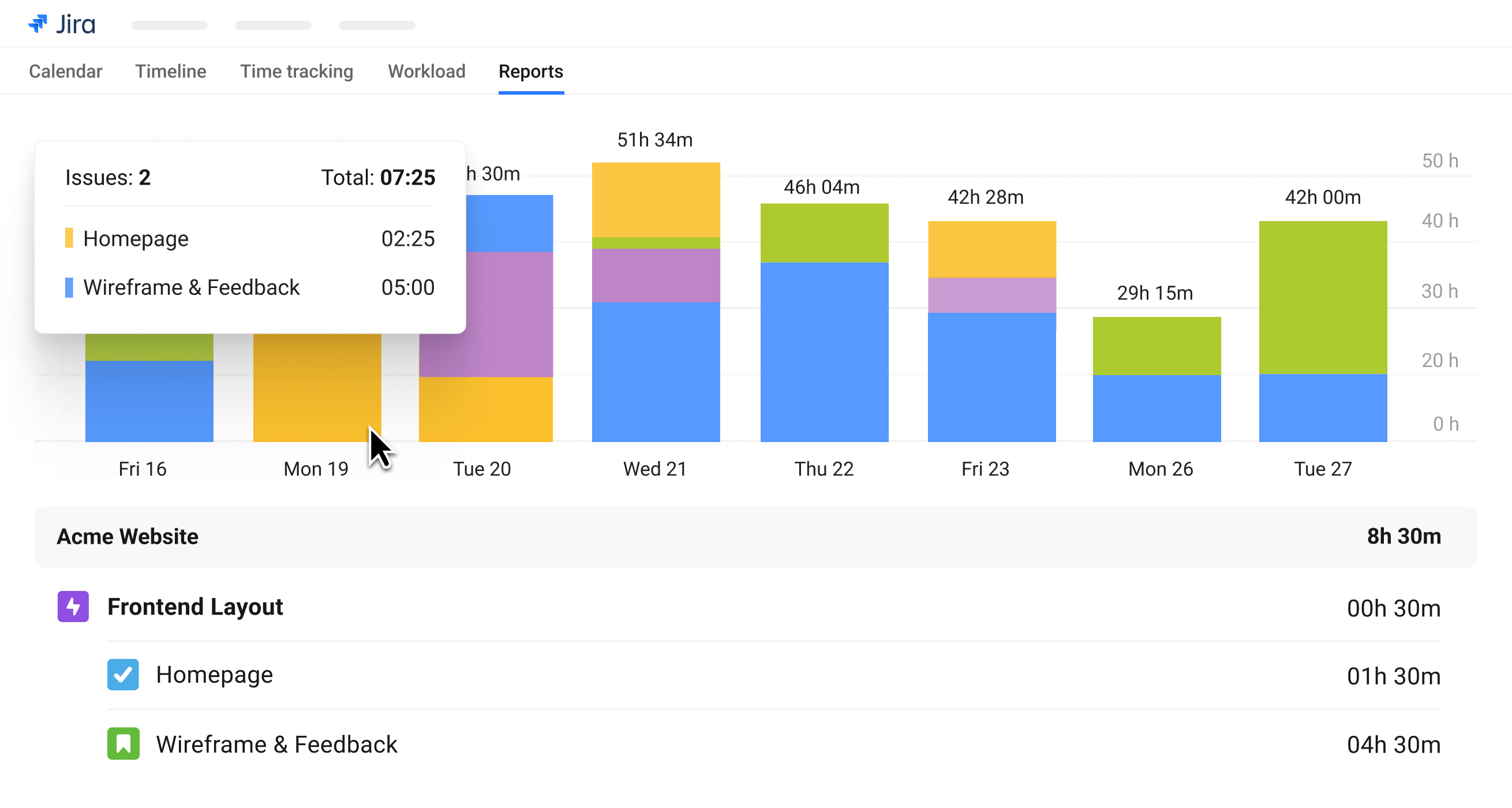
These tools help track actual vs. planned effort and improve future estimates.
Automate Workload Balancing
Plugins like Planyway and ActivityTimeline can:
-
Detect overallocation in real time
-
Suggest task reassignments
-
Adjust schedules dynamically
This reduces manual effort and optimizes team efficiency.
4. Monitoring and Reporting for Continuous Improvement
Regularly Review Work Reports
Key Jira reports for resource management:
-
Version Workload Report (sprint capacity)
-
User Workload Report (individual assignments)
-
Time Tracking Reports (actual vs. estimated effort)
Prioritize Tasks & Manage Backlogs
5. Common Challenges in Jira Resource Management (and Solutions)
| Challenge |
Native Jira Solution |
Plugin Enhancement |
|---|
| Over-allocation |
Workload schemes |
Planyway’s auto-balancing |
| Lack of cross-project visibility |
Basic roadmaps |
Multi-project Gantt charts in Planyway |
| Inaccurate time tracking |
Manual logging |
Tempo/Planyway integration |
| Difficulty forecasting capacity |
Basic reports |
Predictive analytics |
Conclusion: Optimizing Resource Management in Jira
While Jira provides foundational tools for resource planning, teams often need plugins like Planyway for advanced features such as:
By combining Jira’s native features with the right add-ons, teams can achieve transparent, efficient, and scalable resource management.
FAQ: Jira Resource Management
❓ Can Jira be used for resource management out-of-the-box?
Yes, but with limitations. Jira’s native features (custom fields, dashboards, reports) help, but plugins enhance workload balancing, forecasting, and cross-team visibility.
❓ What are the key benefits of using Jira for resource management?
- Centralized task tracking
- Real-time workload visibility
- Integration with Agile workflows
❓ When should I consider a Jira resource management plugin?
If your team struggles with:
- Overlapping assignments
- Manual capacity planning
- Lack of long-term forecasting
👉 Explore Planyway for Jira to enhance your resource planning.
