Hi everyone,
I’ve just upgraded Confluence from version 8.9.8 to 9.2.4, and I’m encountering an issue where the user interface is not loading CSS properly, resulting in layout and color display problems.
Issue details:
The main user interface doesn’t render the header styling correctly — the background color and text color are missing.
When inspecting with DevTools, I see that the following CSS variables are not being applied properly:
#header .aui-header {
background-color: var(--confluence-color-scheme-topBarColor, var(--ds-surface));
color: var(--confluence-color-scheme-breadcrumbsTextColor, var(--ds-text-subtle));
}
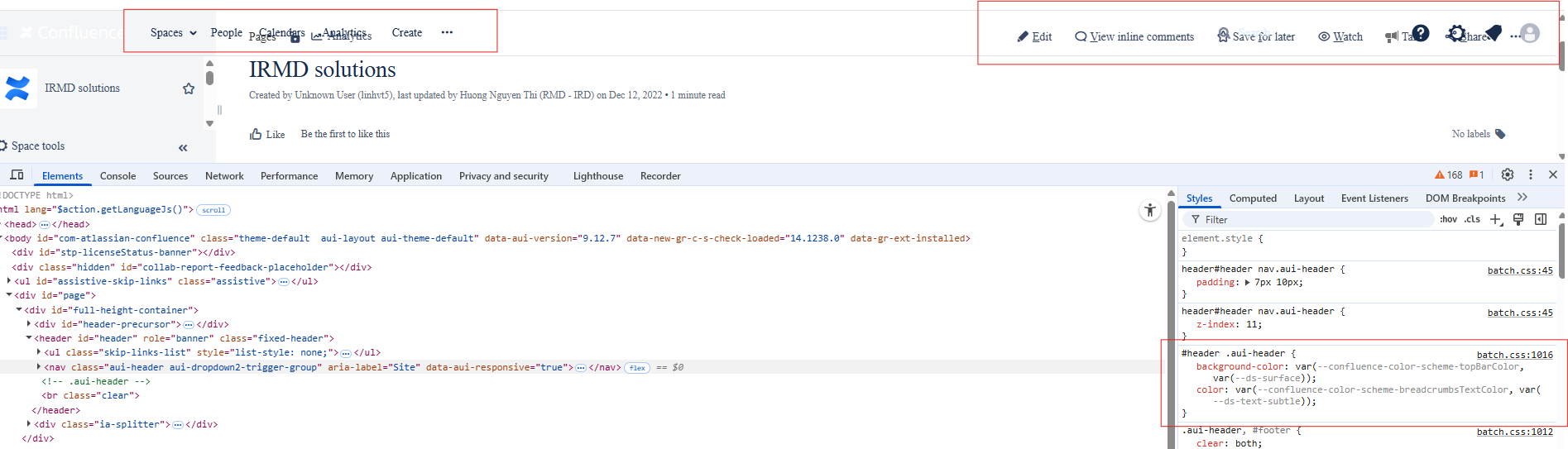
As a result, the header text is hard to read or invisible due to missing background and text colors.
However, the admin interface loads CSS and displays correctly. The issue only happens on the regular UI.
 What I’ve tried so far:
Cleared browser cache
Deleted Confluence cache directories (<confluence-home>/temp, work, etc.)
Restarted the Confluence service
None of these resolved the issue.
System details:
Current version: Confluence 9.2.4
Previous version: 8.9.8 (no issues)
OS: Windows Server
Browser: Chrome, Firefox (same behavior)
Deployment: Running as a Windows service
Questions:
Has anyone experienced this issue with CSS variables (e.g. --ds-surface, --ds-text-subtle) not being applied after upgrading?
Could this be related to caching, theme changes in Confluence 9, or permission issues?
Is there a way to force Confluence to reload or reset these CSS variables?
Thanks in advance for any help or suggestions!

