Keeping track of time is important when you're working on projects. It helps you stay organized, see how things are going, and use your time better. Trello has a handy power-up called List Time Tracker that makes this really easy.
Why use time in list tracking in Trello?
Tracking time card time in list shows you how long tasks are taking. This helps you:
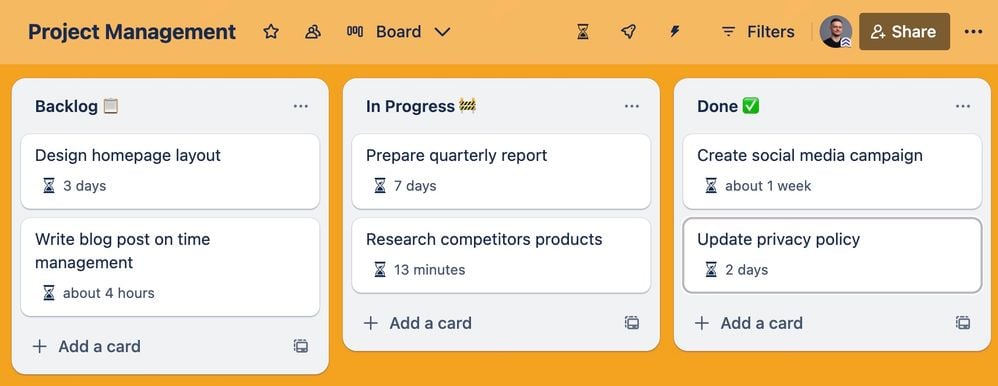
How to Set Up List Time Tracker
-
Turn on the Power-Up
Go to your Trello board. Click "Power-Ups" at the top, then "Add Power-Ups." Search for "List Time Tracker," click "Add," and follow the instructions. You might need to approve a few permissions.
-
Authorize it
Once added, click the hourglass icon that shows up. Hit “Authorize” to give it access. Now you're ready to go!
-
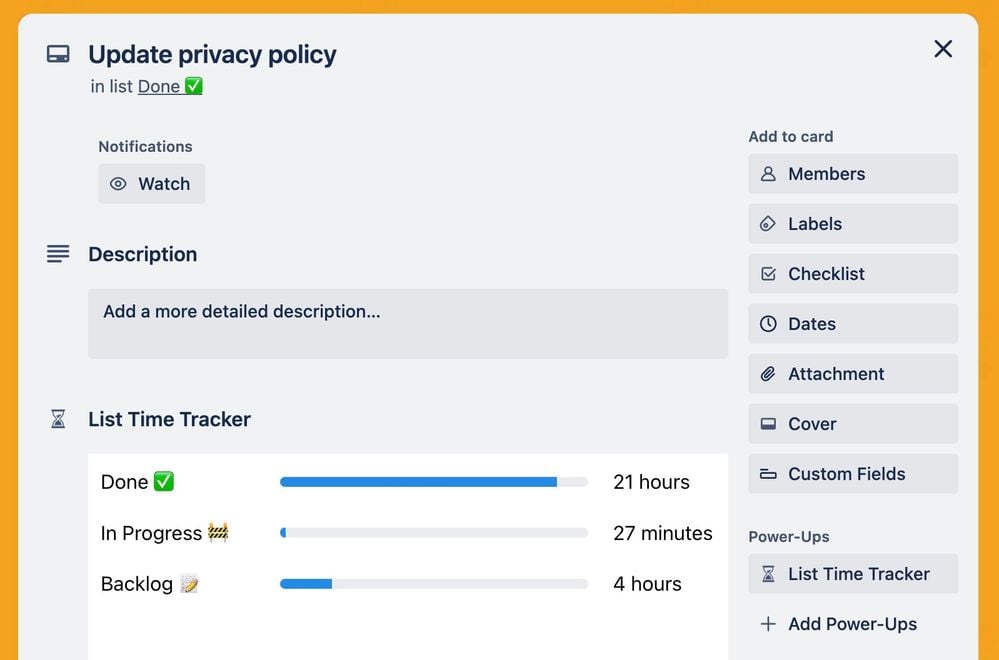
See time data on your cards
You'll now see:
What are the benefits?
-
See where time goes: Know exactly how long tasks stay in each stage
-
Work smarter: Find tasks that take too long and make changes
-
Plan netter: Use the data to assign people and time more effectively
Add List Time Tracker to your Trello boards now!
