Struggling to understand why issues aren’t getting to "Done"? You're not alone.
Many Agile teams move tasks through their Jira boards only to find half-finished work and missed commitments at the end of the sprint.
In this article, we’ll show you how tracking Time in Status reveals hidden blockers and handoff delays. Plus, we’ll show how one tool Flow Time Report for Jira makes it effortless to use this data in retros, standups, and planning.
Why Teams Get Stuck (Even When They Look Busy)
Across Agile teams, a common pattern emerges: the board looks active, people are engaged, but velocity doesn’t improve. At the end of a sprint, many issues are still in "In Progress," "Review," or "Waiting for QA."
It’s hard to tell where the real slowdown is.
That’s where Time in Status comes in. By measuring how long each issue spends in a given workflow status, teams move from assumption to evidence:
-
See where issues are getting stuck
-
Detect handoff delays early
-
Spot statuses that consistently create friction
What Time in Status Reveals (Real Examples)
Example 1: Code Reviews Bottlenecking QA
One team discovered that issues were spending more time in "Ready for Review" than in "In Progress."
At their retro, they realized:
👉 Fix:
✅ Result:
Example 2: Review Requests Lost in the Noise
Another team committed to 10 issues. Only 4 were completed.
👉 Status showed:
✅ Result:
Next sprint, waiting time dropped by 50%.
What Is Flow Time Report for Jira?
Many teams try to track Time in Status manually via spreadsheets. That approach is slow, fragmented, and quickly becomes outdated.
Flow Time Report is a Jira Cloud app that automatically visualizes Time in Status for each issue, right inside the issue panel.
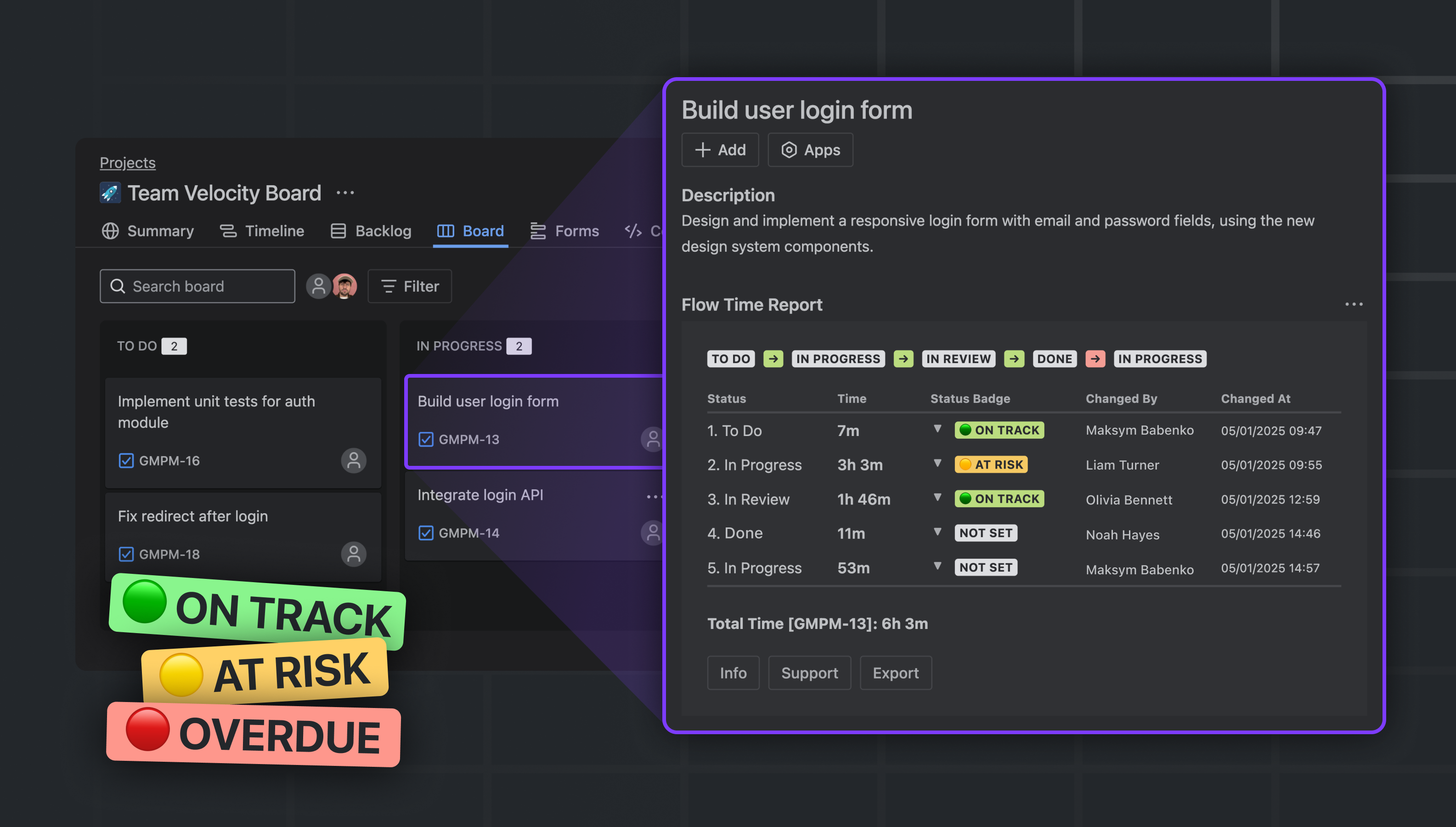
What it shows:
-
Time spent in each workflow status
-
Who transitioned the issue, and when
-
Entry and exit timestamps for each status
-
Exports in CSV, JSON, Markdown, or plain text
“It’s like having a mini-retrospective for every issue.”
How to Use Time in Status in Agile Workflows
➡️ 1. Sprint Planning
Use historical Time in Status data to set better expectations:
-
Identify stages where stories often stall
-
Add buffer for design, testing, or review if needed
➡️ 2. Daily Standups
Use current status durations as prompts:
➡️ 3. Retrospectives
Dig into issues with the longest cycle times:
➡️ 4. 1-on-1s and Team Reviews
Time in status data helps uncover:
It's About Visibility, Not Blame
Some worry that tracking Time in Status might feel like micromanagement. But in practice, it does the opposite.
Teams don’t use the data to blame individuals, they use it to improve systems:
“We didn’t realize QA was only getting stories on Fridays. Once we saw the timing, we agreed to tag QA early.”
Time in status insights promote accountability, smoother collaboration, and shared clarity.
What Doesn’t Work (Lessons Learned)
Not all approaches to Time in Status are helpful. Here are common mistakes teams make when first trying to improve flow visibility:
👉 Using outdated spreadsheets. Manual tracking quickly becomes inaccurate and hard to maintain.
👉 Focusing only on total time. Without context (e.g. where the time was spent), it’s hard to act on.
👉 Using data for blame. Teams that treat time tracking as a performance metric often face pushback.
Time in Status works best when used as a conversation starter, not a control mechanism.
Start Free
Flow Time Report is free for up to 10 users, and comes with a 30-day free trial for larger teams.
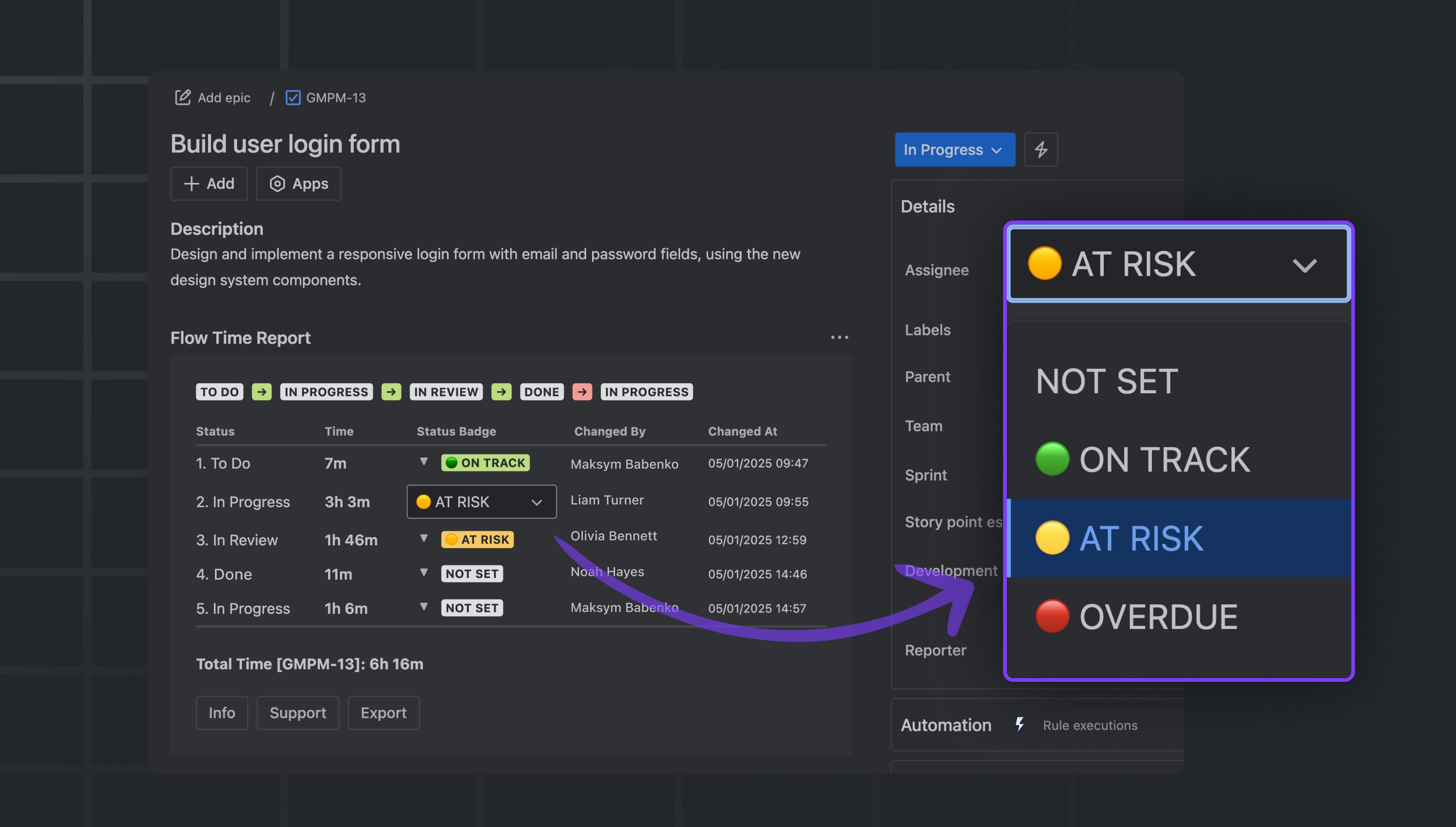
🔗 Install Flow Time Report on Atlassian Marketplace
If your team is ready to stop guessing and start optimizing, let your Jira workflow tell its story and use that story to work better together.

