Dear All,
In the Confluence, Table Transformer, I'm trying to derive a logic to colour the output cells based on a condition but not successful though:
Table:
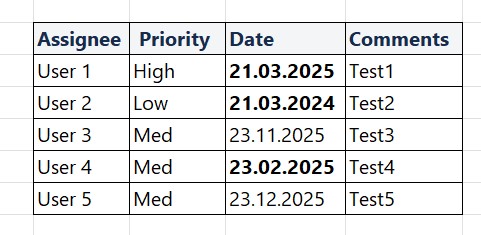
Note:
((I'm using a CONDITION ->
"FORMATDATE(DATEADD('week', -11, T1.[Target end]), 'dd/MM/yyyy')"
for deriving the date less than 11 weeks of Target End date i have for the TKTS)) ..
and the result of this condition which is a Date which if less than Today(CURDATE), then i want to color that cell bg as RED in the column 'Date' .. if not, no need to color
the ask is -> if the result of this condition is less than CURDATE, then colour the background of those Date cells as 'RED'..
Code:
SELECT
T1.'Key',
T1.'Summary',
T1.’Target end’,
FORMATWIKI("{cell:bgColor=red}", (FORMATDATE(DATEADD('week', -11, T1.[Target end]), 'dd/MM/yyyy') < CURDATE), "{cell}") AS ‘Date'
FROM T1
have tried converting both the Date formats (the condition and the CURDATE or NOW) as follows:
IF (FORMATDATE(DATEADD('week', -11, T1.[Target end]), 'dd/MM/yyyy') < FORMATDATE(CURDATE(), 'dd/MM/yyyy'), '{cell:bgColor=red}', '{cell}') AS 'Date'
<checked the settings for the Date format in Table Transformer and made sure it reflects dd/mm/yyyy as well>
also, have tried the following:
1.
FORMATWIKI
(
CASE
WHEN (FORMATDATE(DATEADD('week', -11, T1.[Target end]), 'dd/MM/yyyy') < CURDATE) THEN '{cell:bgColor=red}'
END
) AS 'Date'
<This returns nothing .. no values at all in the Date col>
2.
FORMATWIKI ("{cell:bgColor=red}", (DATEADD('week', -11, T1.[Target end]) < CURDATE), "{cell}") AS 'Date'
3.
FORMATWIKI("{cell:bgColor=red}", WHEN FORMATDATE(DATEADD('week', -11, T1.[Target end]), 'dd/MM/yyyy') < CURDATE, "{cell}") AS 'Date'
4.
IF FORMATDATE(DATEADD('week', -11, T1.[Target end]), 'dd/MM/yyyy') < NOW () Then FORMATWIKI("{cell:bgColor=yellow}",'Date',"{cell}"),
tried few more combinations and finally reaching out to you seeking assistance ..
Please Help ..


