In April 2025, Atlassian delivered a long-requested feature: public forms in Jira Software and Work Management. And while this marks real progress, many users are asking the same question:
Is this really the form experience we’ve been waiting for?
If you’ve scrolled through the Community thread, you’ll see a mix of enthusiasm... and hesitation.
Not all form submissions are created equal. Sometimes, all you need is a quick issue intake. Other times, you need a structured approval flow, field mapping, and automation built in.
With Jira’s new native public forms, teams now have a simple way to collect requests from outside the tool. But if your workflow goes beyond a single submission, you may still need more — and that’s where Smart Forms for Jira comes in.
🚧 What Native Jira Forms Still Can’t Do
Here’s what early users are noticing:
📎 No attachment support
You can't collect screenshots, mockups, or documents — even though it's one of the most common needs for bug reports and feedback forms.
🔒 Restricted fields are auto-hidden
Fields like assignee, label, version, sprint, or team can’t be used at all on public forms.
📋 All form fields must map to Jira issue fields
While that sounds efficient, it’s actually limiting.
Sometimes, you just need internal-only fields for instructions, section headers, or extra inputs that shouldn't clutter the issue.
✅ Smart Forms allows non-issue fields that don’t have to tie to Jira — great for internal notes, logic control, or optional metadata.
🛑 No update to existing issues
Public forms are a one-shot interaction: they create an issue, and that’s it.
✅ With Smart Forms, you can re-attach forms to existing issues and update fields (like NPS score, progress notes, or approvals).
⚙️ No conditional logic or field rules
Everyone sees the same form, no matter what.
✅ Smart Forms supports show/hide logic, default values, and validation rules.
📤 No automated transitions or workflows
You can't change issue status, assign users, or trigger rules based on form submissions.
🧪 Where Native Jira Forms Shine
Jira’s public forms are great for:
- Simple issue creation from external users
- Fast setup by project admins
- Basic intake workflows where all you need is a few fields and a comment trail
They now support:
✅ Public access without login
✅ reCAPTCHA verification
✅ Setting a default reporter for issues created
✅ Simple form design via drag-and-drop builder
That’s a solid foundation — especially if your team just needs a quick way to collect external inputs.
🔍 Where Smart Forms Steps In
Smart Forms for Jira is built for teams that manage more than one step in the journey — and need forms that do more than just create an issue.
Here's what it adds to the experience:
🧩 Works Across All Jira Products
Smart Forms isn’t limited to Jira Software. It also works in:
-
Jira Product Discovery (JPD)
-
Jira Service Management (JSM)
-
Jira Work Management (JWM)
-
…and even Confluence
That means you can use the same form structure across departments, workflows, and tools — without starting from scratch.
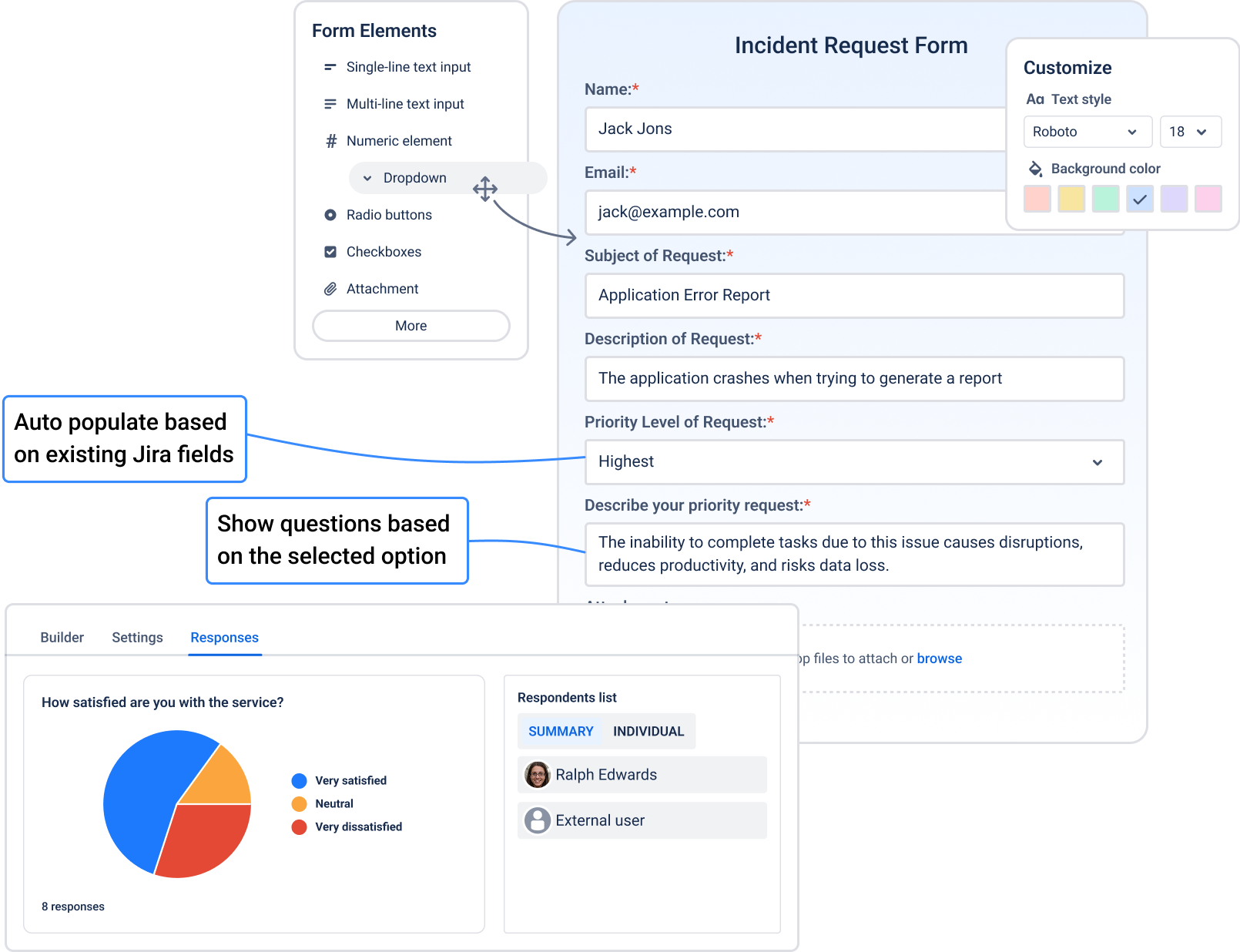
🛠️ Richer Form Experience
- Use conditional logic to show or hide fields
- Add section headers, help text, internal-only notes
- Set default values (e.g., prefilled priority or department field)
- Use non-issue fields — perfect for capturing info that doesn't need to live in the issue itself
- Customize Form appearence
- Embed elements for logo or useful guidlines
🔄 Flexible Form Addition
- Add or auto-add form inside work item
- Auto-update issue fields after a form is submitted
- Trigger status transitions (e.g., move to “Done” when an NPS form is filled)
- Send confirmation emails with form responses
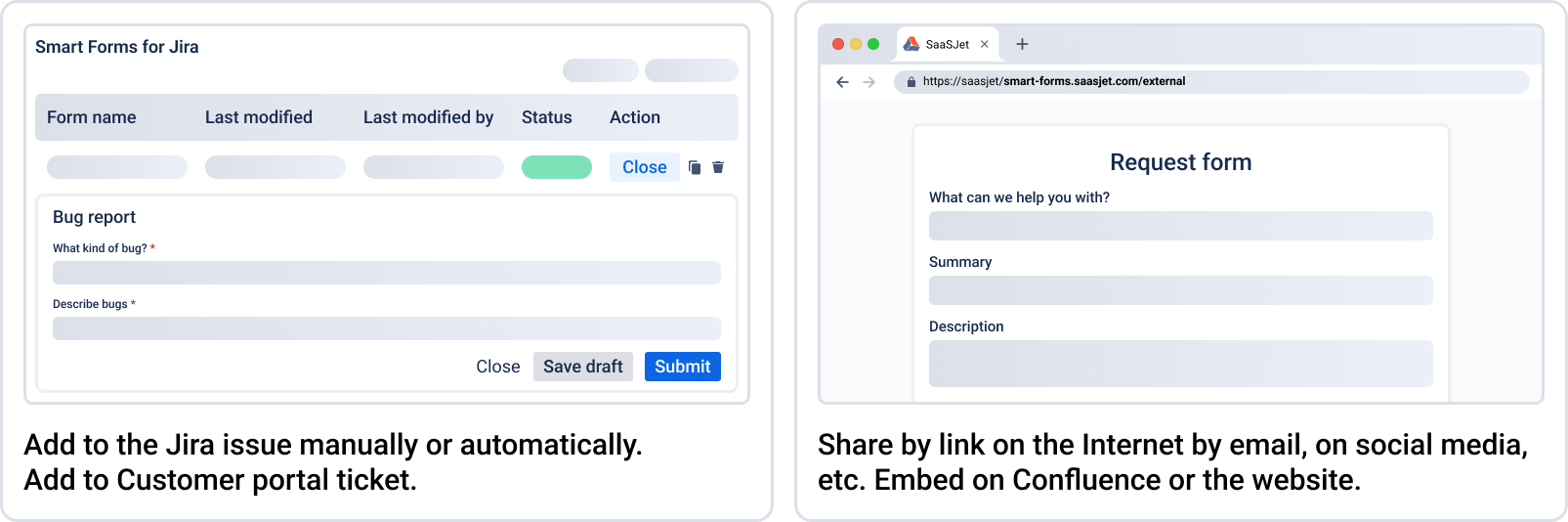
🔐 Advanced Sharing & Security
- Share forms publicly, internally, or by email domain only
- Allow access via QR code, embed on websites, or within Confluence pages
- Set email restrictions (e.g., only users from @company.com)
📝 Reuse & Update
- Attach forms to existing Jira issues
- Use forms to update fields, not just create them
- Map multiple form fields into the same Jira field (e.g., compile key responses into the Description)
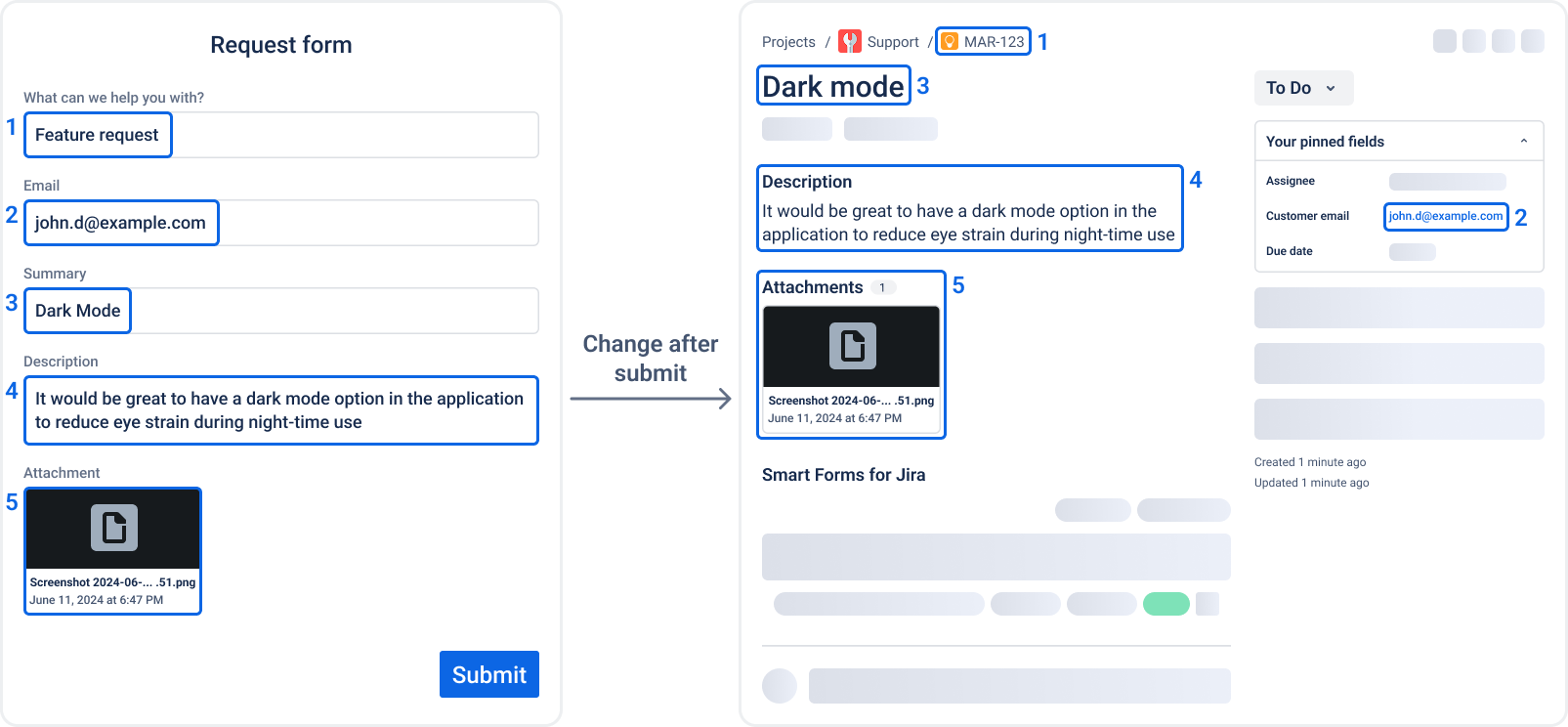
📎 Yes, Attachments Are Supported
Unlike native Jira forms, Smart Forms lets you collect files — screenshots, briefs, images, contracts — even on public forms.
🆚 Quick Comparison
| Feature |
Jira Native Forms |
Smart Forms for Jira |
|---|
| Create new issues |
✅ |
✅ |
| Public form access |
✅ |
✅ |
| Map form fields to issue fields |
✅ All fields must map to Jira |
✅ |
| Attachment support |
❌ |
✅ |
| Update existing issues |
❌ |
✅ |
| Field logic & validation |
❌ |
✅ |
| Email domain restriction |
❌ |
✅ |
| Add form inside work item for submission |
❌ |
✅ |
| Status transition automation |
❌ |
✅ |
| Reuse forms on issues |
❌ |
✅ |
| Multiple field mapping to single issue field |
❌ |
✅ |
| Works across Jira Software, JSM, JPD, JWM |
❌ (limited) |
✅ |
| Confluence & website embed |
❌ |
✅ |
| Export to PDF/Excel |
❌ |
✅ |
| Form Responses Analytics |
❌ |
✅ |
👂 What Users Are Saying
Community users were quick to share their concerns:
"Our internal users need to submit attachments, like bug screenshots. Why block that?"
"We expected something closer to the JSM portal experience."
"It’s helpful for basic issue creation, but not enough for real workflows."
One particularly thoughtful comment sums it up:
“This would have been possible if Atlassian had leveraged Advanced/ProForma forms instead of this very limited feature…”
What Smart Forms Adds
Smart Forms for Jira expands your form experience with:
- ✅ Non-issue fields — use instructions, dividers, or internal-only inputs
- ✅ Attachments — supported on all form types, including public
- ✅ Follow-up forms — update fields on existing Jira issues
- ✅ Controlled visibility — limit by email domain or user group
- ✅ Field logic & validation — guide the user and prevent errors
- ✅ Custom thank-you messages and dynamic field responses
- ✅ PDF/Excel export, automation triggers, and status transitions
So, What’s the Verdict?
If you just need a basic form to create a ticket — and don't care about control, automation, or custom experience — the native Jira form is a solid, simple tool.
But if you want to build real form-driven workflows — especially across teams, internal and external users, or projects that evolve over time — you’ll want more than just a form that fills an issue.
👉 Explore Smart Forms for Jira
Because sometimes you need your forms to do more than just create tickets.


