Hello Atlassian community,
As someone who works closely with Data Center teams, I understand the challenges you face maintaining large-scale Jira instances. Today, I'm excited to announce that we're making your job easier with the release of instance optimization in Portfolio Insights beta.
Why we built this
Many of you have told us that:
-
Troubleshooting performance issues takes too much time
-
It's difficult to proactively identify potential system bottlenecks
-
Managing multiple nodes and their health requires constant attention
-
Keeping track of instance limits and guardrails is a manual process
-
Planning for growth and scale needs more data-driven insights
What's available now
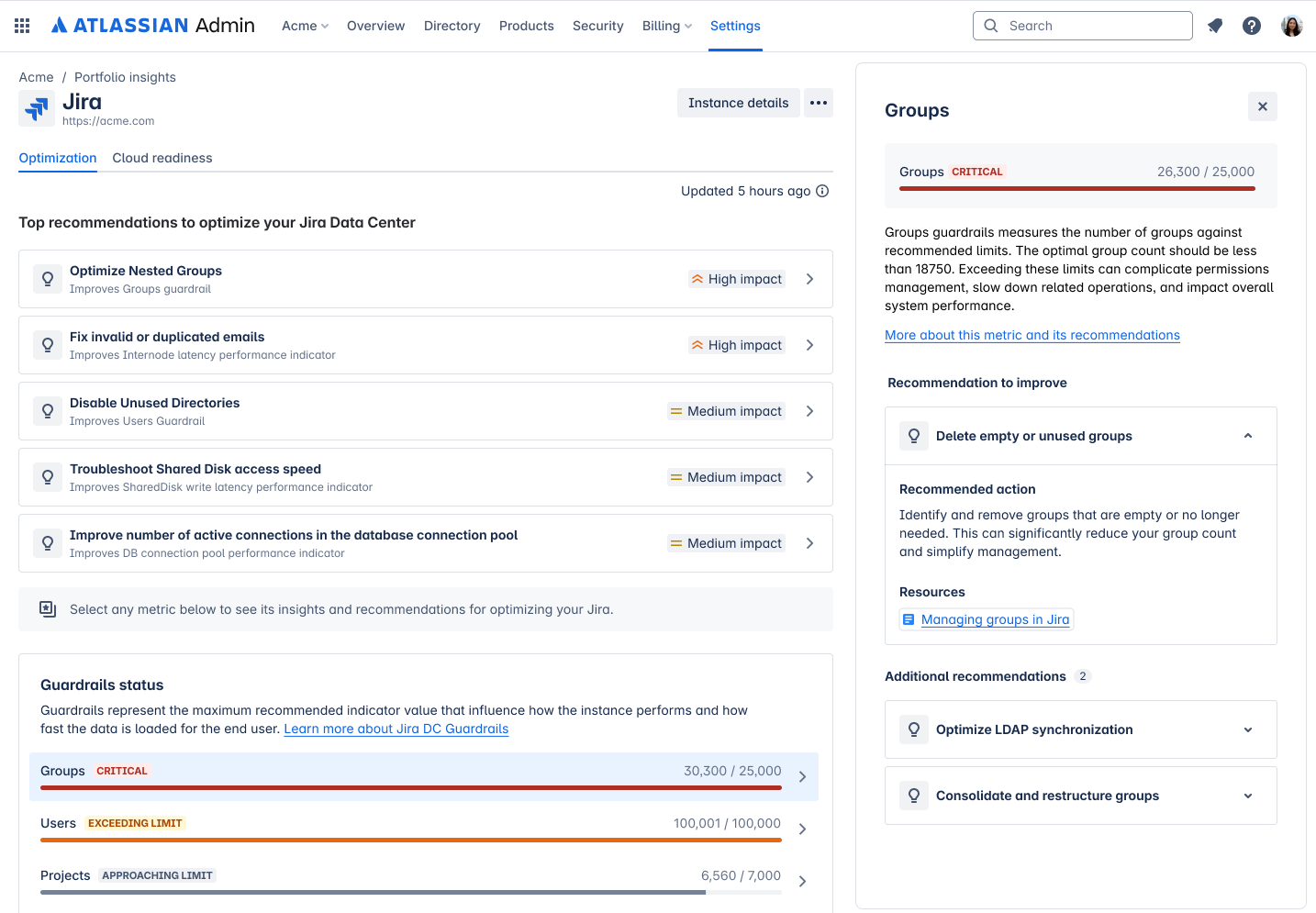
We've built an optimization space for Jira Data Center that puts all critical instance health information in one place:
System guardrails monitoring
-
Track groups, projects, custom fields, and users against recommended limits
-
Get instant visibility when you're approaching or exceeding thresholds
-
Access specific queries and steps to address limit breaches
Node performance tracking
-
Monitor database connection latency across nodes
-
Track CPU load and garbage collection metrics
-
Identify internode communication issues
-
Assess shared disk write performance
-
View HTTP connection pool status
Actionable recommendations
Each insight comes with:
-
Clear explanation of the impact on your instance
-
Step-by-step resolution steps
-
Relevant documentation links
-
Diagnostic queries where applicable
Plus, for teams considering cloud, we've included cloud readiness assessments to help you understand your migration readiness.
Here are some ways you can use these insights:
-
Quickly identify which nodes are experiencing performance issues
-
Determine if your custom fields or groups need cleanup
-
Understand if your database connection pool needs optimization
-
Plan capacity based on current usage patterns
-
Prepare for cloud migration with confidence
Getting started
-
Go to Administration > Manage apps
-
Update Atlassian Troubleshooting and Support Tools (ATST)
-
Open ATST, navigate to Optimization, and follow the steps to access Portfolio insights
Resources
What's next?
We're working closely with admins like you to build:
-
Support for Confluence Data Center optimization
-
Additional performance metrics based on your feedback
-
Manual data upload option
-
Automated implementation of selected optimization recommendation
-
Improved troubleshooting capabilities
Join the conversation
As a Data Center admin, your experience is invaluable. Share your thoughts below:
-
Which metrics are most useful for your daily operations?
-
What additional insights would help you maintain your instance?
-
How can we make the recommendations more actionable?
Best regards,
Mateusz Miodek
Senior Product Manager, Data Center


