Hello everyone. I have a Jira Automation rule. In that rule I either create a Confluence page if it doesn't exist, in Confluence. And if it does exist, I update the page. I run the rule using a cron schedule. Every morning at 06:00 from Monday through Friday. For testing purposes I can run the rule manually by clicking "Run Rule".
After running the rule I go to the page in Confluence. The page is filled with Jira issues and a table for each issue containing the comments of that issue. Now, the issue that I am facing is a strange one.
Once the page is created at 06:00 by the cron schedule, it is re created multiple times per day, but every time the page is recreated, it is completely blank. On the page it says something like: "Created by MyName 31 minutes ago" even when I open the page at 12:00 during the day.
When I go to the audit log of the Jira Automation rule, it says it only ran once at 06:00 which is the time it is supposed to run. After that there are no signs of execution of the rule. So it seems to me that something strange is going on that is causing the page to get recreated every time but I have no clue what it could be.
A colleague of mine told me that once a page is created, the ID can be subject to change. Meaning that it could change and that the ID will never stay the same. Could this be something that relates to the issue? I use the ID of pages when I need to update a page.
My rule:
Step 1 : Trigger : Cron schedule = 0 0 6 ? * MON,TUE,WED,THU,FRI * : JQL = Sprint in openSprints() AND project = myProject
Step 2 : JQL condition : (updated < now() AND updated >= startOfWeek("+1d")) AND (comment ~ "anything*" OR comment !~ "anything*")
Step 3 : create variable ( pageTitleGET ) : smart value = 'Weekrapportage%20myProject.%20Week:{{now.weekOfYear}}%20Jaar:%20{{now.Year}}'
Step 4 : create variable ( pageTitlePOSTandPUT ) : smart value = Weekrapportage myProject. Week:{{now.weekOfYear}} Jaar: {{now.Year}}
Step 5 : Webhook GET : url = https://confluence.mycompany.nl/rest/api/content/search?cql=title={{pageTitleGET}}&limit=1 : Custom body = { "status": "current" } : Wait for response = checked
Step 6 : create variable ( pageBody ) : smart value = Deze weekrapportage laat alle comments op issues zien die de afgelopen week zijn gewijzigd! Als er géén wijzigingen in kaartjes zijn doorgebracht dan is deze pagina (nog) leeg! {{#issues}} key,summary,type,created,updated,due,assignee,reporter,priority,status,resolution{{key}} Klik op mij om het commentaar van de story te zien!{{#comments}}{{/}} Datum Gebruiker Commentaar {{created.format("dd-MM-yyyy HH:mm:ss")}} {{author.displayName}} {{body.jsonEncode}} {{/}}
Step 7 : IF statement : 2 equals conditions : = {{webhookResponse.status}} equals 200 & {{webhookResponse.body.results}} contains myCompany
Step 8 (inside IF) : create variable ( pageID ) : smart value = {{webhookResponse.body.results.id}}
Step 9 (inside IF) : Webhook GET : url = https://confluence.mycompany.nl/rest/api/content/{{pageID}}?expand=version : Custom body = { "status":"current" } : Wait for response: Checked
Step 10 (inside IF) : create variable ( pageVersion ) : smart value = {{#=}}{{webhookResponse.body.version.number}} + 1{{/}}
Step 11 (inside IF) : Webhook PUT : url = https://confluence.mycompany.nl/rest/api/content/{{pageID}} : Custom body = {"id":"{{pageID}}", "type":"page", "title":"{{pageTitlePOSTandPUT}}", "space":{"key":"mySpace"}, "body":{"storage":{"value": "{{pageBody}}","representation":"storage"} }, "version":{"number":{{pageVersion}} }} : Wait for response: Checked
Step 12 : ELSE statement : Webhook POST : url = https://confluence.mycompany.nl/rest/api/content : custom body : {"type":"page","title":"{{pageTitlePOSTandPUT}}","space":{"key":"mySpace"},"ancestors":[{"id":2756609130}],"body":{"storage":{"value":"{{pageBody}}","representation":"storage"}}} : Wait for response NOT checked
And to describe what it is supposed to do in a more readable format:
1: run every morning at 06:00 from monday to Friday and find me all issues from my project that are currently in the active sprint
2: filter those issues so that I only have the issues that have been updated this week and have comments
3: create a variable that I can use in the URL of the rest api
4: create a variable that I can use in the body of the rest api
5: try to find the page by looking for the page title using the variable in step 3
6: create a variable that holds the body that displays the issues on the page that has to be created or updated
7: IF statement where we check if the response is OK and if there is a page returned that contains the word myCompany
8: inside the if we know the page exist, so create a variable that saves the pageID for the update call later on
9: search for the page with the ID we just found so that we can fetch the version of the page
10: create a variable where we increment the existing version with 1 so that we have a new version available for the update call
11: update the existing page by using the variables we created before, including the version, pageID and the body
12: inside the else we know the page does not exist, so create the page by using the title and body and create it inside the ancestor page
This is the audit log of the rule:
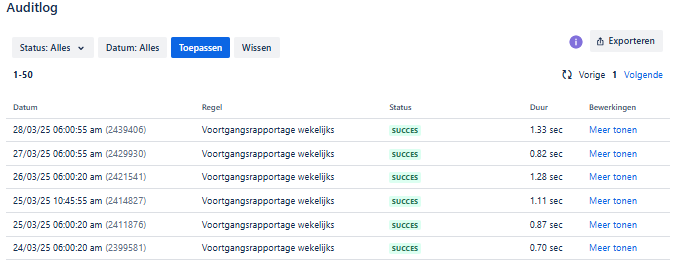
As you can see it only runs once a day at 06:00. On the 25th I ran it manually once to see if it worked. It updated the already existing page and showed the jira items, table, comments etcetera. Only to dissapear after a few hours as a new empty page was recreated.

