Streamlining CI/CD Workflows: Best Practices for Jenkins Integration with Atlassian Tools
For modern DevOps teams, a CI/CD workflow is essential for accelerating software delivery. However, many teams face workflow bottlenecks that slow down deployments and increase errors. Without clear deployment tracking, real-time updates, and efficient collaboration, teams struggle to maintain agility and visibility across projects.
Common CI/CD Workflow Challenges
🚧 Lack of Visibility – Teams use multiple tools, but deployment data remains fragmented.
📉 Inefficient Communication – Developers and operations teams work in silos with no real-time updates.
✏️ Manual Tracking – Without automated deployment tracking, build results and releases require manual documentation.
These issues disrupt workflows, leading to delayed releases, inefficiencies, and increased risk of deployment failures.
How Jenkins Integration with Atlassian Tools Can Help
By integrating Jenkins with Confluence, Compass, and Jira, teams can:
✅ Automate deployment tracking for real-time visibility.
✅ Enhance CI/CD workflow efficiency by eliminating manual processes.
✅ Improve collaboration by syncing deployment data across development, IT, and QA teams.
This integration ensures that all stakeholders—from developers to product managers—have instant access to critical build and deployment data, reducing confusion and speeding up decision-making.
3 Top Jenkins Integration Options for a Smoother CI/CD Workflow
Option #1: Confluence Jenkins Integration
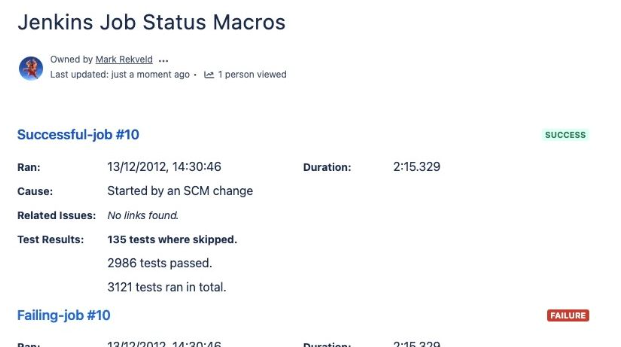
You can improve CI/CD workflow transparency by automatically publishing Jenkins build results in Confluence.
✨ Benefits
-
Automate deployment tracking by pushing build results into Confluence pages.
-
Keep release documentation up to date without manual input.
-
Enhance team collaboration with real-time status updates and visibility. See below.
🛠 How to Integrate
-
Multiple plugins in the Jenkins ecosystem could support a webhook-based integration with Confluence.
-
For an easier setup, consider using Jenkins for Confluence
Confluence acts as a centralized knowledge base, ensuring that deployment records, release notes, and pipeline statuses are always available for future reference.
Option #2: Compass Jenkins Integration
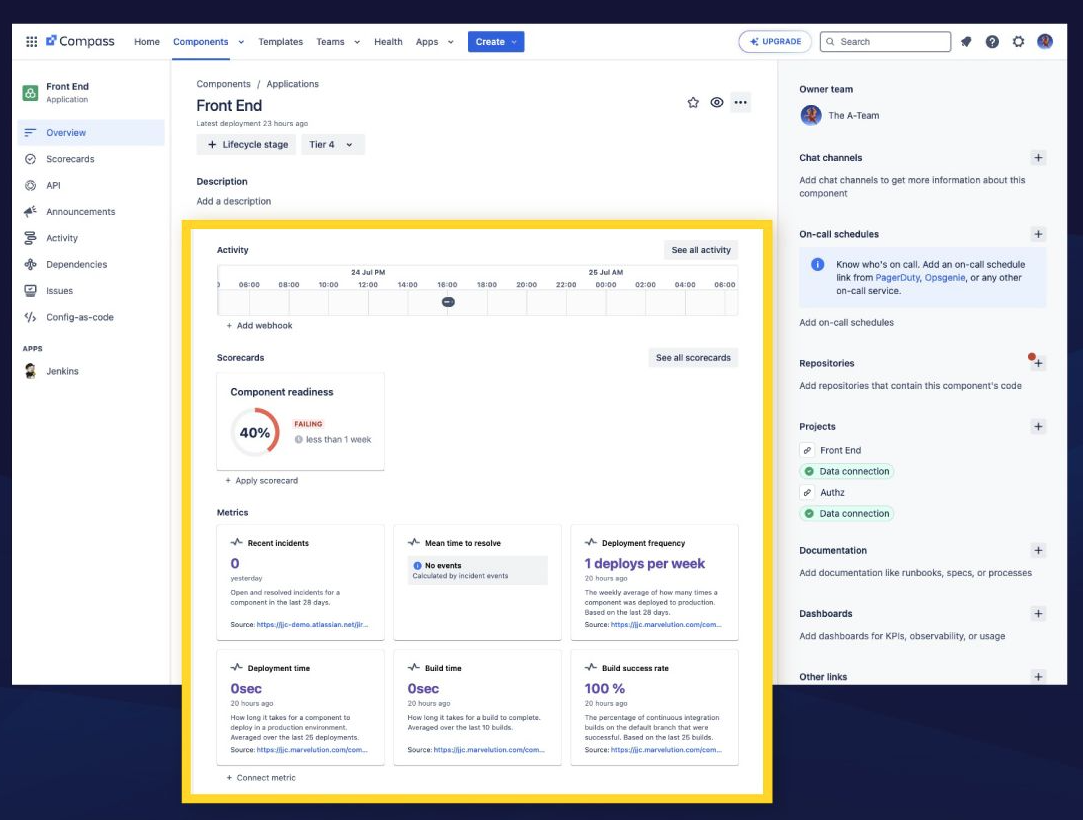
You can improve deployment tracking by consolidating Jenkins build history in Compass for better service management.
✨ Benefits
🛠 How to Integrate
-
Use Compass APIs to sync Jenkins build and deployment data.
-
Explore Jenkins for Compass for an easy, prebuilt integration.
By connecting Jenkins and Compass, teams gain a clear picture of service health and deployment stability, making it easier to troubleshoot and optimize CI/CD workflows.
Option #3: Jira Jenkins Integration
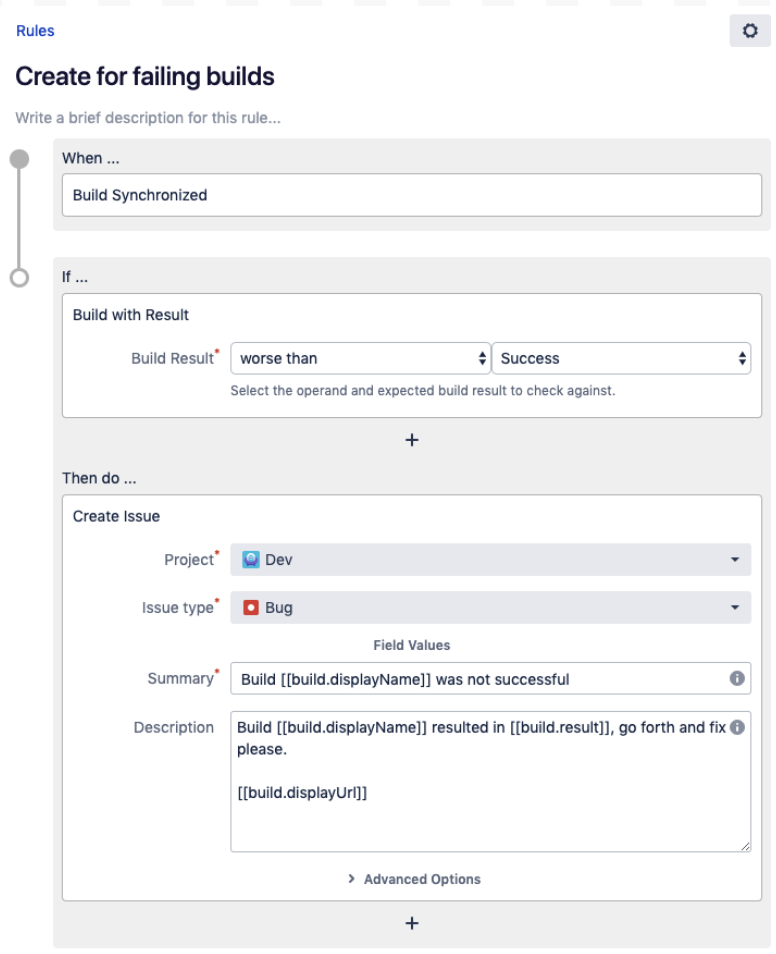
Improve issue traceability by linking Jenkins builds to Jira issues for better CI/CD workflow automation. It’s super helpful for Agile project management too.
✨ Benefits
-
Trigger Jenkins builds from Jira workflows should certain conditions be met, reducing manual deployment steps.
-
Improve auditability and traceability by linking code changes to Jira tickets.
🛠 How to integrate:
With Jira integration, teams can quickly track the status of a build, understand how changes impact development, and reduce deployment errors by ensuring all builds are connected to relevant tickets.
Best Practices for a More Efficient CI/CD Workflow
Integrating Jenkins with Atlassian tools is only part of the equation—teams must also follow best practices to maximize their CI/CD workflow efficiency.
✅ Use Consistent Naming Conventions
-
Ensure Jira issue keys are included in commit messages.
-
Use standardized naming for Jenkins jobs, branches, and artifacts.
✅ Automate CI/CD Workflow Notifications
-
Configure Slack, Jira, or email alerts for build failures and deployments.
-
Keep stakeholders updated on real-time build statuses.
✅ Enforce Permission Controls
-
Restrict who can modify deployment configurations.
-
Set up role-based access for different teams (e.g., Dev, Ops, QA).
✅ Regularly Audit Your CI/CD Pipeline
Regularly reviewing and optimizing these areas ensures a more secure, efficient, and error-free CI/CD workflow.
Simplify CI/CD Workflows with Jenkins Integration
Integrating Jenkins with Confluence, Compass, and Jira removes workflow friction, enhances deployment tracking, and streamlines CI/CD automation. With real-time updates, automatic documentation, and seamless issue tracking, teams can deploy faster and with greater confidence.
For teams looking to simplify these integrations, apps like Jenkins for Compass, Jenkins for Jira, and Jenkins for Confluence offer a pre-built solution to save time and improve workflow efficiency.

