Managing tasks in Trello can be a mess when you have multiple deadlines and team members to track. Time Slot Calendar power-up makes it easy by turning your Trello cards into a Google Calendar-style schedule. Instead of clicking through each card, you'll see everything in a clear, weekly layout, so you always know who’s working on what.
Here's what it looks like:
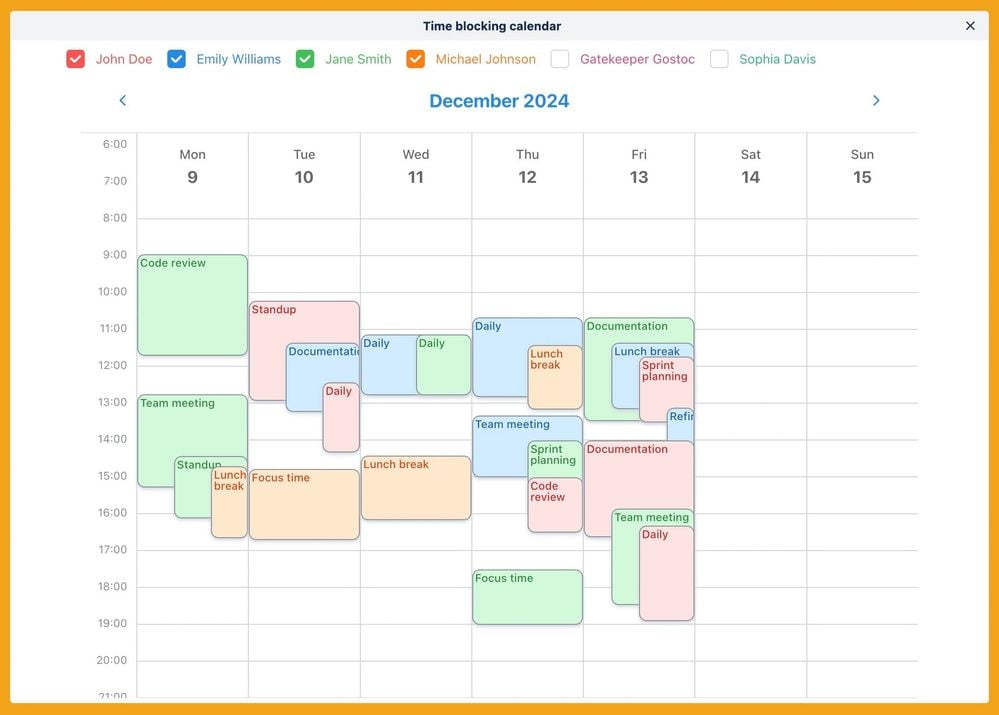
How to enable and use Time Slot Calendar in Trello
You can do it in three simple steps:
- Add the Power-Up - Open Trello, go to your board, click "Power-Ups," search for "Time Slot Calendar" and add it.
- Set Start & End Dates - Open any Trello card, add start and end dates to schedule tasks.
- View Your Calendar - Click "Time Slot Calendar" board button to see your team’s tasks as time blocks.
Why use Time Slot Calendar for Trello?
With Time Slot Calendar power-up, you can quickly spot scheduling conflicts and avoid last-minute surprises. It helps your whole team stay aligned by making workloads visible, so you know who’s busy and when. Plus, setting start and end dates is effortless, meaning better planning without extra tools.
Stop wasting time. Add Time Slot Calendar to your Trello board here and stay on track! 🚀
