Hey Jira Admins – if you're like me, you've probably battled with a flood of "High Priority" tickets that make it nearly impossible to distinguish what really needs attention. Here's a quick, actionable guide to implementing a Priority Matrix that brings clarity and efficiency to your workflow.
1. Define Your Priority Fields
Start by setting up two key custom fields: Impact and Urgency.
- Impact: How broadly does the issue affect your organization?
- Urgency: How much is the issue disrupting your team's workflow?
For example:
- High Impact: Affects the entire organization
- High Urgency: Work is completely blocked
→ These combine to mark an issue as Critical Priority.
2. Create Your Priority Matrix
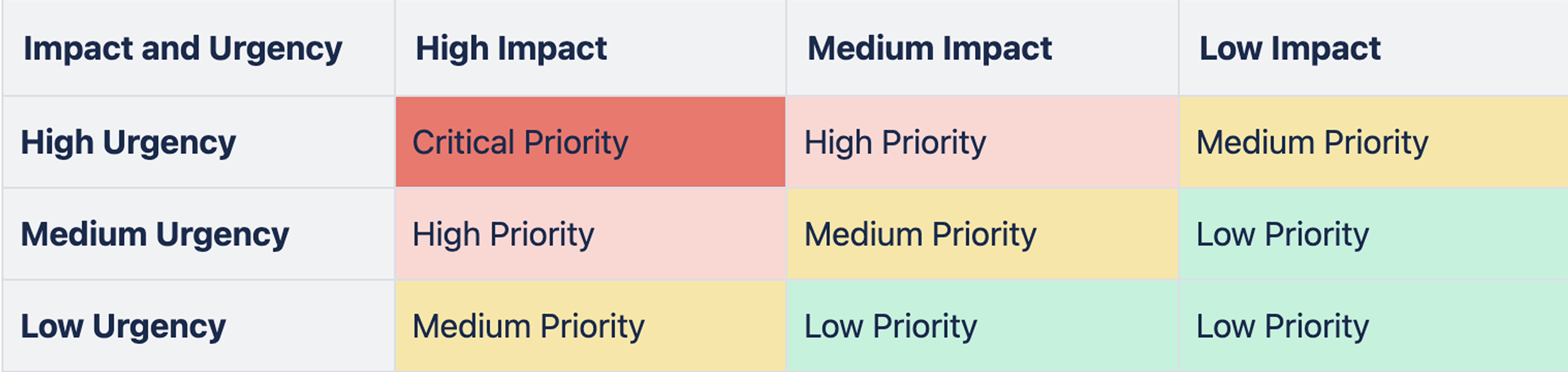
Visualize your priorities with a simple, color-coded table:
- Horizontal Axis (Impact): Low, Medium, High
- Vertical Axis (Urgency): Low, Medium, High
At the intersections, assign your priority levels:
- Critical Priority (High Impact & High Urgency): Red
- High Priority: Orange
- Medium Priority: Yellow
- Low Priority: Green
This mapping makes it clear which issues deserve immediate attention.
3. Automate in Jira
Leverage Jira's powerful automation capabilities to assign priorities automatically based on the Impact and Urgency fields.
- Trigger: Issue Created (or Field Updated)
- Conditions: Check the values of Impact and Urgency
- Action: Update the Priority field accordingly
Automation minimizes manual intervention and ensures consistency across your projects.
4. Test and Iterate
Before rolling this out organization-wide, run a pilot with a subset of issues.
- Gather feedback: See how the new matrix works in practice
- Refine: Adjust field definitions, matrix mappings, and automation rules as necessary
A test environment is a great place to start—ensure everything is tuned before going live.
5. Configure SLAs
Boost your system by linking each priority level to specific Service Level Agreements. For example:
- Critical: 4-hour response
- High: 24-hour response
- Medium: 48-hour response
- Low: 96-hour response
This alignment ensures that issues are addressed promptly based on their true urgency.
Interested in how the Priority Matrix works?
It's a practical framework for making sense of Jira tickets, and we've put together a quick guide to break it all down. Feel free to take a look and share your thoughts!
It's for free here.


