Service Level Agreements (SLAs) play a crucial role in ensuring timely and efficient service delivery. In today's fast-paced business environment, tracking SLA response times accurately can significantly impact customer satisfaction and internal team performance.
This article will guide you through:
-
What is a service level agreement (SLA)?
-
Understanding SLA Metrics in Jira
-
Why an SLA matters
-
The difference between an SLA and a KPI
-
SLA Response Time vs SLA Resolution Time (with a comparison table)
-
SLA challenges
-
Factors that influence SLA response time
-
How to set an SLA and measure performance
-
How to improve SLA response time
We will be Mastering SLA with help of Time Metrics Tracker.
Let's hop in!

What Is a Service Level Agreement (SLA)?
A Service Level Agreement (SLA) is a formal commitment between a service provider and a customer that defines the expected level of service. It sets specific, measurable targets for performance, including response time, resolution time, and availability.
Key Components of an SLA:
-
Service Description: Details of the services provided.
-
Performance Metrics: Response time, resolution time, uptime.
-
Responsibilities: Obligations of the service provider and client.
-
Penalties: Consequences for not meeting SLA requirements.

Understanding SLA Metrics in Jira
Jira, especially with Jira Service Management (JSM), allows teams to track SLA performance through built-in metrics and customizable reports. Key SLA metrics include:
-
Time to First Response: The time taken to respond to a ticket for the first time.
-
Time to Resolution: The total time taken to resolve a ticket.
-
Time in Status: Time spent in each workflow status.

Why an SLA Matters
SLAs are essential for:
-
Customer Satisfaction: Meeting response expectations builds trust.
-
Operational Efficiency: Clear performance targets enhance productivity.
-
Accountability: Establishes clear responsibilities for service teams.
-
Continuous Improvement: SLA reports help identify bottlenecks and optimize processes.

The Difference Between an SLA and a KPI
While SLAs and Key Performance Indicators (KPIs) both track performance, they serve different purposes.

| |
SLA
|
KPI
|
|
Definition
|
A contractual service commitment
|
Internal performance metric
|
|
Scope
|
External (customer-focused)
|
Internal (team-focused)
|
|
Examples
|
Response time, uptime
|
Team productivity, CSAT
|
|
Consequence
|
Potential penalties if unmet
|
Insights for optimization
|
SLA Response Time vs SLA Resolution Time
These two metrics often cause confusion, but they measure different aspects of service performance.

| |
Definition
|
Purpose
|
|
SLA Response Time
|
Time from ticket creation to the first agent response
|
Measures communication speed
|
|
SLA Resolution Time
|
Time from ticket creation to ticket closure
|
Measures issue resolution speed
|
Example:
A customer submits a ticket at 10:00 AM.
SLA Challenges
Tracking SLAs is not without obstacles. Common challenges include:
-
Incomplete Data: Missing or inaccurate SLA configurations.
-
Overcomplicated Metrics: Too many SLA rules lead to confusion.
-
Lack of Real-Time Monitoring: Delayed insights into SLA breaches.
-
Cross-Team Misalignment: Different teams may prioritize SLAs differently.

Tip: Simplify SLA tracking and receive real-time alerts for breaches. Use Time Metrics Tracker for this.
Factors That Influence SLA Response Time
SLA response times can vary due to multiple factors:
-
Ticket Volume: High volume can slow response times.
-
Team Capacity: Fewer available agents lead to slower responses.
-
Issue Complexity: Complex issues take more time to address.
-
Tool Efficiency: Inefficient tools hinder SLA performance.

Solution: Regularly review workload distribution and optimize workflows using Jira dashboards.
Set an SLA and Measure Performance in Jira with Time Metrics add-on help
Step 1: Define SLA Metrics
Step 2: Configure SLAs as a Time Metrics
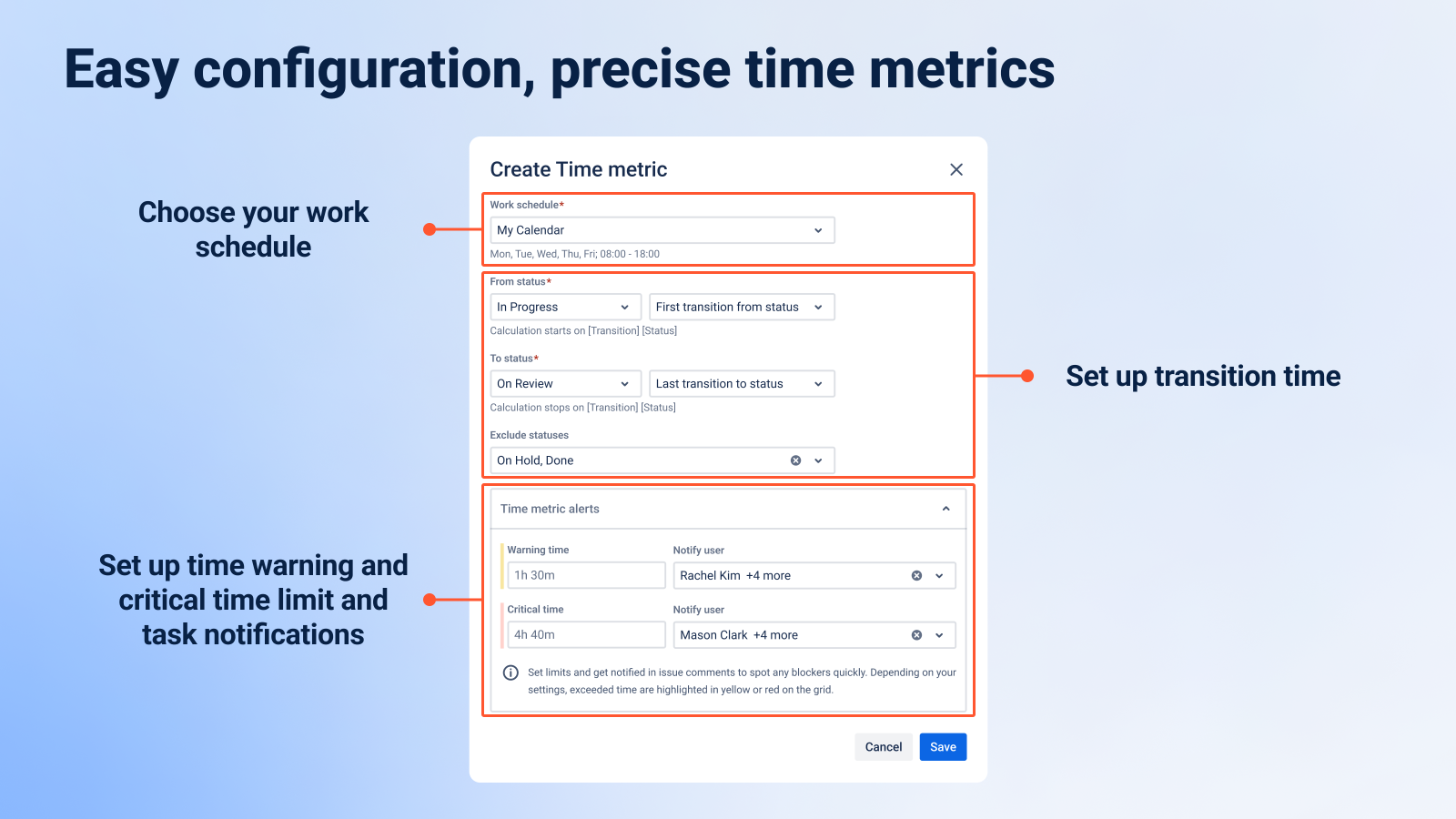
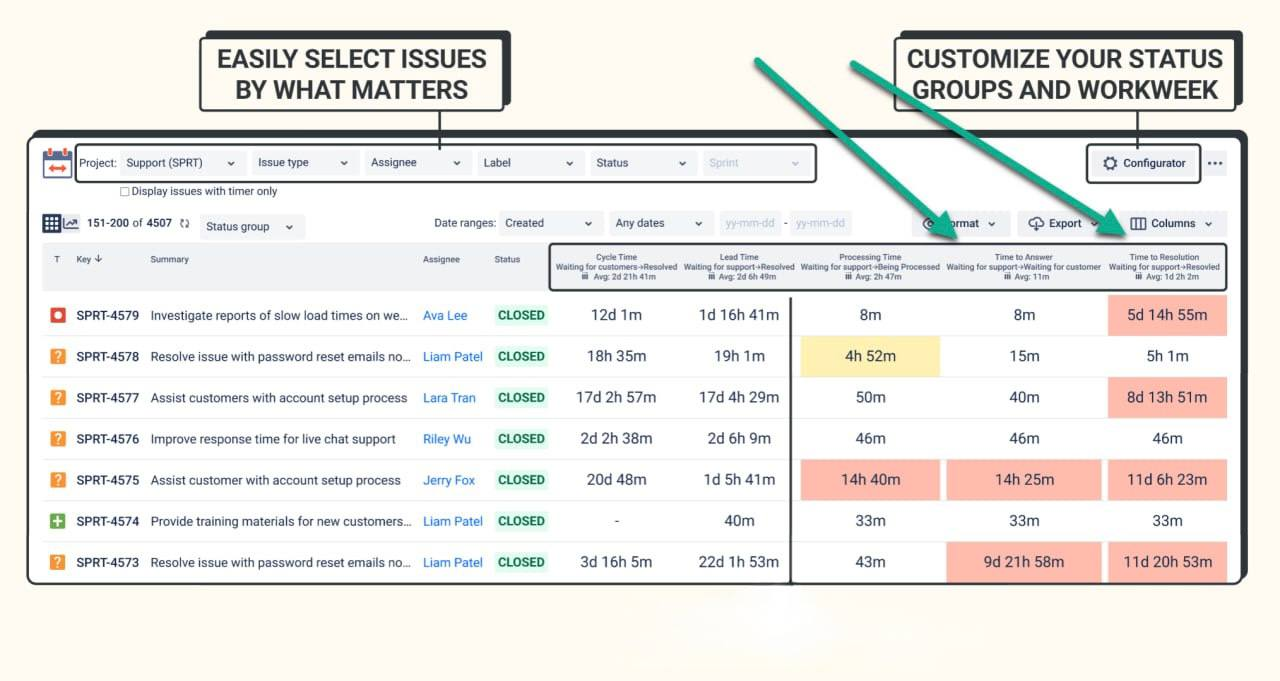
Step 3: Create SLA Dashboards
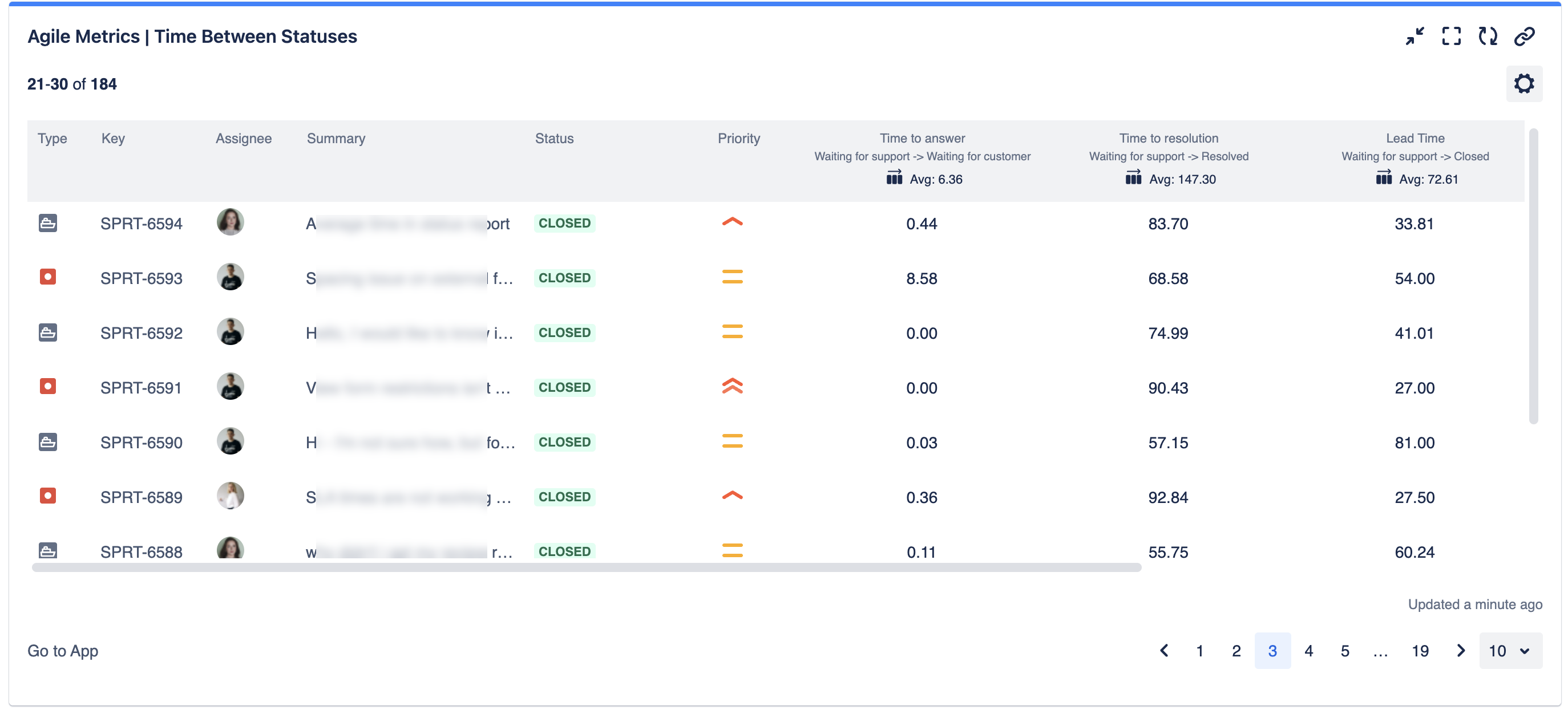
Step 4: Track Performance
How to Improve SLA Response Time
🚀 1. Automate Repetitive Tasks
Use Jira automation rules to handle routine updates, notifications, and ticket assignments.
🎯 2. Optimize Resource Allocation
Monitor workload in Time Metrics Tracker and adjust resource allocation based on SLA performance.
🔔 3. Set SLA Breach Alerts
Configure alerts to notify the team when an SLA is at risk.
📊 4. Conduct Regular Training
Ensure team members understand SLA targets and best practices.
🔄 5. Analyze SLA Reports
Regularly review reports in Time Metrics Tracker to spot recurring issues and implement improvements.
Conclusion
Effective SLA management ensures better customer satisfaction, improved team productivity, and streamlined processes. Consider using tools for detailed time reports, customizable dashboard widgets, real-time notifications, and performance tracking across various Jira projects.
💡 Start tracking your SLAs effectively today!
Ready to improve your SLA response time? Install Time Metrics Tracker and configure your first SLA dashboard in minutes! 🚀