I’m working on a CI/CD pipeline for a Flutter project. I managed to create the pipeline for Android and Web, but I’m having issues with setting up the pipeline for the iOS platform. The company I’m working at has its own Mac Mini on which the build should run. The build and deployment work fine when the Mac Mini manages to pass the “git clone” part, which is the first step in the process.
What happens is, when it tries to “git clone” the project the Mac Mini gets this dialog “Keychain not found - A keychain cannot be found to store ‘x-token-auth’”
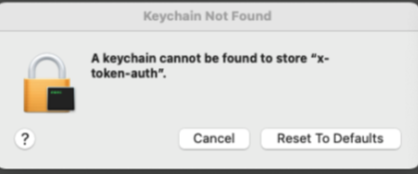
So if I press the cancel button, it continues working as expected.
I tried giving permission to all apps in the keychain to the bitbucket.org internet password, but nothing changed. I tried unlocking the system and login keychain, also no change.
There is a magic workaround and it works with that (I can’t find the source from where I got this from):
“
…Remove the account.
…Quit Xcode.
defaults write com.apple.dt.Xcode DVTDeveloperAccountUseKeychainService_2 -bool NO
…Restart Xcode, and re-add the account.
”
After doing the steps above, it doesn’t work immediately, I need to stop using the Mac Mini for 24+ hours and then it magically works (I tried after 12 hours, but it didn’t work).
However, the pipeline stopped working because of an available update for the macOS runner “The version of this runner is outdated. Upgrade to the latest version (3.1.0).”, and after the update, I had to use the workaround again.
Is there some solution to my problem that isn’t a hack? If someone has any idea why is it working with the solution above, that would be also helpful.
macOS version: 14.5

