Hi Everyone,
Previously, I deployed a Confluence 8.9.8 system on a Windows Server 2019. Last week, I migrated it to run using Docker Kubernetes (EKS).
The migration steps I followed were as below:
Step 1: Downloaded the Docker image and initialized a new Confluence instance on Kubernetes.
Step 2: Used the "Backup and Restore" feature to create a backup file from the Confluence instance on the Windows Server.
Step 3: Used the "Backup and Restore" feature to restore Confluence on Kubernetes from the backup created in Step 2.
Currently, I am facing an issue with storing the backup files using the "Back Up Confluence" job. Even though I configured the storage path as: /var/atlassian/application-data/shared-home/backups.
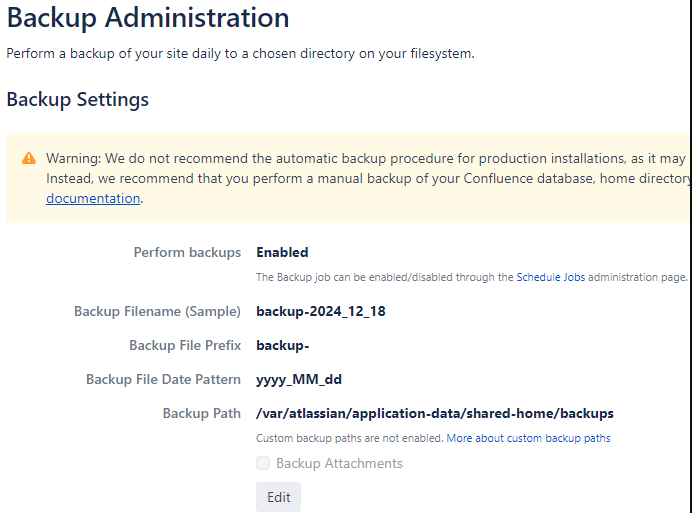
For some reason, when running on Kubernetes, it creates a folder named after the backup storage path on the Windows Server: 'C:\Program Files\Atlassian\Application Data\Confluence\backups' and stores the backup file there, instead of saving it in the configured directory.
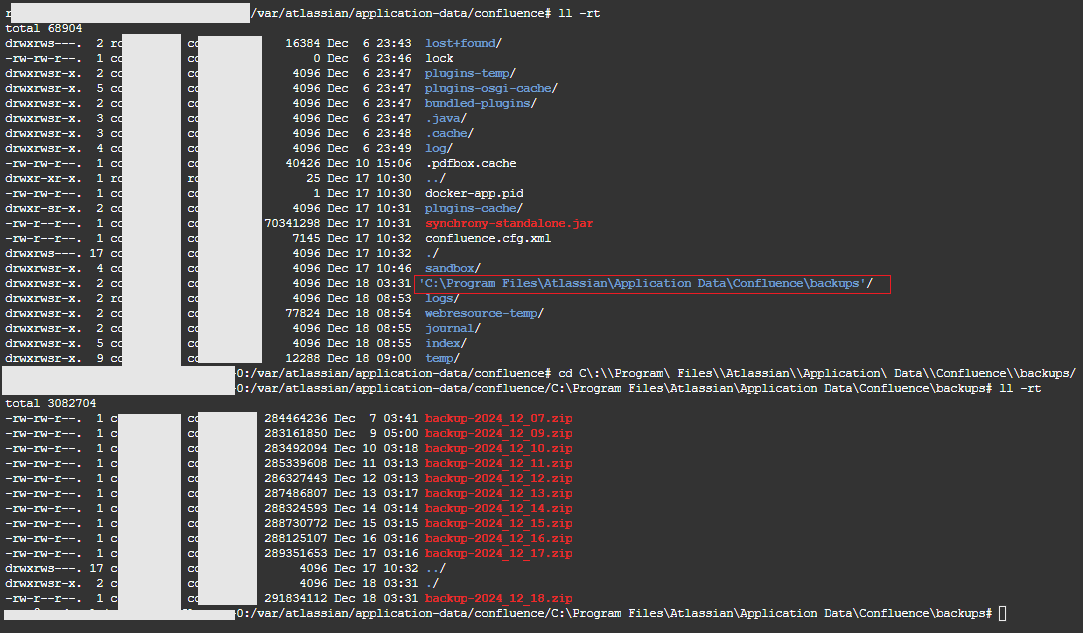
Have anyone encountered a similar issue? Could you please advise on the cause and how to fix this?
Thank you in advance.

