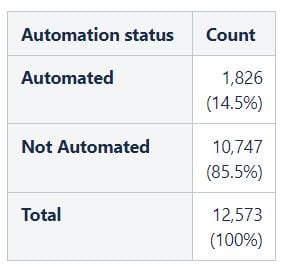
I'm using a pivot table, which works nicely to get me the data I need. But I don't like the grey look, and want to change the formatting of the table.
I've wrapped the pivot table in a Table Transformer, but can't figure out how to use the Stylesheet configuration of this macro to adapt the table to how I want it to look.
Specifically, I would like the first row 'Automation status' and 'Count' to remain in bold but the background to be the standard Light Blue 35% background.
Next, I would like the first column in the next rows to not have a grey background, and probably just normal text, not bold. That is, each of the cells 'Automated', 'Not Automated' and 'Total'.
When I try to set what I think is the right CSS, the combinations of TH or TR tags used in the pivot table seems to mean I am always getting it wrong!