Hello I have a quite complex problem it seems:
I have 2 Asset object customfields configured "Service Category" and "Service". Both filter for their corresponding objectType to adjust the options that users can chose from in general. A "Service" object uses an attribute reference to a dedicated "Service Category" object. See following Screenshot:
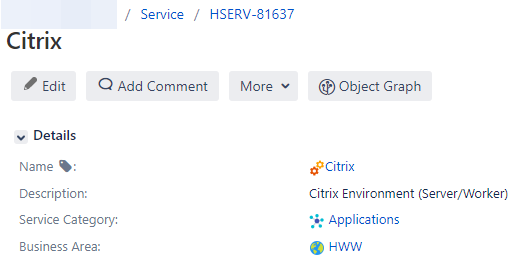
I also know I can confgure an AQL Filter Issue Scope in my "Service" customfield like: "Service Category" = ${customfield_18702} to limit the "Service" options based on the value that has been chosen in the "Service Category" field before. This does not work, when the "Service Category" field is Empty.
Since I want to provide users the opportunity to either go and select the "Service Category" first and then get a prefiltered list with all linked "Services" according to the selection I also want to provide the opportunity to go the other way around. So that users chose a "Service" first out of all "Service" objects without AQL Issue filter scope. Can anyone help me out on that? Following tries did not work out and maybe I dont even need behaviours or I can use some workaround:
import com.atlassian.jira.component.ComponentAccessor
import com.onresolve.jira.groovy.user.FieldBehaviours
import groovy.transform.BaseScript
import com.onresolve.scriptrunner.runner.customisers.WithPlugin
import com.onresolve.scriptrunner.runner.customisers.PluginModule
import com.riadalabs.jira.plugins.insight.channel.external.api.facade.IQLFacade
import com.riadalabs.jira.plugins.insight.channel.external.api.facade.ObjectFacade
import com.riadalabs.jira.plugins.insight.services.model.ObjectBean
import com.atlassian.jira.issue.customfields.option.Options
import com.atlassian.jira.issue.customfields.option.Option

@WithPlugin("com.riadalabs.jira.plugins.insight")
@PluginModule ObjectFacade objectFacade

@WithPlugin("com.riadalabs.jira.plugins.insight")
@PluginModule IQLFacade iqlFacade

//Get the asset object field
def assetField = getFieldByName("Service")
log.warn("Asset Field: $assetField")

//Filter for specific Assets
def filter = 'objectType = "Service" AND \"Service Category\" = "SAP"';

//Run the AQL query using IQLFacade
def queryResult = iqlFacade.findObjects(filter, 0, 50)

//Verify if Asset objects are found
if (!queryResult) {
    log.warn("No objects found for Filter: $filter")
    return
}

/* ######################VERSION 1############################

//Extract ObjectBeans from result
def objectBeans = queryResult.objectBeanFilterResult.objectBeans

//ObjectBeans to options
def options = objectBeans.collect { ObjectBean objectBean ->
    return [
        id  : objectBean.id,
        value: objectBean.objectKey
    ]
}

//Options
log.warn("Options: $options")

//Set the options
assetField.setFieldOptions(options)*/

/* ######################VERSION 2############################

//Collect Asset keys
def objectBeans = queryResult.objects
def objectKeys = objectBeans.collect { it.objectKey }
log.warn("Object Keys: $objectKeys")

//Set the Asset Object Keys
assetField.setFieldOptions(objectKeys)*/

/* ######################VERSION 3############################

//Collect the object IDs
def objectBeans = queryResult.objects
def objectIds = objectBeans.collect { it.id as Long }
log.warn("Object IDs: ${objectIds}")

//Set the Asset Object Keys
assetField.setFormValue(objectIds)*/


