Hi,
I am trying to use the 'Table from JSON' macro to retrieve data from Azure DevOps, via the API endpoints exposed for query data from that platform.
I want to use a personal access token (PAT) from Azure DevOps, but I'm really not clear how to configure the macro to use this, and certainly not getting anything back into the macro, so far!
I enter the JSON URL (obviously with placeholders to not expose company specifics!), such as:
https://<devops_org>/<devops_instance>/<devops_project>/_apis/wit/wiql/1cb4290a-7faa-4bb8-8a15-8211af5e2b14
The actual endpoint returns JSON data, no problem.
I'm not sure how to enter data into the dialogs to use the PAT? I select 'Authentication type' as 'Custom' and then click on 'Change authentication header'.
In the 'Request header' dialog and field I have tried entering each of (again substituting placeholders which are for illustration here):
Bearer <Azure PAT>
Authorization: Basic <Azure PAT>
Authorization: Basic <Azure PAT Base64 encoded>
I get a 'Failed to retrieve data from URL: Request failed: 400 Bad Request
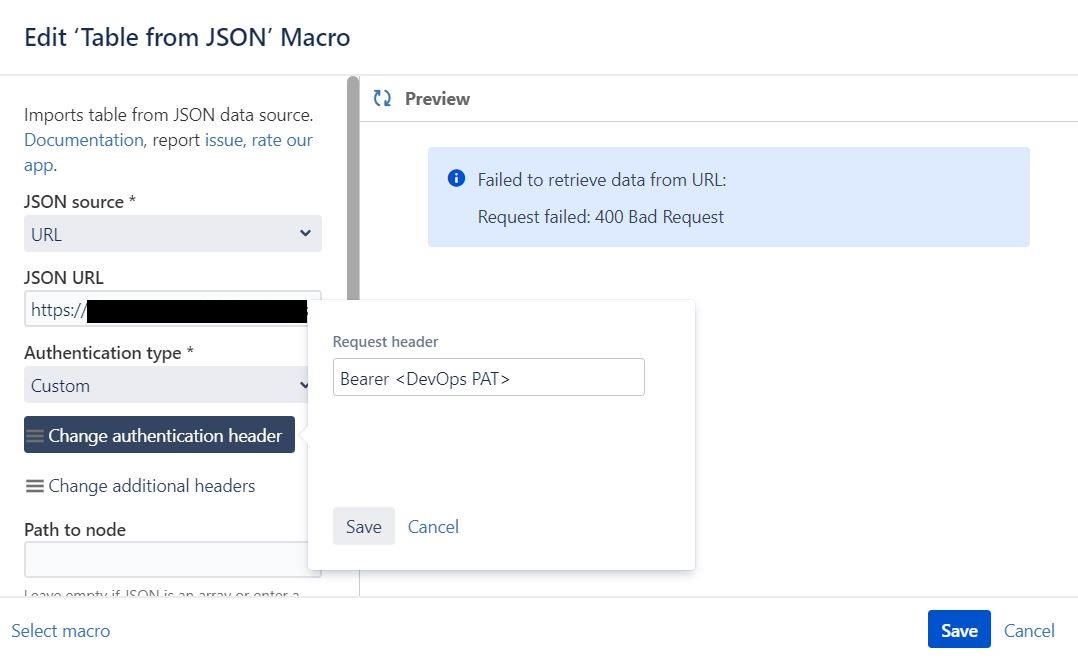
I've referred to this page:
https://docs.stiltsoft.com/tfac/cloud/table-from-json-58427709.html
This is great, but I do find the part I need (about setting the credentials) just a bit confusing!
The instructions are about using PAT's from Jira, Bitbucket or GitLab, but I assume the same is also relevant for Azure DevOps. Point 5 confuses me, as I don't see a 'Change request header' but instead select 'Change authentication header' and enter Bearer <Azure PAT>, as I described earlier.
1. Create a personal access token in your Jira, Bitbucket or GitLab account
2. Insert the Table from JSON macro on the Confluence page
3. Add a URL to JSON.
To specify a correct URL for GitLab, visit its API documentation
4. Select the Authentication type: Custom
5. Use Bearer Auth without the username
Change request header: Bearer Your_Token
6. Save Request header
Can I have exact instructions on how to get this working, using the data center version of Confluence?

