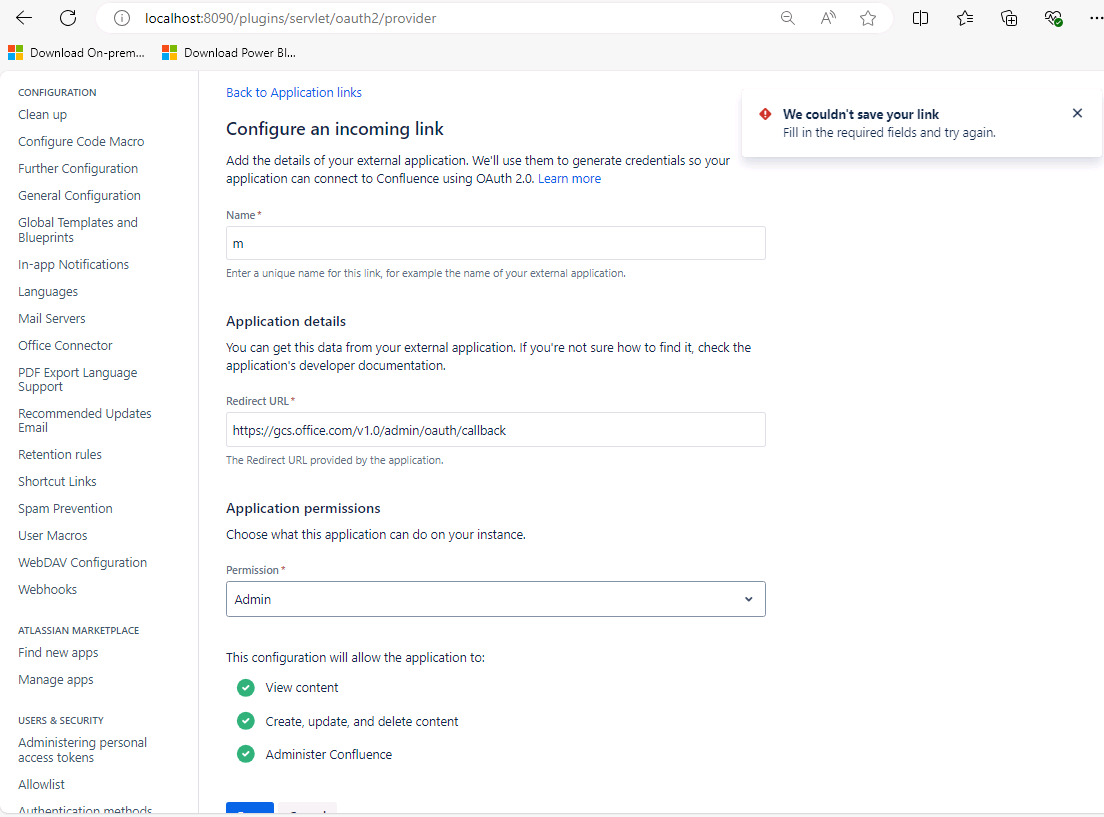
I follow the article Confluence On-premises Microsoft Graph connector (preview) and I am stuck at the step 3.5 authentication type. If I want to use oAuth 2.0 and following the steps below:
- Go to Administration > General configuration > Application links.
- Select Create link
- Select External application, and then choose Incoming as the direction.
- Fill in the
- Redirect URL:
<a href="https://gcs.office.com/v1.0/admin/oauth/callback" target="_blank" rel="nofollow noopener noreferrer">https://gcs.office.com/v1.0/admin/oauth/callback</a> - Scope: Admin
- Complete the connection settings step using the client ID and secret.
I also found similar guide at Confluence documentation: Configure an incoming link | Confluence Data Center 9.1 but when I try to save the link, I got an error (no matter what permission level I choose):
We couldn't save your link.
Fill in the required fields and try again.
I have attached screenshot. I have no idea what extra fields it requires to be filled in as there is not much in the form and all is filled in.
Do you have any suggestion how to overcome this obstacle?
Thanks in advance
Michal