Who doesn’t love a shortcut? In addition to Jira’s keyboard shortcuts, another easy way to find what you’re looking for is by changing parameters in URLs in your browser’s address bar.
For example, at the end of your Jira URL, add “/browse/” and an issue ID to go straight to an issue’s details page.
| Change: |
your-jira-URL/browse/ |
| To: |
your-jira-URL/browse/ISSUE-123 |
Here are some ways I frequently use this “hack”. Simply prepend your Jira URL and change the bolded parameters. In some instances, Jira will redirect you to a longer URL.
Jira Service Management
Customer Portal
Specific Service Desk
| Format: |
/servicedesk/customer/portal/PORTAL-ID |
| Example: |
/servicedesk/customer/portal/4 |
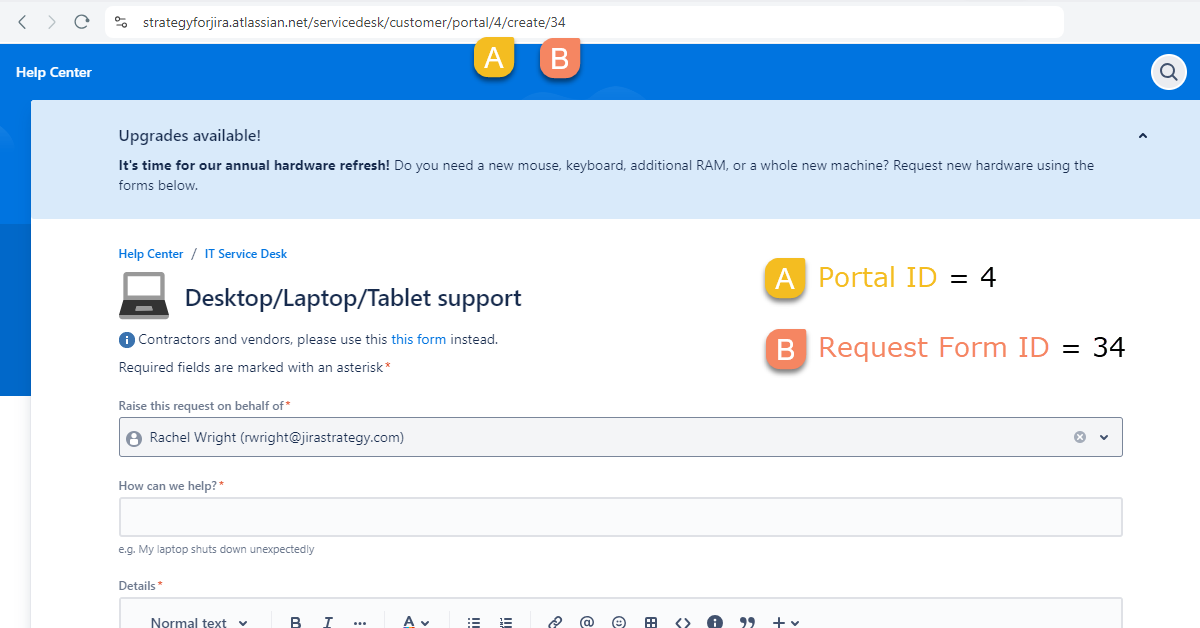
Request Form
| Format: |
/servicedesk/customer/portal/PORTAL-ID/create/REQUEST-FORM-ID |
| Example: |
/servicedesk/customer/portal/4/create/34 |
Individual Request
| Format: |
/servicedesk/customer/portal/PORTAL-ID/ISSUE-ID |
| Example: |
/servicedesk/customer/portal/4/HELP-1 |
Queue
| Format: |
/jira/servicedesk/projects/PROJECT-KEY/queues/custom/QUEUE-ID |
| Example: |
/jira/servicedesk/projects/HELP/queues/custom/59 |
Jira
Projects
| Format: |
/browse/PROJECT-KEY |
| Example: |
/browse/HR |
Boards
Cloud
| Format: |
/jira/software/c/projects/PROJECT-KEY/boards/BOARD-ID |
| Example: |
/jira/software/c/projects/DEV/boards/39 |
Server and Data Center
| Format: |
/secure/RapidBoard.jspa?rapidView=BOARD-ID |
| Example: |
/secure/RapidBoard.jspa?rapidView=11 |
Dashboards
Cloud
| Format: |
/jira/dashboards/DASHBOARD-ID |
| Example: |
/jira/dashboards/10019 |
Server and Data Center
| Format: |
/secure/Dashboard.jspa?selectPageId=DASHBOARD-ID |
| Example: |
/secure/Dashboard.jspa?selectPageId=10000
TIP: ID 10,000 is the default system dashboard |
Filters
| Format: |
/issues/?filter=FILTER-ID |
| Example: |
/issues/?filter=10045 |
JQL Keyword Search
| Format: |
/issues/?jql=text%20~%20″KEYWORD“ |
| Example: |
/issues/?jql=text%20~%20″website%20error“ |
Tips:
- Use “%20” to represent a space in a URL. For additional character codes, see: HTML URL Encoding Reference.
- In JQL, use the format “text ~ keyword” to find issues that contain specific keywords in an issue’s summary, description, or comment fields.
JQL Query
| Format: |
/issues/?jql=JQL-QUERY |
| Example: For the JQL query “status = backlog” |
/issues/?jql=status%20%3D%20backlog |
Automation Rule
Cloud
| Format: |
/jira/settings/automation#/rule/RULE-ID |
| Example: |
/jira/settings/automation#/rule/9623874 |
Data Center
| Format: |
/secure/AutomationGlobalAdminAction!default.jspa#/rule/RULE-ID |
| Example: |
/secure/AutomationGlobalAdminAction!default.jspa#/rule/2 |
Have additional examples to share? Post them below!
